
Adding Insurance
Add insurance while creating a patient or from the Demographics section of an existing patient’s profile. Select the Insurance Company, which sets the Plan Type, then enter:- Policy Number and Group Number
- Effective Date and Expiration Date
- Guarantor — the relationship to the policyholder (defaults to Self). If the relationship is not Self, open the guarantor fields and enter the policyholder’s first name, last name, email, phone, date of birth, gender, and home address.
- Insurance Card — optionally upload a photo of the card
- Require prior auth on submission — toggle if this insurance requires a prior authorization
Special Insurance Types
- Workers’ Compensation — selecting a workers’ comp insurance company automatically sets the plan type to Workers’ Compensation (you can also set it manually). Extra fields appear, including Claim Number, Accident Date, and — depending on your site’s settings — Employer details. For auto/accident claims, an Accident State is required.
- Self-Pay — type Self Pay in the Insurance Company field and select it; the insurance detail fields are replaced with Self-Pay (No Insurance).
- Missing Insurance — if you don’t have the patient’s insurance yet, type Missing Insurance in the Insurance Company field and select it.
Editing Insurance
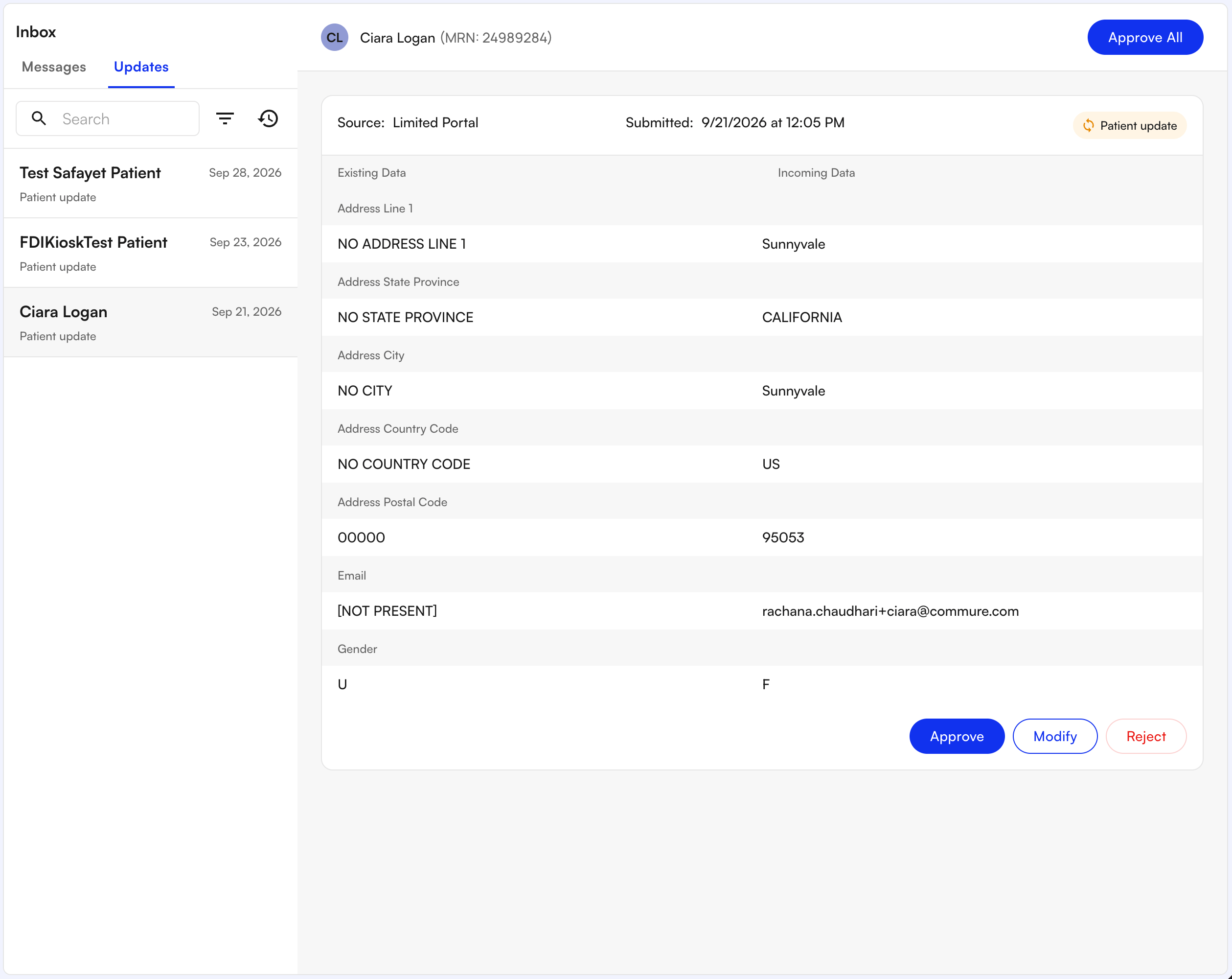
To edit insurance later, open the patient’s profile, go to the Demographics section, and edit the insurance entry. Patients also have the ability to update their own Insurance and Demographics information via the Patient Portal. Any changes submitted by the patient are sent to your front desk for review instead of updating the patient’s chart immediately:- After submitting, patients see Request sent for approval on their portal.
- The changed field shows a Pending review indicator in the Insurance and Demographics pages. The previously confirmed value stays displayed until staff act on the request.
- With Front Desk Inbox staff must approve, modify, or reject the updates from the Updates tab of the Inbox page in order for these changes to be written into the chart.
- If staff approve, the new value is displayed. If staff reject, the indicator clears and the original value remains.
FAQ
What if the policyholder isn't the patient?
What if the policyholder isn't the patient?
Set the Guarantor relationship to something other than Self, then fill in the policyholder’s name, contact details, date of birth, gender, and address.
How do I record a self-pay patient?
How do I record a self-pay patient?
Type Self Pay into the Insurance Company field and select it. The insurance details collapse to Self-Pay (No Insurance).
What happens if patients update their Demographics or Insurance?
What happens if patients update their Demographics or Insurance?
Staff must approve the change before it is written into the chart. Staff will be notified of the change request in the he Insurance and Demographics pages which will redirect you to the Updates tab within the EHR inbox to approve, modify, or reject changes.