
Insights
Rules Are Now Available at Every Site
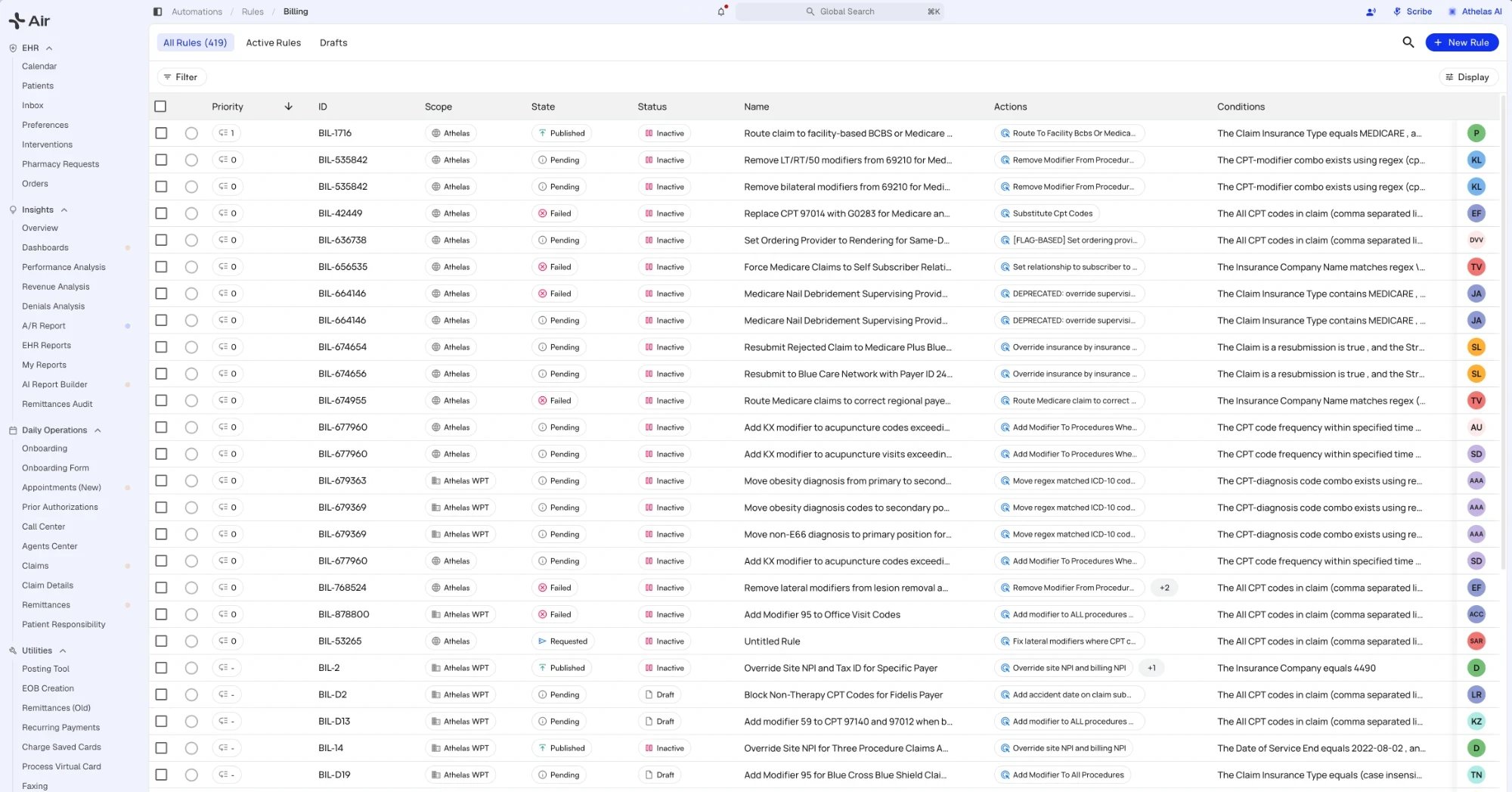
- Everyone at your practice can view rules. Creating, editing, submitting, and switching rules on or off take write access, which your practice admin can add to a role.
- Describe a rule in plain language and the AI rule builder drafts it for you. Test it against real claims before it goes live.
- Parent sites can clone rules to their child sites in bulk. Conflicts are listed first, and you can swap the payer or skip the rule. Clones arrive as drafts, and you can put several drafts into effect at once.
- Ask for a rule to be turned on or off from its Properties panel. Depending on how your practice works with Athelas, the change takes effect right away or goes to review first, and you can cancel a pending request.
- The rules list adds a Drafts view next to All Rules and Active Rules. You can filter it by rule ID or by Failed state, and Shift-click to select a range of rules. When you go back to the list, your search is kept and the rule you opened is highlighted.
Dashboards Are Now Available at Every Site
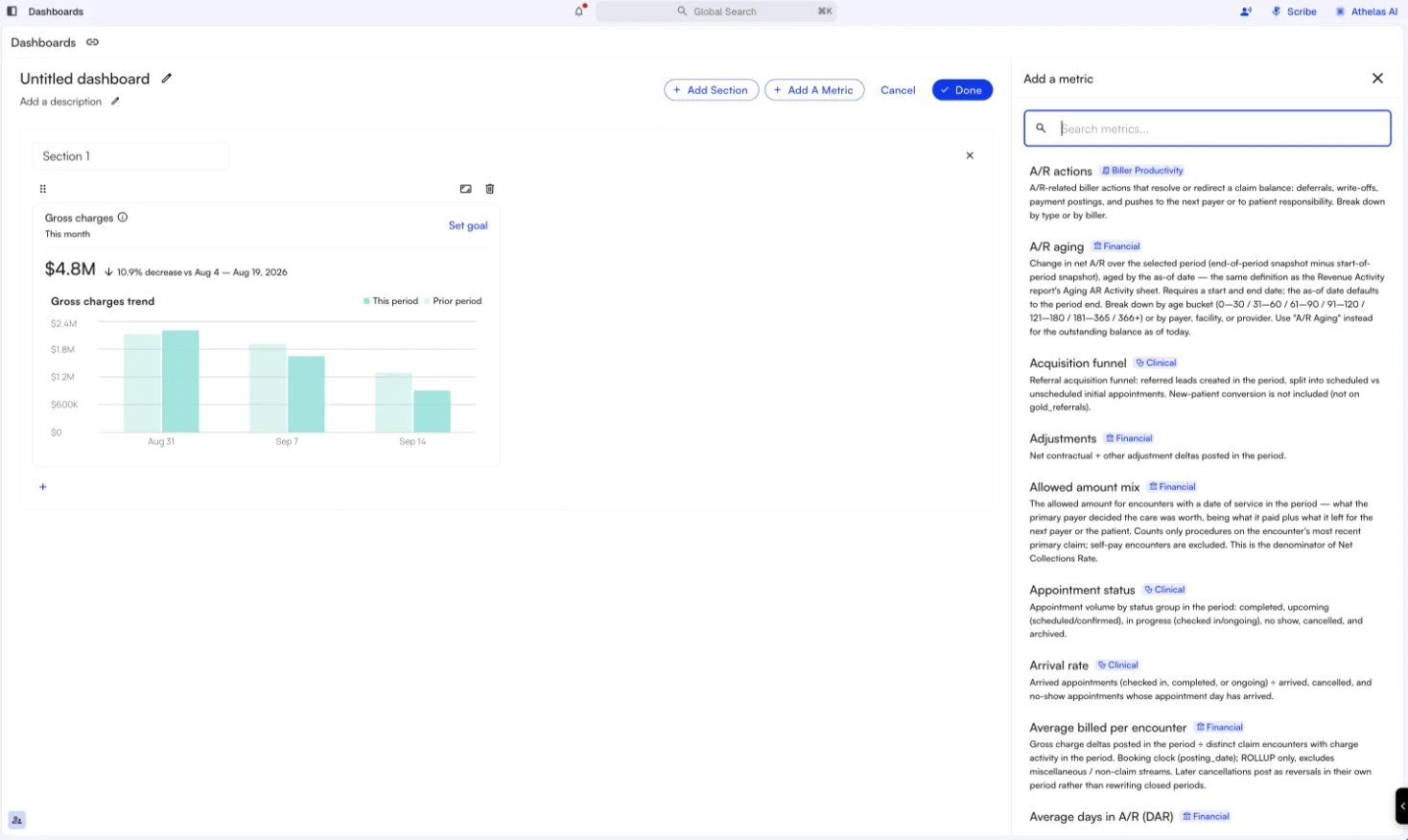
- Duplicate a template or an existing dashboard, then edit your copy.
- The Add A Metric panel tags each metric Financial, Biller Productivity, or Clinical, groups the library by category, and lets you filter by category.
- The biller leaderboard can be grouped by team.
- Drilldowns can be searched and sorted, and View Claims opens the claims behind a number in a new tab, so you keep your place on the dashboard.
- Payer filters can include or exclude payers, A/R tiles show the date their data is as of, and year-to-date tiles can be broken out by month or by quarter.
- First pass rate is now measured from each claim’s submission date.
A New Look for Insights and Air
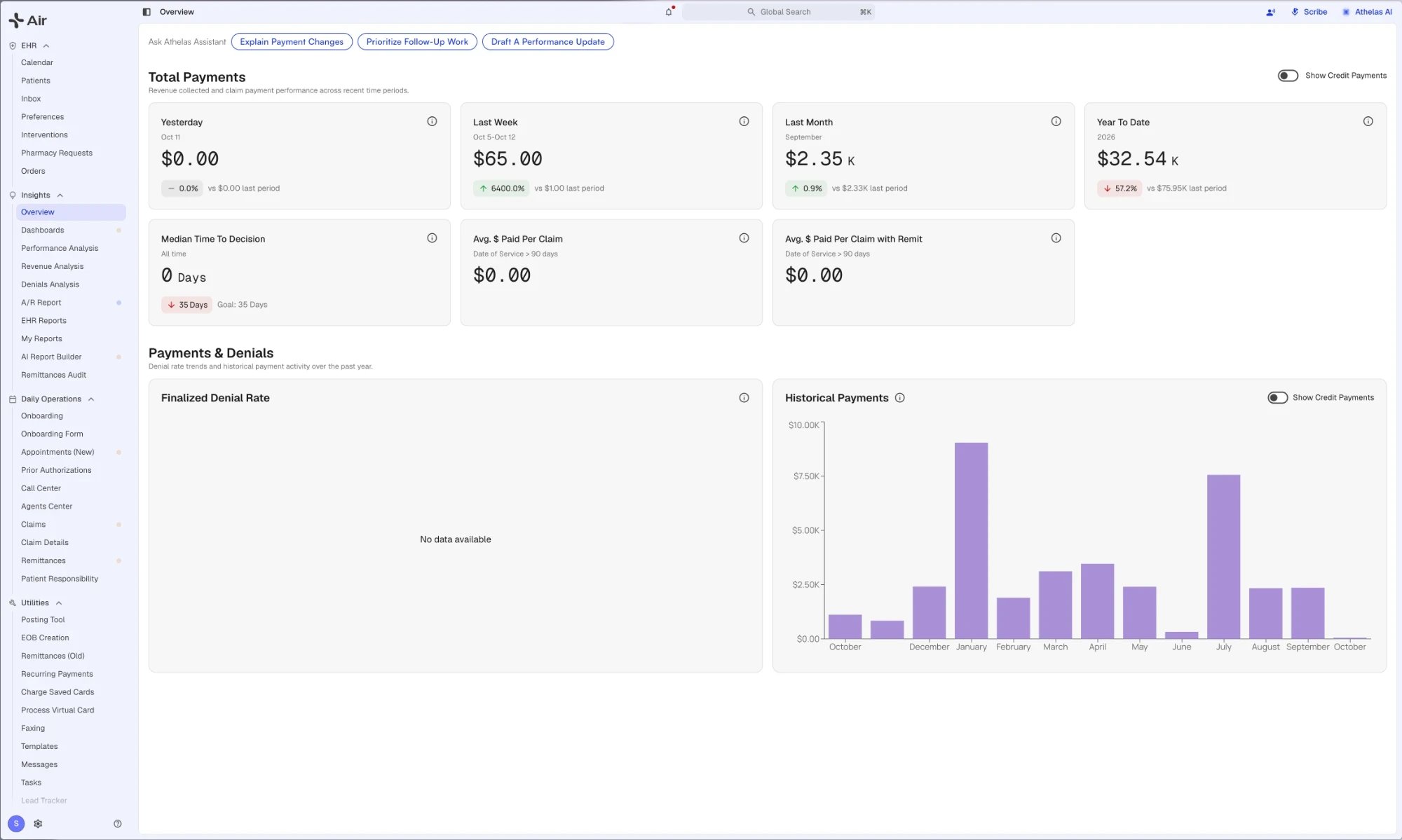
- Global Search sits at the top of every page. Press ⌘K (Ctrl+K on Windows) to find a claim, a patient, or a page.
- The notification bell gathers notifications, requests, messages, tasks, and medication updates in one place.
- Scribe and Athelas AI sit in the header, and the left navigation collapses to give the page more room.
- Your profile menu switches between light and dark appearance. The Help menu links to the documentation, this changelog, and Give Feedback.
- A short tour introduces the layout the first time you open it. For a limited time, Go back to old version in your profile menu returns you to the previous layout.
My Account and My Practice Are Now One Settings Page
Since September 15, My Account and My Practice have been tabs on a single Settings page. Open it from the gear icon at the top of the page, or from Settings at the bottom of the left navigation in the previous layout. My Account comes first, followed by your practice tabs, such as Team Members, PR Settings, Facilities, Providers, and Payers. Each person sees only the tabs they could see before, and old links to My Account and My Practice open the matching tab.Front Desk Payments Appear on the Visit Right Away
Starting September 30, a payment your front desk collects at check-in appears on the visit as soon as the claim is submitted, instead of waiting for patient responsibility to be generated. It shows as an Upfront Payment, followed by an Upfront Payment Adjustment when patient responsibility is generated. This applies to visits on or after September 1, 2026. Nothing new is billed or collected from patients.Claims Page: Filter by Status Reason, Download to Excel, and Arrange Your Columns
- Filter by status reason. Type part of a status reason, such as a denial code or an error message, to find every claim that matches.
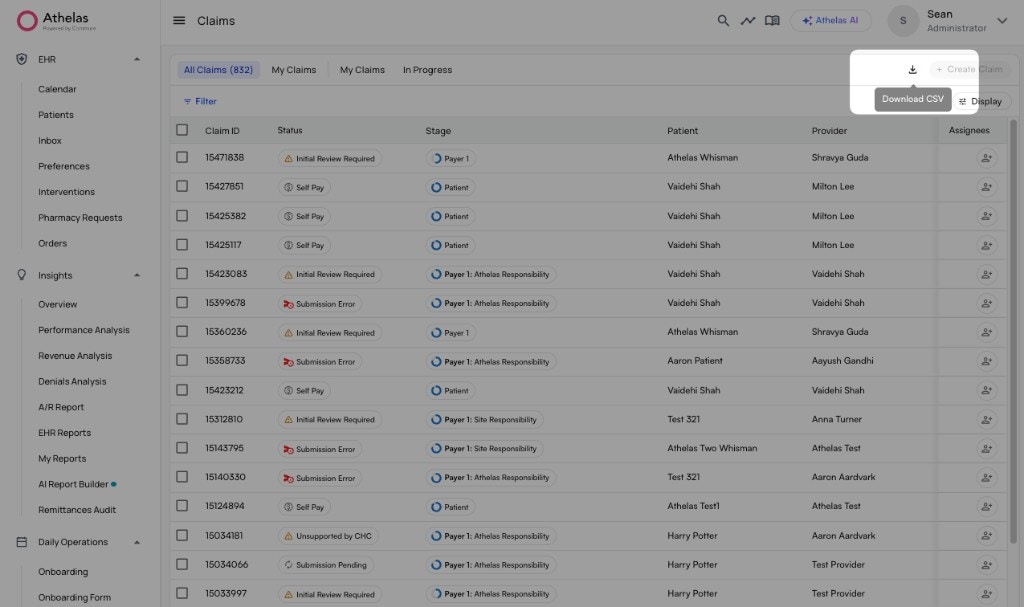
- Download to Excel. Download the claims list as an XLSX file that keeps your view’s grouping, or as a CSV. Both include the columns you see on the page.
- Arrange the page your way. Drag columns into the order you want, reorder your saved views, and add a filter on top of a saved view’s own filters. Display settings now sit apart from filters, with their own save and clear controls.
- Create a claim in the order you work. Date of Service now sits right below the patient, so you can check eligibility and view eligibility history before you save the claim.
- Open a rule from a claim. Each Rule # on a claim’s Review tab opens that rule on the Automations page in a new tab.
- Activity feed and submissions. Sort the activity feed oldest first, and hover over an earlier submission error status to see its details. The submissions table adds Method and Submission ID columns.
Appeals and Medical Records on the Claim
- Appeal and medical record submissions appear in the submissions table in Claim Context, next to the claim’s other submissions.
- A new Packet Pending status marks a claim whose appeal or medical record packet is being prepared. A claim moves there when someone selects Request Appeal, or when Athelas determines from the denial codes that an appeal or medical records will resolve the denial. The claim moves on once the packet is submitted. Packet Pending is a workable status, so these claims appear in Workable Claims.
Write Off an Exact Amount on Each Procedure
On a single claim, you can now write off an exact amount on each procedure line and choose the adjustment type for each one. Each amount shows its procedure description, and the confirmation step lists every procedure and amount before you apply the write-off.Pushing a balance to patient responsibility is also much faster. The patient’s balance now appears within seconds instead of minutes, including after a write-off or a push from the claim form.Filter Claims by Describing Them
If you aren’t sure which filter to use, choose AI filter in the filter menu and describe the claims you want, such as “unsubmitted claims from the last week”. The AI filter applies ordinary filters, so you can see which filters it chose, adjust them, and save the result as a view. The AI filter also works on the Appointments page. See Filtering with AI.Athelas Assistant on Billing Pages
- Athelas Assistant now opens by default on the Claims page, with quick starts for common billing tasks. Close it and it stays closed.
- Analyze on a claim opens Athelas Assistant with that claim ready to review.
- When a claim has a submission error, Athelas Assistant explains the error as soon as you open it.
- Confirmation prompts now name the action and bold its target, as in Submit to Primary, so you can catch the wrong payer before you confirm.
Remittances: Deposit Slips at Every Site, and EOB Uploads Move to the EOBs Tab
- The Deposit Slips tab reached every site on September 22. You can filter and sort deposit slips by file name, deposit date, amount, matching status, upload date, and parsing status.
- Automatic matching of checks to bank deposits now uses the check number as the primary match.
- Process Virtual Card now requires the check number, so the payment can be reconciled.
- EOB Creation stopped accepting uploads on September 30. Upload EOBs from Remittances → EOBs instead. EOBs already started on EOB Creation can still be finished there.
The New Appointments Page Is Now the Default
Since September 14, the new Appointments page is the default at every site for users whose role includes the Appointments (New) permission. Admins can add that permission to other roles, and Switch to Classic Appointments Page is still available. Also new on the page:- From a parent site, you can run a live eligibility check on a child site’s claim, appointment, or patient.
- Large sites load the page faster when filtering by missed collections or prior authorization denials.
Patient Statement and Payment Settings
- Only Send Post-Remittance PRs, on the Electronic and Paper tabs of Patient Statements, sends statements only for patient responsibility created after the remittance posts.
- Apply statement config filters to manual statement downloads, under PR Settings → General, makes downloaded statements follow the same rules as statements you send.
- Skip Specific Patients’ Address Validation, on the Paper tab, lets you send paper statements to selected patients whose addresses fail validation.
- Prefer each user’s default card reader over last-used, under PR Settings → General, uses each staff member’s own card reader. Each person sets theirs in My Account → Card Reader.
- Payment plans now appear on both the parent site and the child site.
Update to the October 1 Legacy Page Archive
This corrects our August 31 notice. On October 1, 2026, Submission Errors, Rejections, Denials Worklist, Claim Recon, Bulk Resubmission, and Encounter Details were retired for most sites, and links to them now open the Claims page. An Encounter Details link opens that claim. Some sites keep these pages a little longer, and your account manager can confirm your site’s date. The old Claim Details page and the old appointments page were not retired on October 1 and are still available. We will announce their retirement ahead of time.[Beta Users Only] Bad Debt Automation
Bad debt automation follows patient balances through a sequence of statements, a final notice, and a write-off to bad debt:- Set it up from Automations → Workflows → New Workflow. Choose how many statements to send and how long to wait before the final notice, write the final notice wording, and set when the balance is written off to bad debt.
- A final notice is held back when the patient has an active payment plan or an upcoming appointment, or when their balance is already with a collection agency.
- The write-off is counted from when the final notice is delivered, not when it is sent, and every final notice appears in the patient’s Statements Sent and touchpoints history.
- Review every balance in one table, filter it and save views, and pause, resume, or opt out a patient.
[Beta Users Only] Eligibility Suggestions in Claim Context
When a claim is denied or rejected for coverage, Claim Context can now suggest the fix, such as adding or updating the primary insurance:- Hover over a suggestion to see the reason, a field-by-field comparison, and the eligibility checks it is based on.
- Accept a suggestion to apply it, and undo it with one click if needed.
- Filter the Claims page to claims with an eligibility suggestion, any suggestion, or no suggestion, and save the filter in a view.
[Beta Users Only] Scheduled Report Delivery
Schedule the Revenue Activity report from My Reports and have it emailed on a regular schedule. The run history lists every past run, and Download all gets every file from a run at once. Contact your account manager for access.[Beta Users Only] Checks and Deposits Tabs
For users with the Checks and Deposits tabs on the Remittances page:- Filter checks and deposits by payment method and receiving account, compare amounts in more ways, and find checks or deposits with no deposit source.
- Checks show the payer name, and the former deposit source field is now Check Issuer.
- A bank deposit links to its deposit slip.
Bug Fixes and Improvements
Claims & Submission:- Claim PDFs on the Claims page generate several times faster.
- Workers’ comp claims can be submitted by mail and by fax again.
- Unsaved billing edits are no longer lost when the page refreshes in the background.
- The diagnosis limit message shows how many diagnoses you entered.
- The charge master shows the actual reason a charge item was rejected.
- Eligibility checks now find coverage for patients with hyphenated names.
- An appointment’s Visit Limits section now shows the limits from the same eligibility result as its eligibility details, without running a new check.
- A manual Check Eligibility task no longer closes itself because of an older check against a payer the patient no longer has.
- My Reports adds a Miscellaneous Revenue Activity report.
- A new Practice Data page lists the adjustment types set up for your site. It is view-only.
Air
A New Prior Authorization Tracker
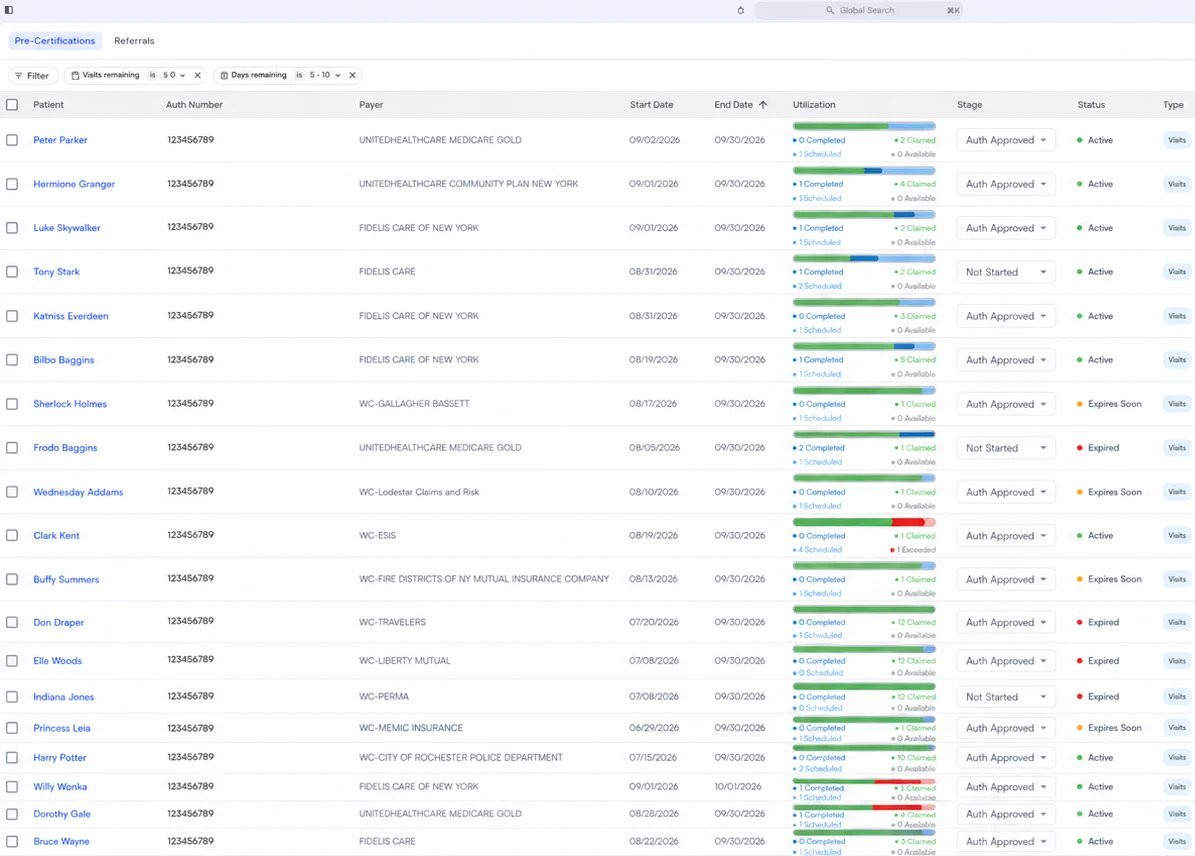
- A utilization bar shows completed, claimed, scheduled, and available visits for each authorization, and changes color as an authorization runs low.
- Each authorization has a Stage you can update from the table, and your practice can reorder stages in Preferences.
- Notes appear on the table, and you can sort by remaining visits and by start or end date, reorder columns, act on several authorizations at once, and export to CSV.
- The history timeline records facility and provider changes, and assigning an authorization to someone creates a task for them.
- When a case is created with an insurance that requires prior authorization, the tracker creates a Needs Auth record for it automatically, and a warning appears while you create the case.
Clinical Tools on the Appointments Page
Since September 25, every Air site can run the clinic day from the Appointments page as well as the calendar:- Check a patient in, or undo a check-in, and open the chart note or facesheet straight from the appointment row.
- The calendar’s alerts, for eligibility, copays, prior authorization, Medicare and workers’ comp, and intake completion, appear in the page’s alerts section.
- Assign rooms and move patients through stages. Moving a patient into an occupied room moves the previous patient out, and you can filter by room and by stage.
- Edit an appointment’s case, type, date, time, provider, and facility, add notes inline, and show clinical columns such as case, room, stage, and check-in time.
- Download the facesheets for many appointments as one PDF.
A New Look for Air
- Global Search, at the top of every page, finds a patient, a claim, or a page. Press ⌘K (Ctrl+K on Windows) to open it from anywhere.
- The bell beside it collects your notifications, requests, messages, tasks, and medication updates in one place.
- Scribe and Athelas AI sit at the top right of every page.
- The left navigation groups pages under EHR, Insights, Daily Operations, and Utilities. Collapse it with the button at the top left. Settings (the gear) and Help are at the bottom, next to your profile.
- Switch between light and dark appearance from your profile menu.
Smart Charge Capture and Care Notes Outside Physical Therapy
Two features that were in beta in August are now on at practices outside physical therapy:- Smart Charge Capture is on at every live site outside physical therapy as of September 23.
- Care Notes is on at sites outside physical therapy. A fax can now be linked to care notes from Manage Care Notes on the fax, and a care note’s task can be assigned to a group.
Procedure and Injection Orders at Every Site
The Procedure order type, which entered beta in August, is now available at every site. Record the procedure location, SIG, drug expiry date, lot number, NDC, units, route, and modifiers. When an in-house procedure order is completed, its CPT/HCPCS code fills into Services. Including procedures in order sets still requires order sets at your site.Outreach Flows Analytics
Every site that uses Outreach Flows can now see how each flow performs:- Messages sent, delivered, failed, and opened (for email) by day, plus link clicks, including review-link and portal-link clicks.
- Forms opened, completed, and partly completed.
- Filter or group the results by patient and by facility. A summary table color-codes click-through rate, form completion, and trend.
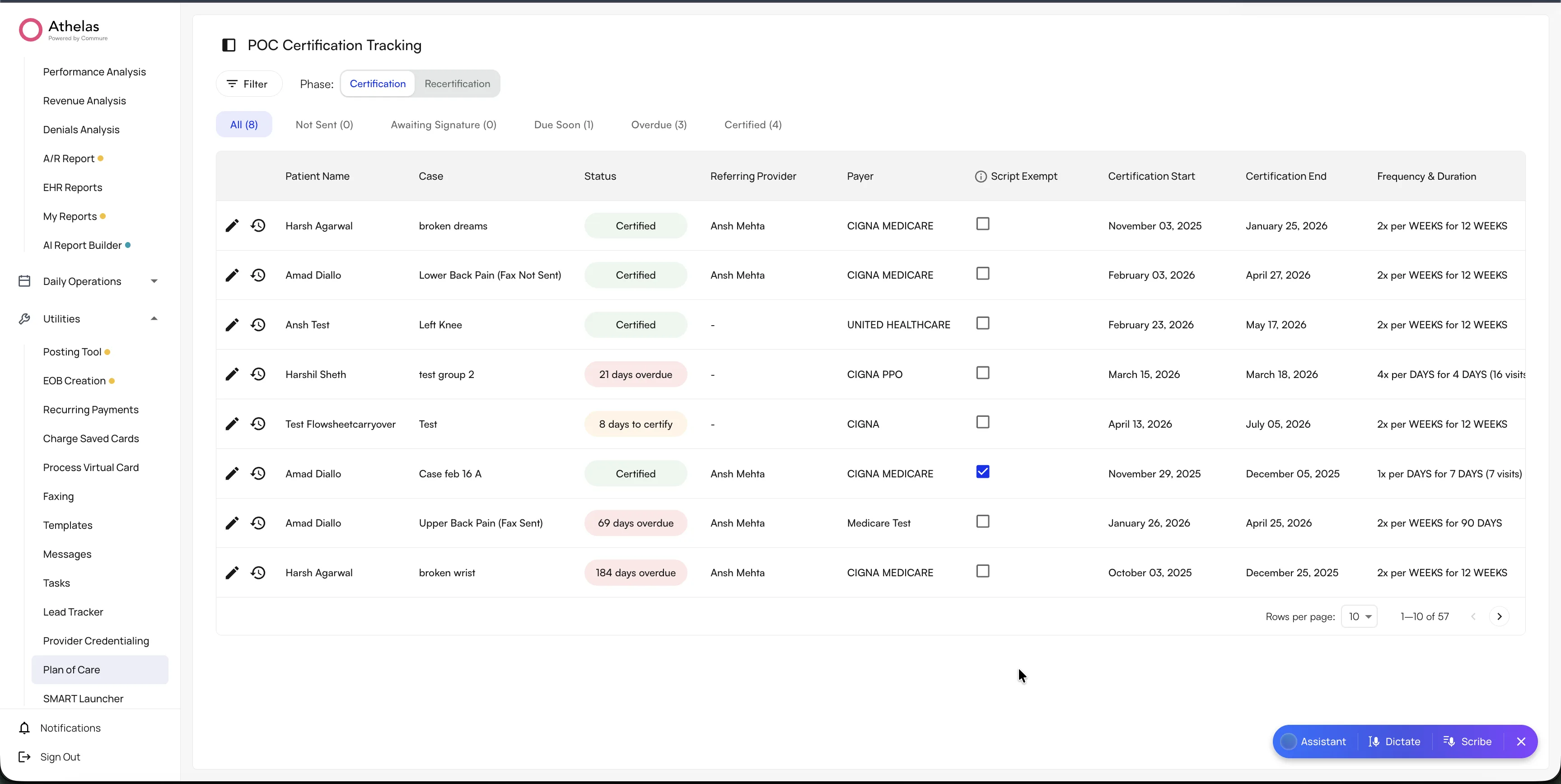
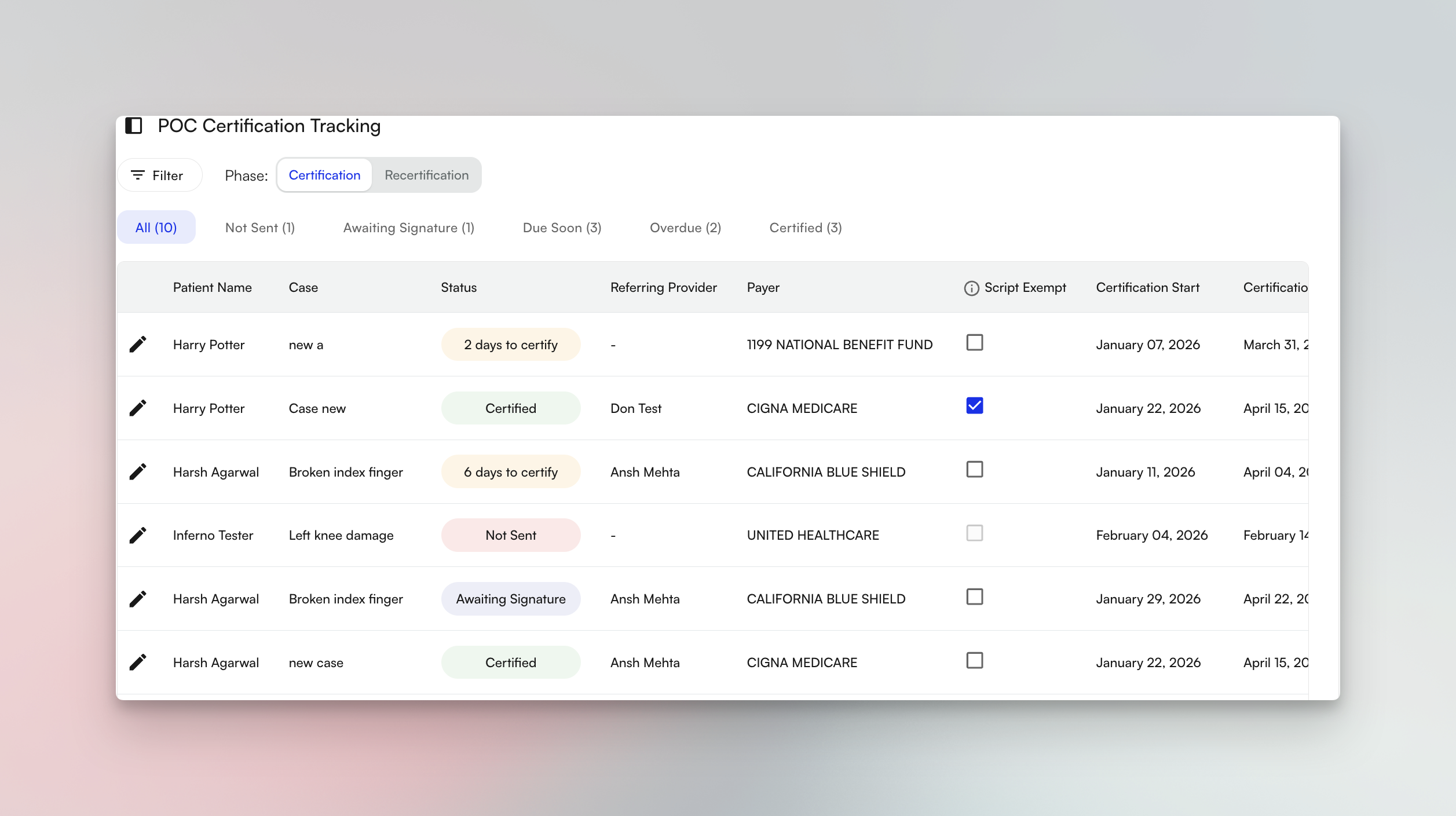
Plan of Care Tracker: Saved Views, Bulk Actions, and Upcoming Recertifications
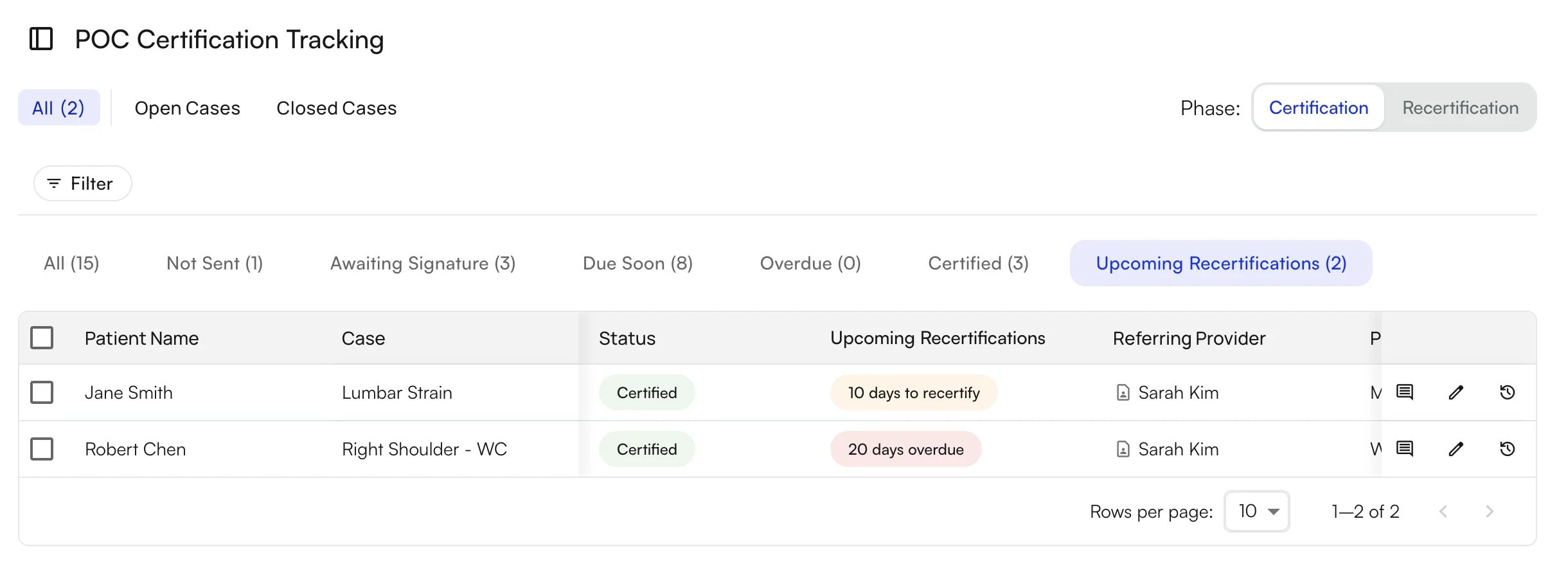
- Save the tracker’s filters as a view.
- Select several plans of care and apply Exempt Script or Resend Fax to all of them.
- A new Upcoming Recertifications tab and column flag certified plans of care that are due for recertification soon or are overdue.
- The drawer links to the sent fax and shows why a plan of care was skipped, and exempted plans of care stand out in the Certified view.
Financial Guarantor Replaces Financially Responsible Party
As of September 30, a patient’s demographics in Air use the same Financial Guarantor as their billing profile, replacing the separate Financially Responsible Party section. A change in either place shows up in both, and existing financially responsible parties were moved over. The Authorized Representative is still separate and still controls portal access. See Patient Demographics.Clinical Conditions in EHR Alert Rules
Since September 21, EHR alert rules can also match on clinical conditions. These cover the patient’s problems (ICD-10), medications, allergies, procedures (CPT), and race, and whether the patient has lab orders, vitals, or an implantable device. See the EHR Alert Rules guide.[Beta Users Only] Care Team Communications
When a provider signs and submits a visit note, Air can send the note to the patient’s care team automatically by fax or email. See Care Team Communications. Contact your account manager for access.[Beta Users Only] Scheduling Templates Updates
- Restrict a template’s blocks and slots to specific insurances or claim types. Availability, booking, and portal booking respect the restriction, and the overlap dialog shows insurance and claim-type conflicts.
- Copy and paste template slots, or drag and drop them.
- Assign one block to several facilities, and add notes to template blocks and calendar slots.
- Only admins can create, edit, or delete templates.
Bug Fixes and Improvements
- Preview the goals Air Scribe suggests before you apply them to the note.
- A prescription you start keeps your progress if you leave the drawer before finishing.
- Archive insurances you no longer use in EHR Preferences → Insurances. Existing patient insurances aren’t affected.
- The calendar’s current-time line can show a timezone, set in EHR Preferences → General.
Insights
Self-Serve Provider-Level Adjustments
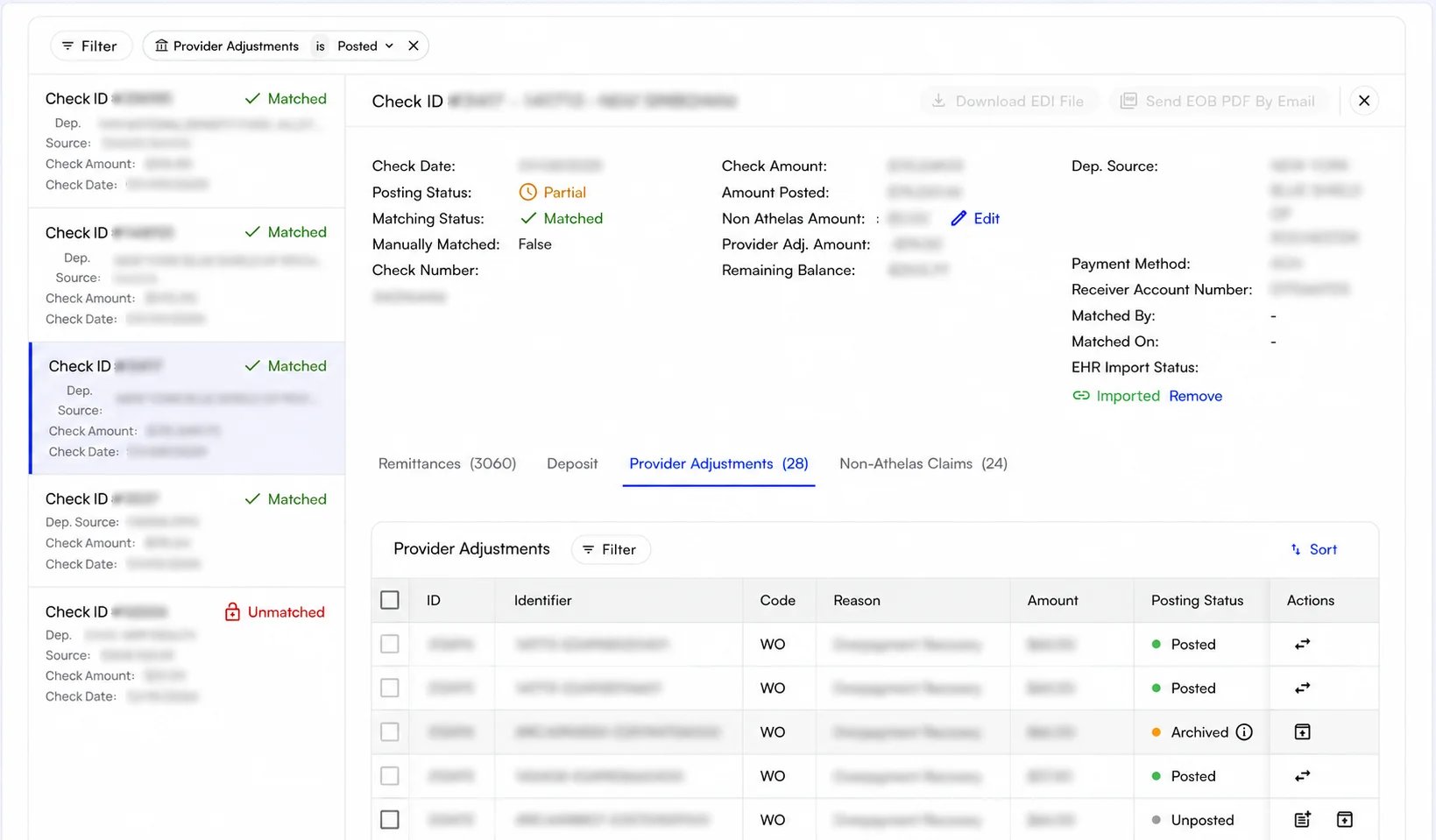
- Filter the Checks tab to checks with unposted provider adjustments, and filter by more than one posting status at a time.
- Post adjustments to the check or to a claim, one at a time or in bulk.
- Archive adjustments that should never post, unarchive them later, and see the reason an adjustment was archived or sent to manual review.
- Reallocate a posted adjustment across claims, move a claim-linked adjustment back to the check, and post an adjustment that is waiting in Manual review.
Legacy Billing Pages Are Archived Starting October 1, 2026
Starting October 1, 2026, the legacy billing pages are archived, and their work continues on the Claims page and the new Appointments page. Each legacy page shows a banner with the date.- Submission Errors, Rejections, Denials Worklist, Claim Recon, Bulk Resubmission, Encounter Details, and the old Claim Details page are replaced by the Claims page.
- The old appointments page is replaced by the new Appointments page.
- The Denials and Encounter Working Status filters are retired from the Claims page. Saved views that used them no longer apply those filters and may show more claims, so check your team’s views.
- The Recon and Rerecon work queues are renamed Decision Pending and Decision Inconclusive, matching the claim statuses of the same name.
More of the Claim’s Story in the Activity Feed
The Activity Feed on each claim now records more of what happens to it, so you can follow a claim without leaving the Claims page:- A badge on the activity feed icon shows how many comments a claim has, even while the feed is collapsed.
- New events cover payment posting (one event per posting instead of several), patient charges and patient payments, remittances received, claims becoming ready to submit, and automatic deferrals.
- Rework is tracked from start to finish: the feed records when medical records are submitted, when reprocessing is requested, and when an appeal is submitted, along with how each one resolves.
- There is less noise. Procedure-level remittance events are consolidated, changes that net to zero are hidden, and rule-override events are worded more clearly.
Sales Tax on Custom Line Items
Practices that sell taxable products can now charge sales tax on custom line items. Turn it on in My Practice → PR Settings, then set a tax rate for each facility:- Sales tax appears as its own line at checkout and on receipts.
- Patient statements and payment links show the tax.
- Transaction reports include the sales tax collected on custom line item payments.
[Beta Users Only] Dashboards
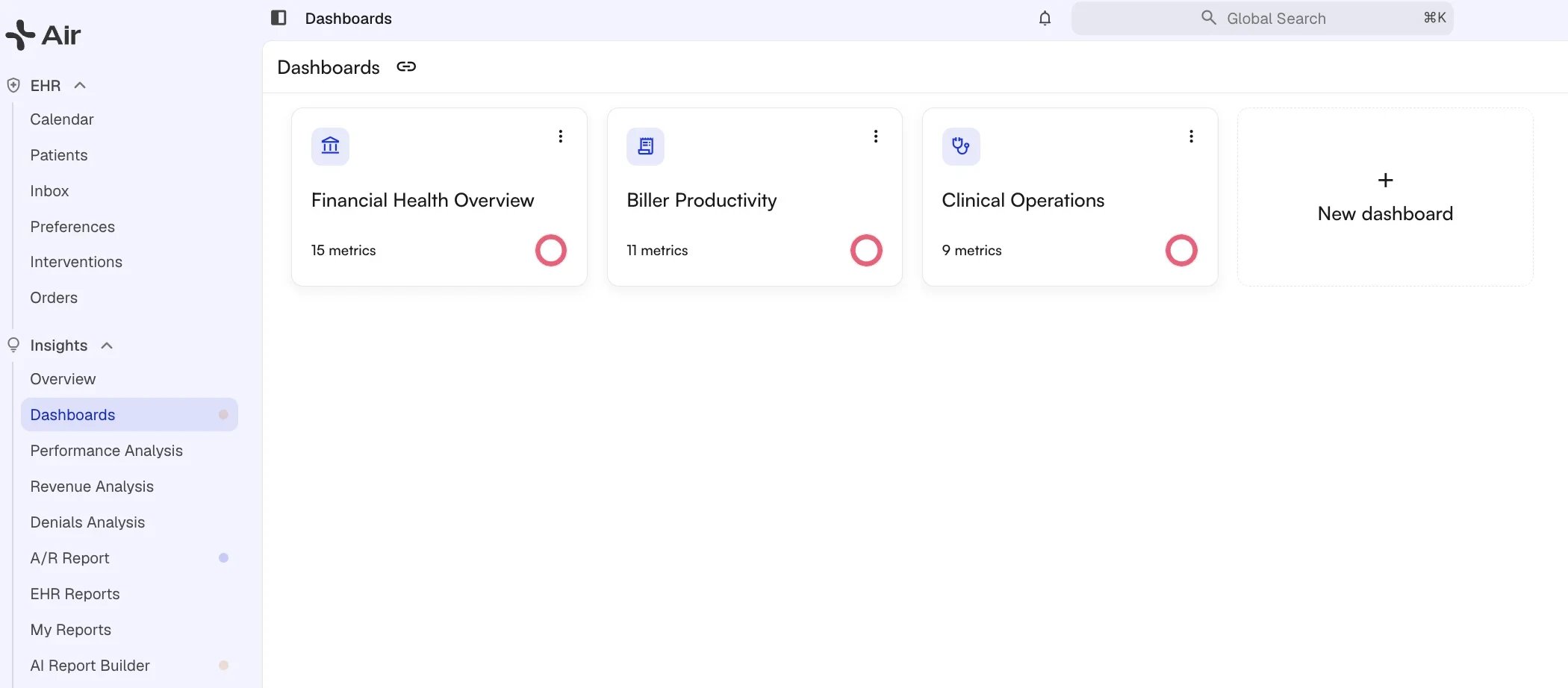
- Financial health cards cover charges, payments posted (split between insurance and patient), net collection rate, days in A/R, A/R aging activity, first-pass and clean-claim rates, denials, and unassigned claims.
- A biller leaderboard tracks productivity, and the whole dashboard can be filtered by biller.
- Billing-mix metrics include paid per encounter, charged per encounter, and insurance paid per CPT unit.
- Cards compare against the prior year or month and offer a quarterly view, and you can set a goal on a metric.
- Click a card or a chart bar to drill into the claims or payments behind the number, then sort them and download a CSV.
[Beta Users Only] Rule Creation Updates
Rule creation, which entered beta alongside the Unified Rules UI in July, picked up several additions:- Test a new rule against real claims before you activate it.
- Parent sites can create rules for their child sites.
- Every rule now requires a description, and rule names can be edited.
- Conditions support IN and NOT IN operators and can be dragged between condition groups.
- Inactive rules can be deleted, and each rule’s activity log accepts comments.
Bug Fixes and Improvements
Claims & Submission:- Editing an institutional submission no longer requires a PPS (DRG) code.
- When saving a claim adds a payer partway through a submission, Insights now asks which payer to submit to instead of resubmitting to the primary as a corrected claim.
- Diagnosis codes starting with V, W, X, or Y now show the Accident Date field on the claim.
- Switching a claim to self-pay no longer fails, and a prior authorization can be added again after one is deleted.
- The insurance card shows the payer ID, the properties panel reads Provider instead of Rendering Provider, and Copy claim URLs puts each URL on its own line.
- The remittances table adds Ins Paid, PR Amount, and Other PR columns.
- The submissions table adds a Created Date column, and submissions and remittances are listed newest first.
- Claim-level adjudication appears first in payments, fully denied $0 procedures read N/A instead of Pending, and multiple submission error reasons are spaced apart.
- Arrow keys and Enter work inside action groups and in the insurance and provider actions, and Cmd/Ctrl+Enter saves a comment.
- The More actions dialog closes after an action runs, the undo toast pauses while you hover over it, and a running bulk submission shows how many claims it is submitting.
- Claims can be switched to self-pay in bulk, and pushing balances to patient responsibility accepts an exact amount per procedure, including $0.
- The bulk adjustment step adds a Remaining balance row and a description for each adjustment reason code.
- Hovering over a saved view previews its ordering, grouping, and filters before you switch to it.
- On the Appointments page, you can click a balance to print a patient statement, add an Appointment Type column, see a single Skipped Collection tag with the reasons on hover, and pick eligibility coverage values (such as Active or Inconclusive) when adding a filter.
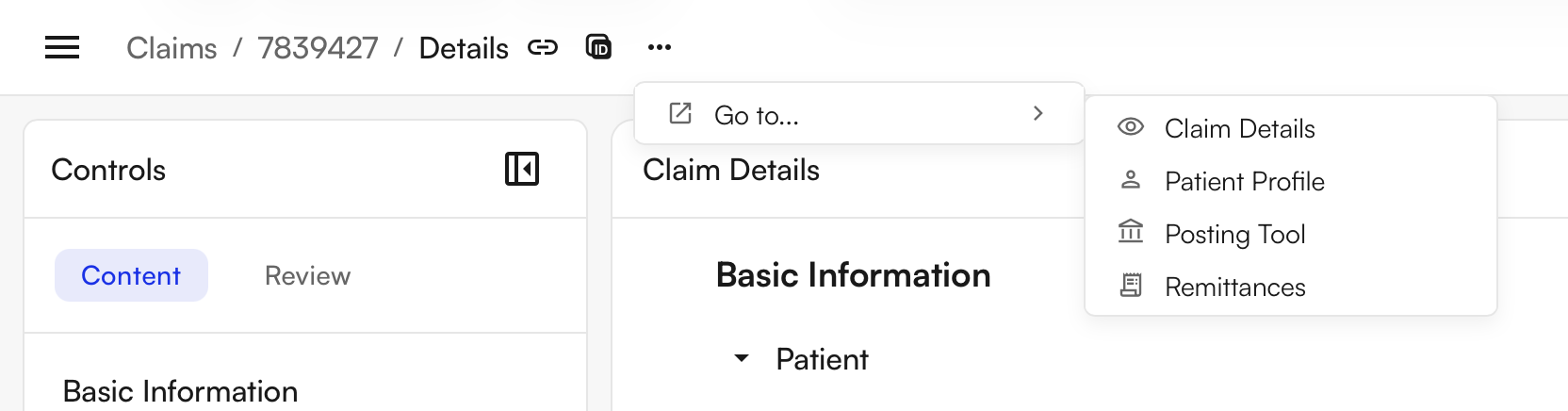
- The patient page’s overflow menu has a Go to… section that links to the patient’s claims and EHR profile.
- Automatic pre-visit payment links now go only to patients who have an amount due.
- My Reports adds a Patient Credits report in a new Month End Close section.
- The Claim Details report shows the payer and payer group even before a claim is submitted.
- Aging A/R PDF and detailed report totals now match, and the detailed report adds an Insurance Type column.
- The 835 remittance uploader now accepts .dat files.
Air
Outreach Flows: Images, New Filters, and New Templates
Outreach Flows can now send richer, better-targeted messages:- Insert Image in the email editor to upload an image or paste its URL (up to 5 MB). Images render in Gmail, Outlook, and Apple Mail.
- New targeting filters: Referral Type (for both patients and leads), Birthday (today, this week, or this month), and Portal registration status.
- Four new suggested templates: Reactivation Campaign, Discharged Patient, Birthday Message, and Patient Portal Invitation.
Eligibility Details in the Calendar
The appointment view in the calendar now shows more eligibility detail:- When the member ID on file differs from the one the payer returns, both are shown side by side, and an alert flags the mismatch automatically.
- The patient’s available credits are shown on the appointment.
- Results that come back Inconclusive (Site Action Required) now come with next steps.
- A Report Issue flag lets staff report a suggested patient responsibility rule that looks wrong.
Automatic Lead Creation from Faxes
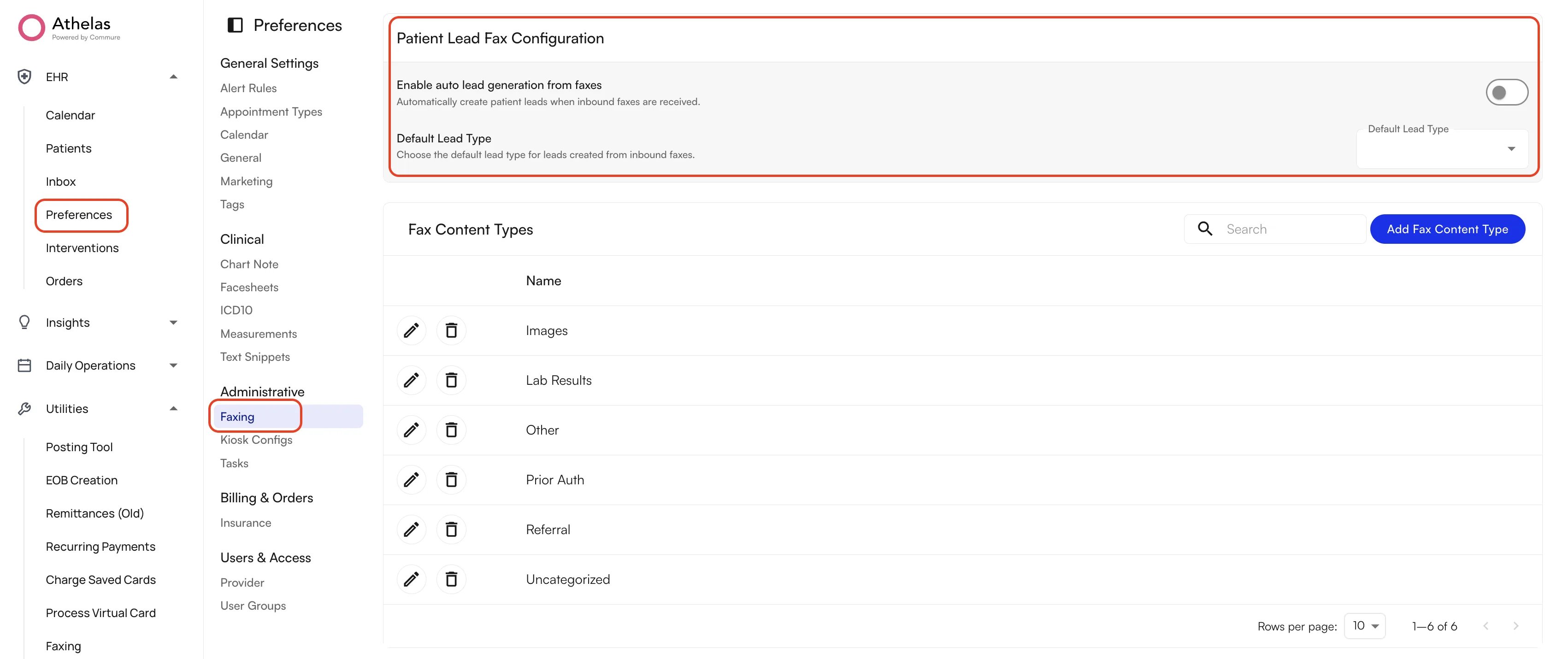
- Turn on Enable auto lead generation from faxes in Preferences → Administrative → Faxing, then choose the lead type and Lead Tracker stage for leads created from faxes.
- Faxing and the Lead Tracker now say “lead” instead of “referral” throughout, and a fax can be unassigned from a lead.
Patient-Initiated Messaging in the Patient Portal
Every practice that uses the patient portal can now let patients start a conversation from the portal instead of only replying to messages from staff. The setting is off by default. When you turn it on, you choose who patients can message: their previous providers, specific users or user groups, or anyone. See Messaging Permissions.[Beta Users Only] Scheduling Templates
Scheduling Templates let you build a provider’s week once, covering the hours they work and what can be booked in each part of the day, and then reuse it:- Build a template by hand, or describe the schedule in plain language to the AI builder and accept or reject each proposed change.
- Mark slots as bookable or non-bookable, choose which appointment types each bookable slot accepts, and color-code slots and blocks.
- Apply a template to one or many providers across a date range. The calendar shows the open slots, and a warning appears when a booking conflicts with a reserved slot.
- Only admins can create, manage, and apply templates.
[Beta Users Only] Care Notes
Care notes give your team a place in the chart for patient communication that isn’t tied to a visit, such as phone calls, outside records, and messages from other providers:- Add a care note from the patient’s Visits & Notes tab, optionally with a case, a source (such as Patient, PCP/Physician, Hospital, or Fax), and an attachment.
- Assign the note to a teammate or a group as a task, and the task links back to the note.
- An entry can’t be changed once it’s added, so each care note keeps a complete activity thread. Close a note together with its tasks, or reopen it later.
- Care notes appear alongside visits in the patient’s timeline, and you can download or fax up to 25 closed notes (care notes and visit notes together) as PDFs at once.
[Beta Users Only] Smart Charge Capture
Smart charge capture turns a procedure you perform often into a single bundle. Admins build the bundle as a text snippet in Preferences → Text Snippets, holding the procedure documentation, CPT/HCPCS codes with default modifiers, and optionally orders, order sets, and ICD-10 codes:- Say the snippet’s name while Air Scribe is recording, or type it into the note, and the documentation, services, and orders are added together.
- CPT codes land in the note’s Services section. Codes that come from an order are added once the order is completed.
- Applying a bundle again skips anything already on the note, and ICD-10 codes are only added, never removed.
- Bundles can be shared across the site or limited to specific providers.
[Beta Users Only] AI Orders from Air Scribe
Air Scribe can now draft orders from the visit conversation:- When a provider clearly orders a lab, an imaging study, a DME item, or a referral, Air Scribe matches the order to your site’s order sets and lists the matches, with their ICD-10 codes, in a new Orders Detected section.
- Apply Scribe adds the selected orders to the visit note as drafts. Nothing is sent until someone reviews and submits the orders.
- Applying Air Scribe again skips order sets that are already on the note.
- AI orders work on the web and on iOS and Android, and they use the order sets your site has already set up.
[Beta Users Only] Procedure and Injection Orders in Order Sets
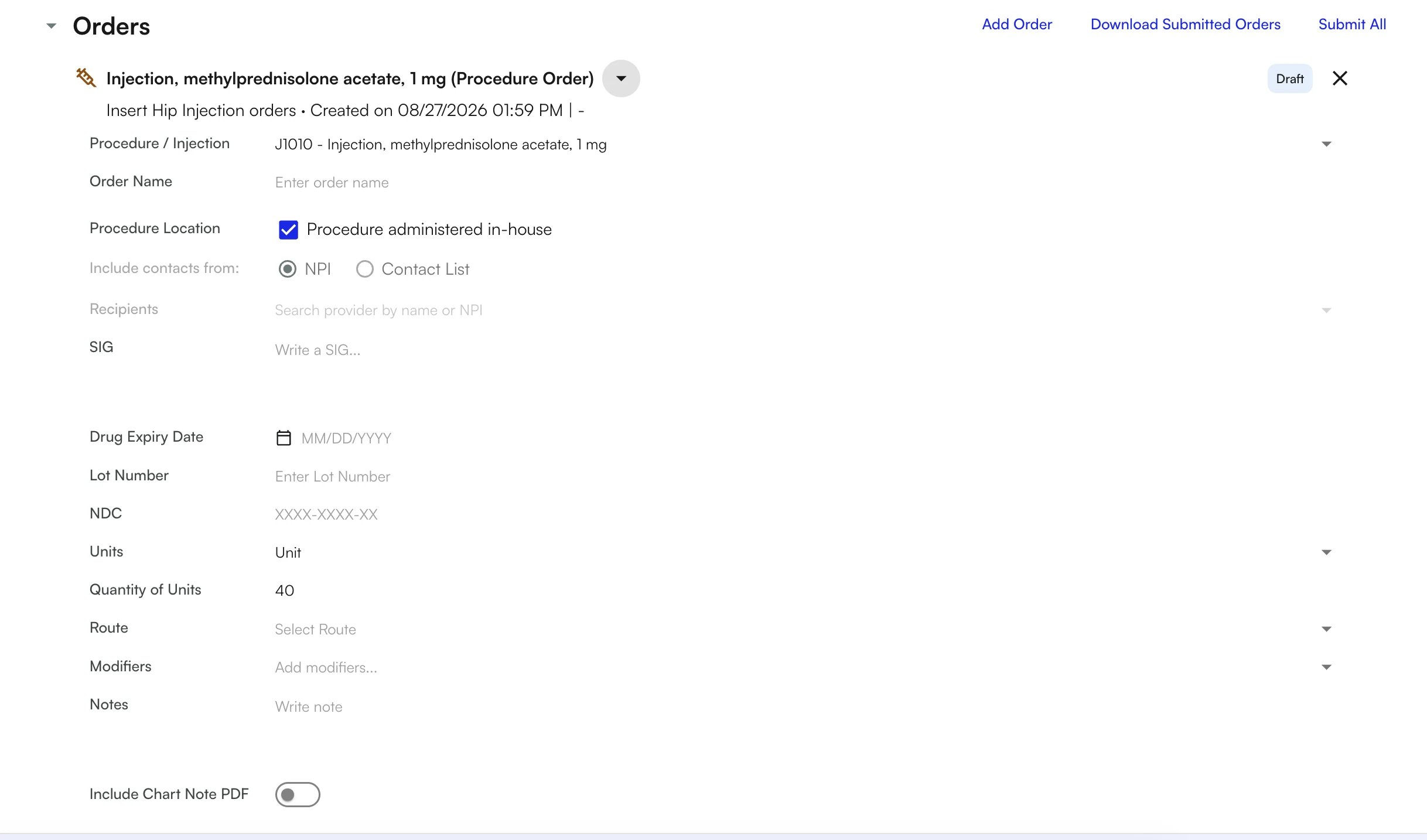
- Record the procedure location, SIG, drug expiry date, lot number, NDC, units and quantity, route, modifiers, diagnosis, and notes.
- A procedure administered in-house carries its CPT/HCPCS code, which fills into Services when the order is completed. The NDC flows through to the encounter.
- Add a procedure order from the visit note with Add Order, on its own or as part of an order set.
[Beta Users Only] Specialty-Aware Air Scribe
Air Scribe now writes and codes for the rendering provider’s specialty:- Air Scribe reads the provider’s full taxonomy, primary and secondary, across documentation, goals, measurements, plan of care, flowsheet interventions, and coding, instead of assuming every visit is physical therapy. OT visits no longer get PT evaluation codes, and chiropractic visits no longer get PT codes.
- ICD-10 suggestions stay closer to the patient’s established diagnoses.
- On the new Services section, suggestions take the codes billed at earlier visits into account, and a suggested service can be added with one click. In the mobile app, Services shows modifiers and units, and the Surgery category is renamed Procedures.
Bug Fixes and Improvements
Chart Notes & Air Scribe:- A Retry button reruns Air Scribe from the start, including transcription, and Air Scribe shows a clear error when a PDF can’t be transcribed.
- Apply Scribe warns you when only part of the output could be applied, and Assessment and Plan output is no longer dropped.
- Text snippet formatting is kept after a snippet is applied, long text wraps inside chart note tables, and surgical notes include the patient’s intake history.
- Notes can be submitted with zero units, and the Default unit calculation rule is renamed Ceiling method.
- CPT and ICD-10 codes on an order now apply to the note when the order is completed rather than when it’s created.
- You can print all completed orders from the visit note at once, the orders list shows a single status that includes fax delivery, and non-medication order PDFs include facility details.
- eRx prescriptions now include days supply, and quantity, refills, and strength reliably reach the pharmacy.
- The medications Drafts tab is renamed Pending Approvals.
- The calendar month view shows patients again, and scheduled appointments no longer disappear from the calendar.
- Pasted appointment details use the date and time you paste into, and moving an appointment no longer fails with an “unavailable slot” error.
- Pinned notes keep a change history that you can restore from.
- Patient Update forms are saved as attachments again.
- The drawer shows the referring provider’s phone number, the edit drawer has a notes field, and Resend Fax is disabled when no fax number is on file.
- Every report category can be filtered by appointment type, reports can be filtered by provider credential, and more metrics drill down to the records behind them.
Insights
[Beta Users Only] Unified Rules UI
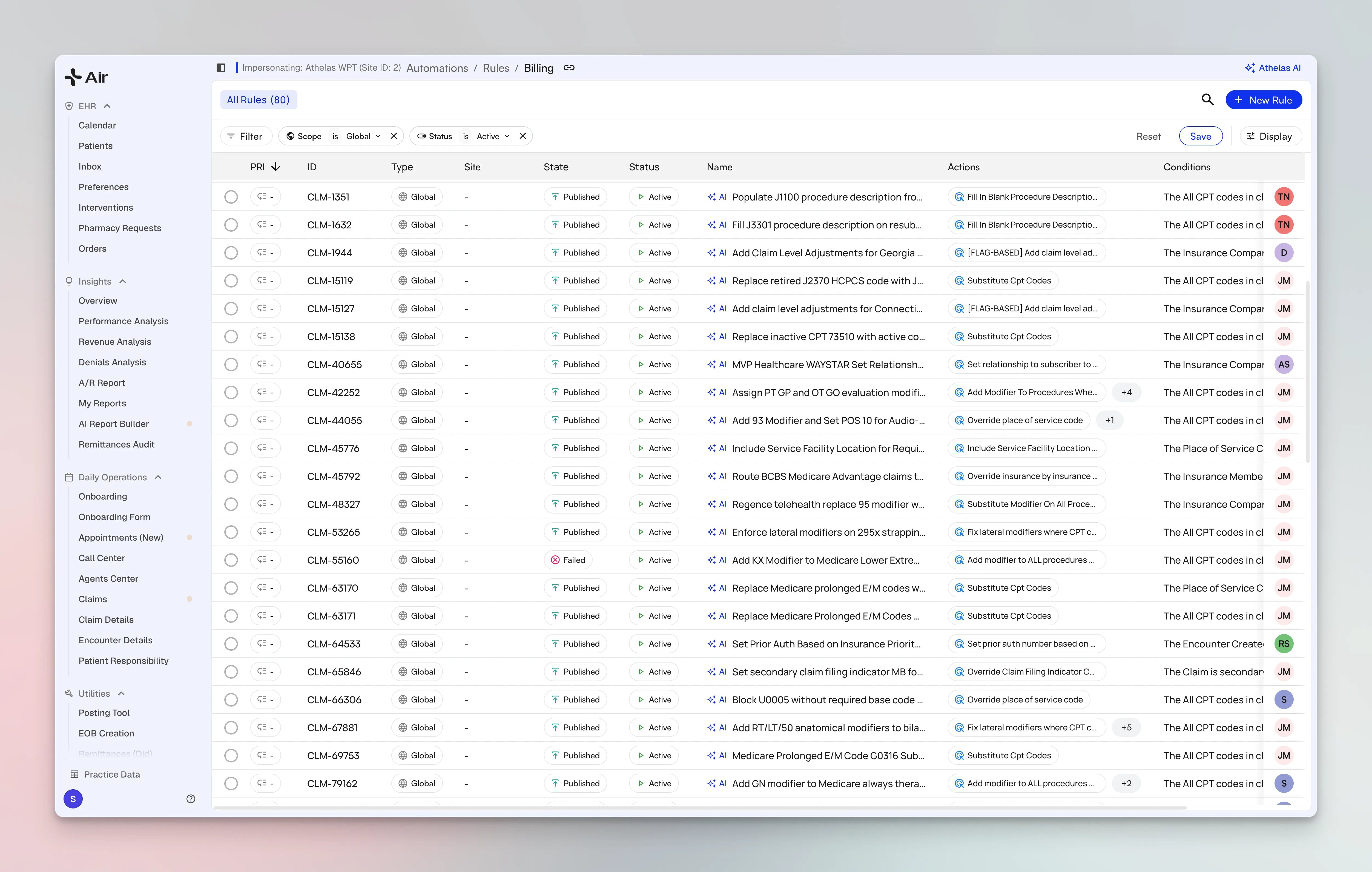
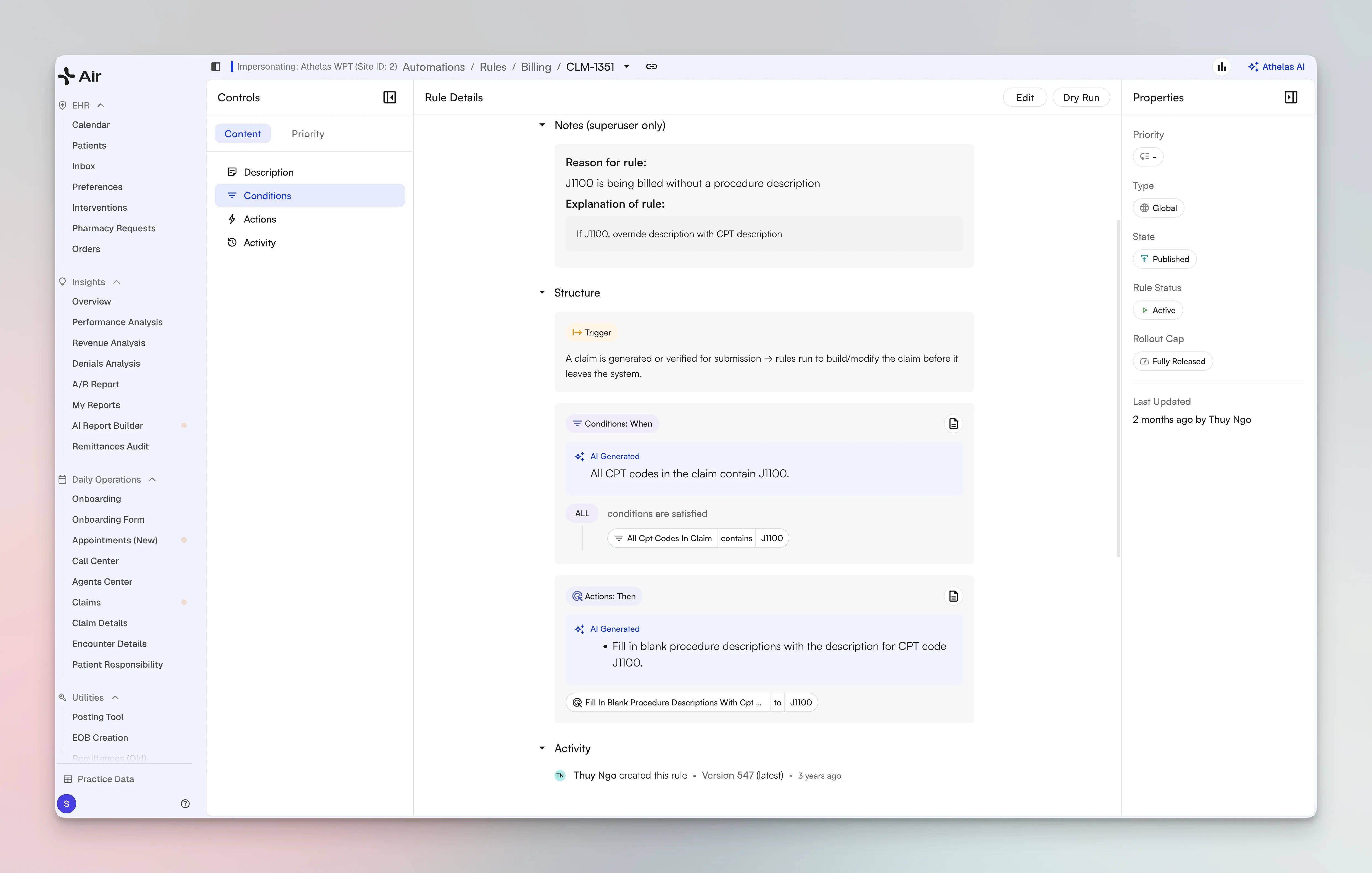
- Browse every rule at your practice in one place, organized by rule engine, with each rule summarized as a natural-language statement — AI-generated summaries even translate regex-heavy conditions into plain English — and the underlying conditions and actions one click deeper.
- No more internal IDs: payers, patients, providers, and facilities now resolve to human-readable names, and every rule carries a description plus a required “reason for the rule,” so the intent behind a rule stays clear months later.
- Rules on a phased rollout display their rollout cap, so you can see exactly how much of your volume a rule currently touches.
- Read-only browsing is live for beta customers today. Create, edit, and clone flows are in beta testing now — including an AI assistant that builds rules from a plain-language description, a dry-run that previews a rule’s impact against real claims (with a side-by-side claim-form comparison) before activation, and an approval step so nothing goes live unreviewed. Contact your account manager for access.
[Beta Users Only] Redesigned Remittance Overview
- Four KPI score-cards — Check Match %, Deposit Match %, Unmatched Checks $, and Unmatched Deposits $ — each with a trend sparkline and week-over-week comparison, viewable by day, week, month, or quarter.
- Click any card to drill into a Match Breakdown screen: verified-vs-unverified charts across Checks and Deposits tabs, plus a table with a Simplified mode (grouped by deposit source) and a Detailed check-level mode, both exportable to CSV.
- A deposits and cashflow chart tracks insurance deposits, check totals, and posted payments side by side for each period, also CSV-exportable.
- A new notification strip flags work the moment the page loads: unmatched check and deposit counts with a one-click jump into matching, bank-feed sync failures with a retry button, and an alert when a payer that regularly deposits suddenly goes quiet.
Claim Deferrals Now Available to All Customers
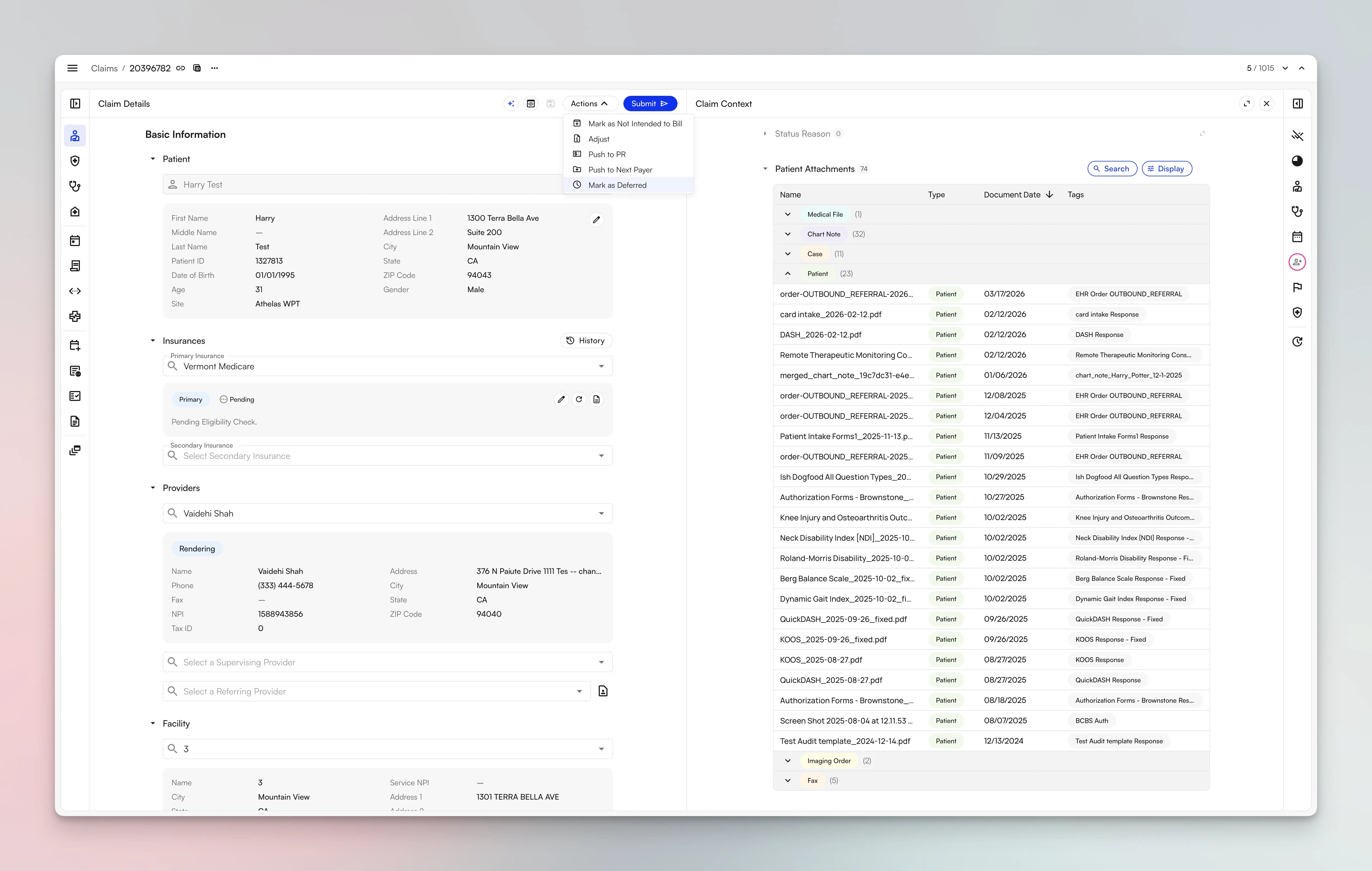
- Defer from the Actions menu with a reason and an expiration date, and the claim drops out of any view filtered to non-deferred claims — like Workable Claims — until the deferral expires.
- PR (patient responsibility) generation is automatically paused for the duration of a deferral, so patients aren’t billed while a claim is intentionally on hold.
- Deferrals clear themselves when they’re no longer needed: if the claim’s status changes before the expiration date — say the remit you called the payer about arrives — the deferral is removed immediately instead of waiting out the clock.
- Defer and un-defer in bulk from the Claims page, and cancel or extend any deferral at any time.
- Deferral reasons are site-specific and customizable — create one inline while deferring and everyone at your practice can reuse it — and every deferral’s date, reason, and duration is logged in the claim’s Activity Feed.
- For claims that come from your EHR, a new “Updated in EHR” deferral reason replaces the old Mark as Updated in EHR flow. It’s available when a claim has a linked EHR claim and an upcoming EHR import: the expiration date is automatically set to the next EHR import (you can still pick a different date), and confirming automatically re-enables EHR imports for that claim so the update actually comes through. If the refreshed claim resubmits cleanly, there’s nothing more to do — if it hits a submission error, it’s un-deferred immediately so it can be worked right away. Bulk is supported here too (~25 claims at a time), and the standalone Enable EHR Import button has been consolidated into this flow.
Bug Fixes and Improvements
Claims Workflow:- Submissions now show who actually submitted the claim rather than who originally created the submission, so audit trails are accurate.
- Bulk actions gained a Cmd/Ctrl+Z undo, and the bulk submission limit increased to 500 claims.
- Cmd/Ctrl+K now supports searching by EHR patient ID and EHR appointment ID.
- Fixed the End-of-Day report so payments display under the correct collector, which previously misattributed collections.
- Fixed a SmartPay discrepancy where the collected amount shown differed from the actual total.
Air
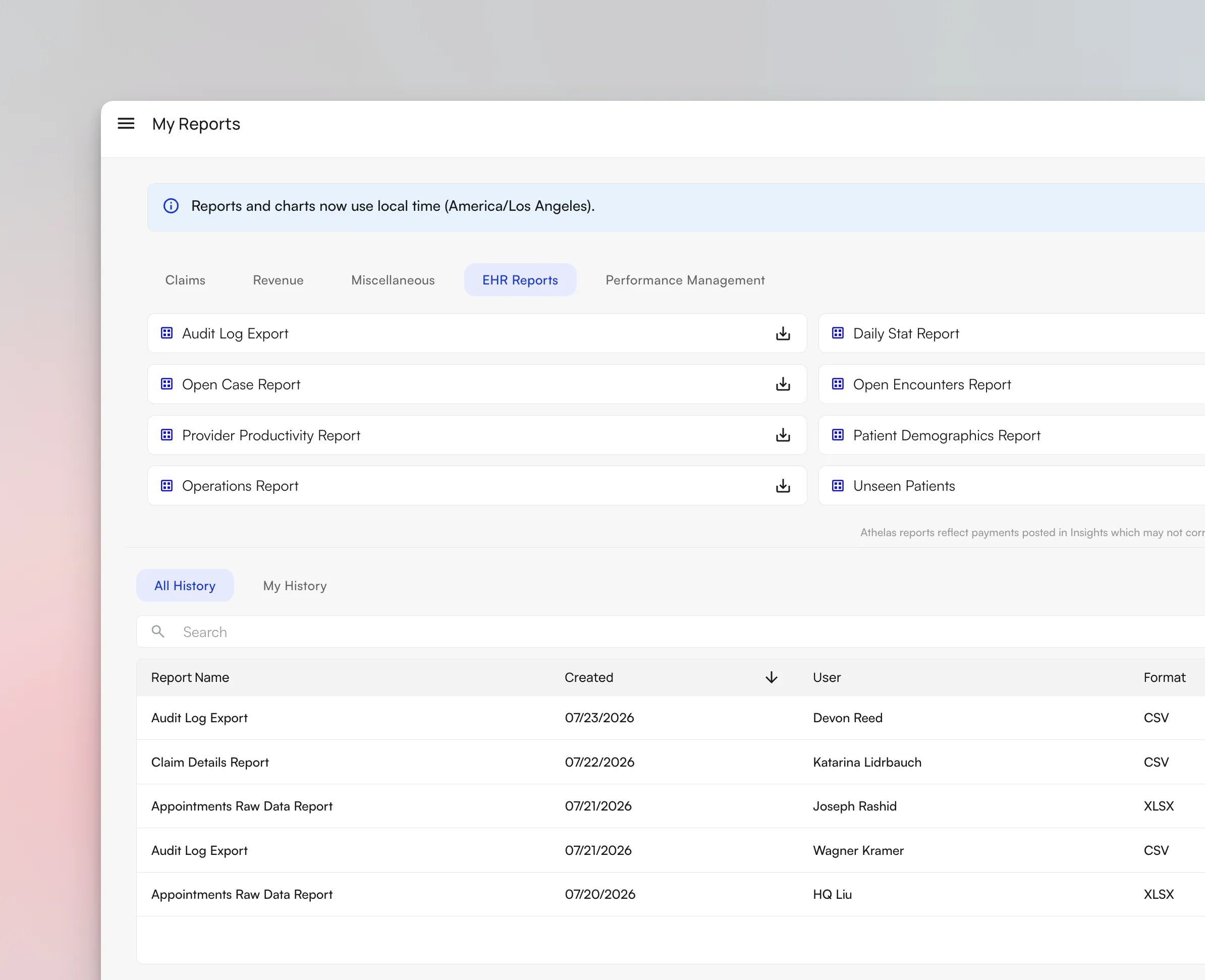
[Beta Users Only] Audit Log Export
In-Line Ordering from the Visit Note
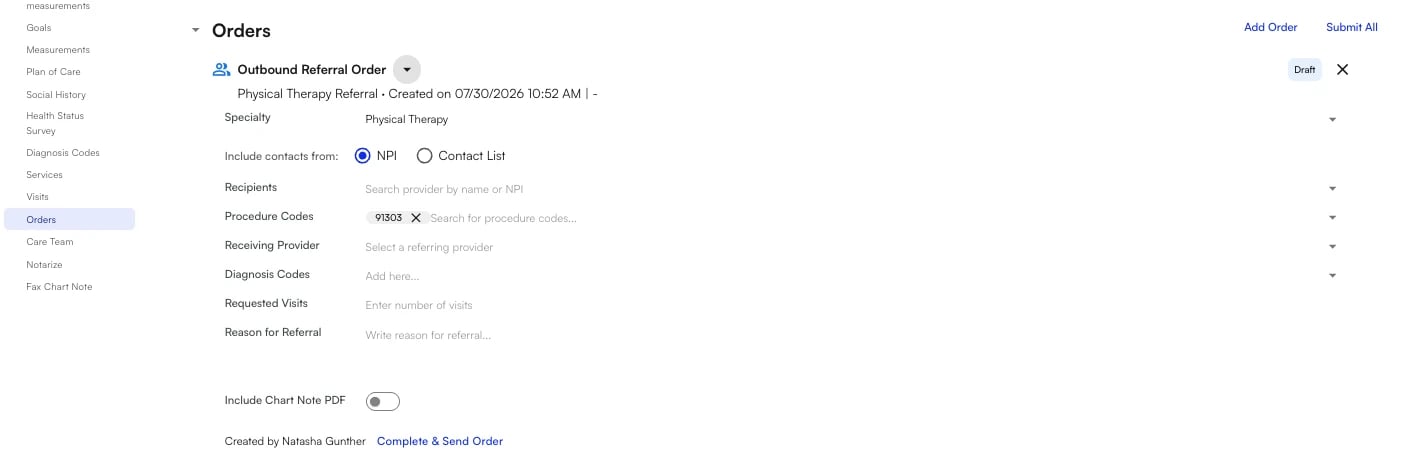
Clinicians can now place, edit, and submit orders directly from the visit note as they document — medications, order sets, and external orders alike — without jumping to a separate ordering screen. Orders in the visit note header now display the specific order name, so it’s clear at a glance what’s been placed.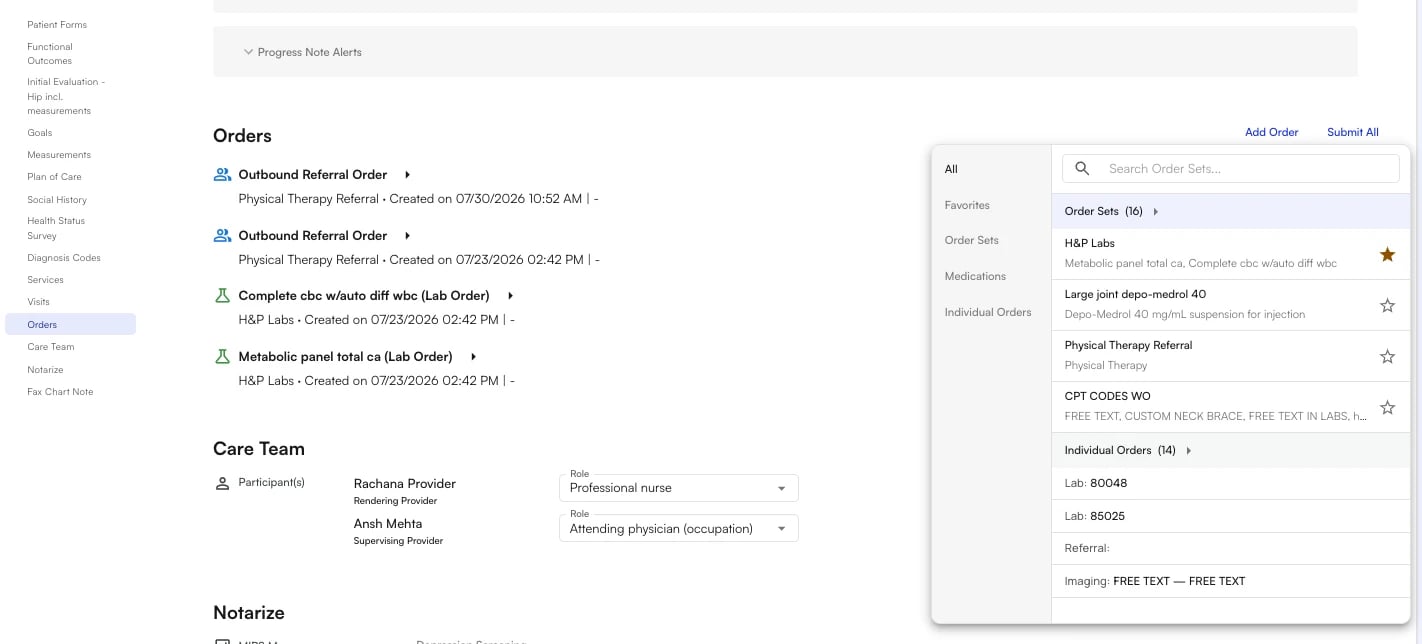
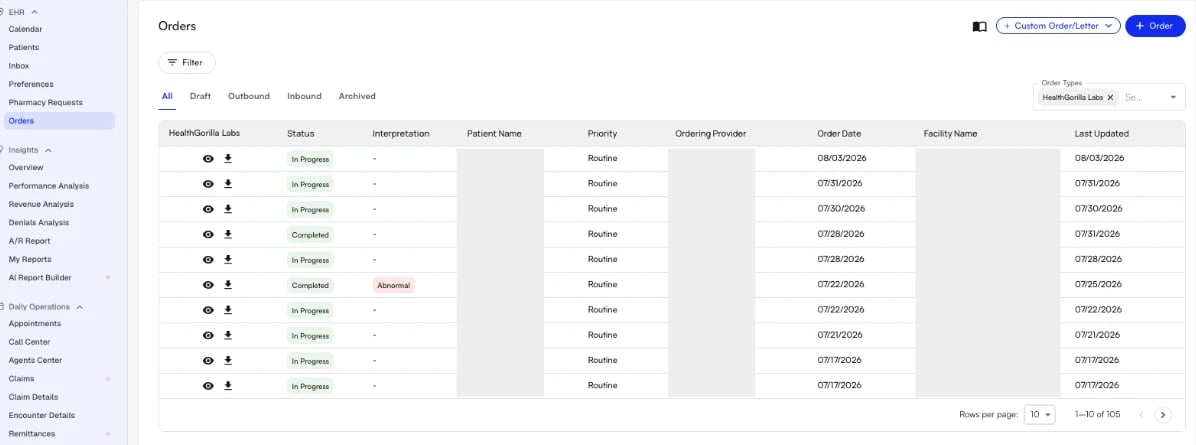
Health Gorilla Labs Visibility Improvements
Lab orders placed through Health Gorilla are now far easier to track and review in Air:-
A new site-level HealthGorilla Labs table shows every lab order across the practice — with status chips (and a legend explaining them), a last-updated column, and a per-patient view.
- Results appear directly in the order drawer as structured values with reference ranges and an interpretation column, parsed straight from the lab feed.
-
Abnormal results are highlighted and filterable, and the drawer calls out exactly which observation was flagged.
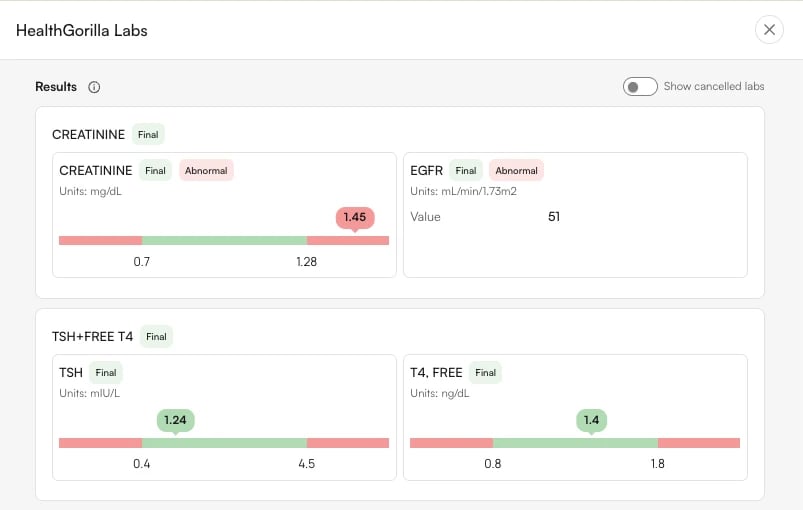
- Cancelled orders are labeled more clearly, with a toggle to show or hide cancelled results.
Medications Usability Improvements
A round of quality-of-life upgrades to medication workflows:-
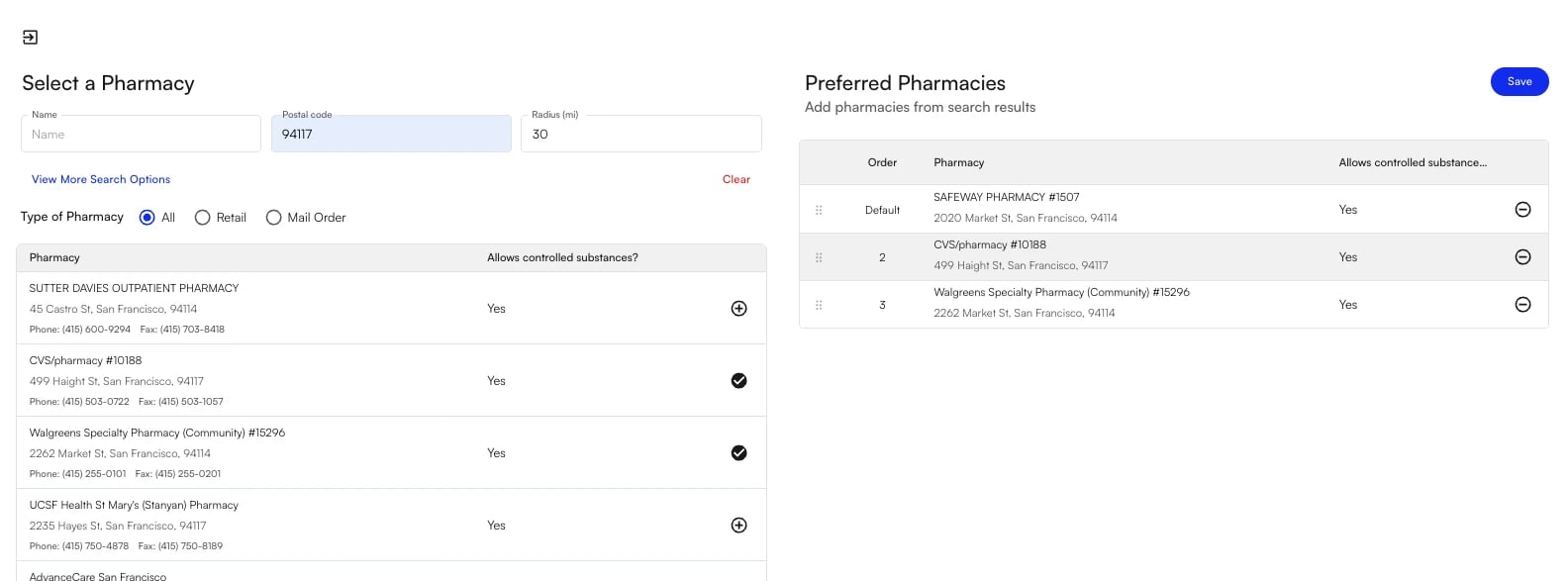
Multiple preferred pharmacies per patient — add, remove, and reorder preferred pharmacies on the patient chart, with one marked as the default.
-
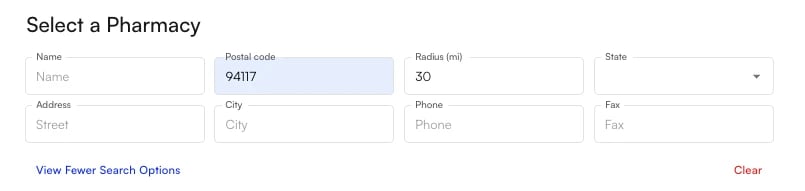
Smarter pharmacy search — search by name, city, state, address, ZIP, phone, or fax, and combine filters (e.g. “CVS” + “Fremont, CA”) to pinpoint the right location among large chains.
-
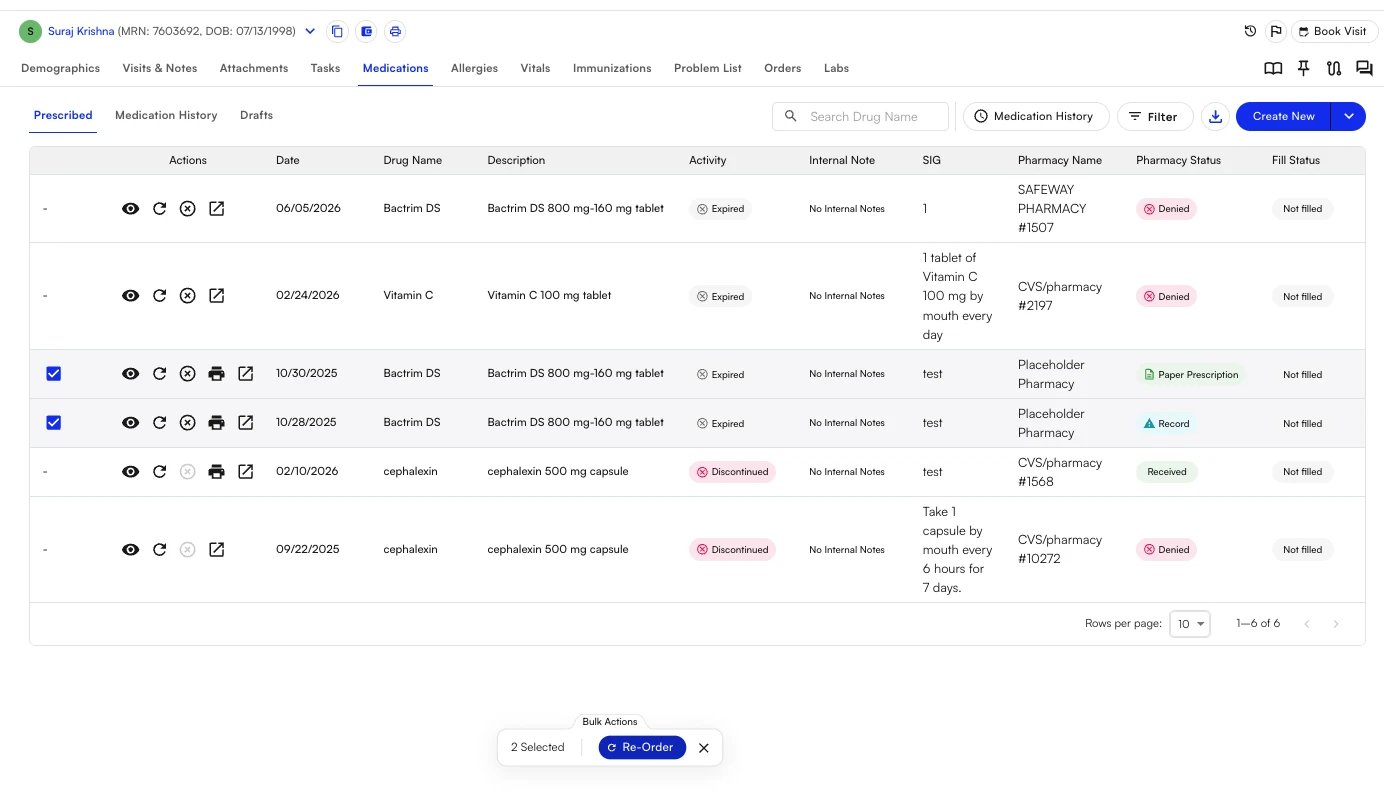
Bulk medication re-ordering — select multiple medications from the med list and re-order them in one flow, adjusting SIG, quantity, and refills before submitting. Bulk re-orders also carry through to the visit note.
[Beta Users Only] New Treatments Section (Services v2)
We’re rolling out a rebuilt Treatments experience in the chart note. Services now live in the billing section of the note with per-service ICD-10 linking and reordering, unit counts, and billing modifiers — plus one-click carry-forward from a previous note. The new section is integrated with Air Scribe, so treatments captured during the visit flow into the note automatically. Contact your account manager for beta access.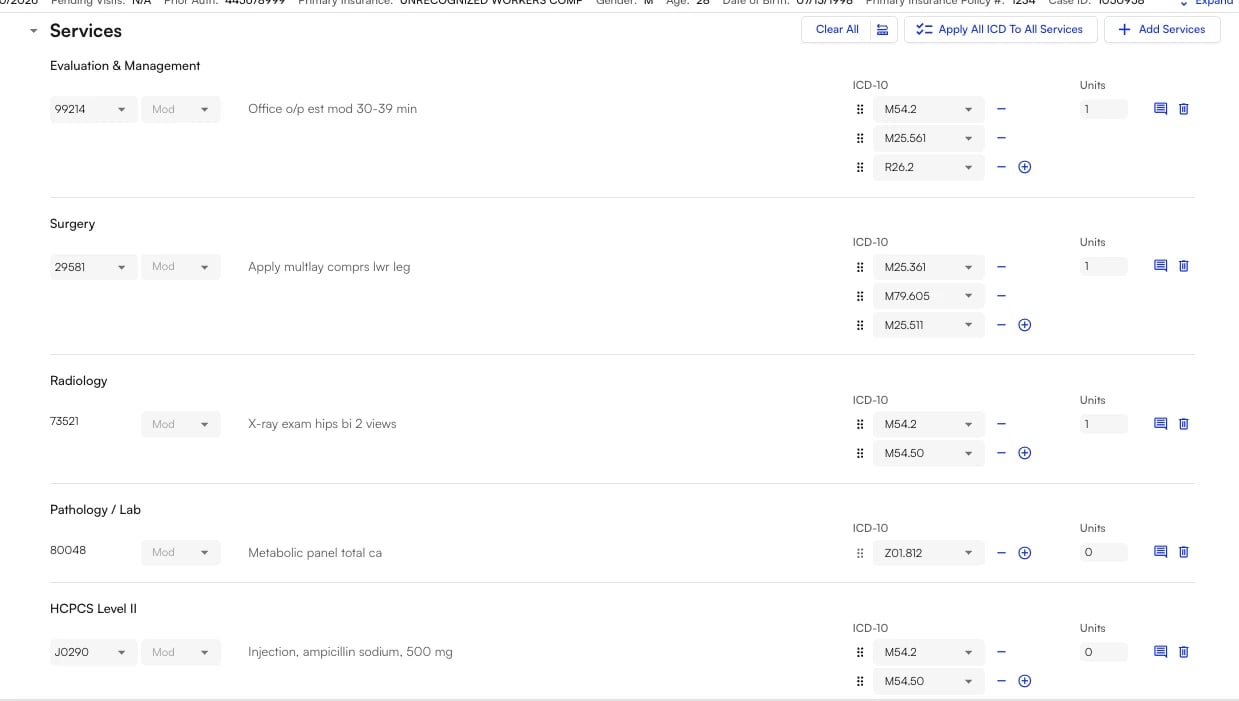
Bug Fixes and Improvements
General:- End-date filters now include the selected end date, so records from the final day of a range are no longer omitted.
- Added an option to send patients a receipt after a kiosk payment.
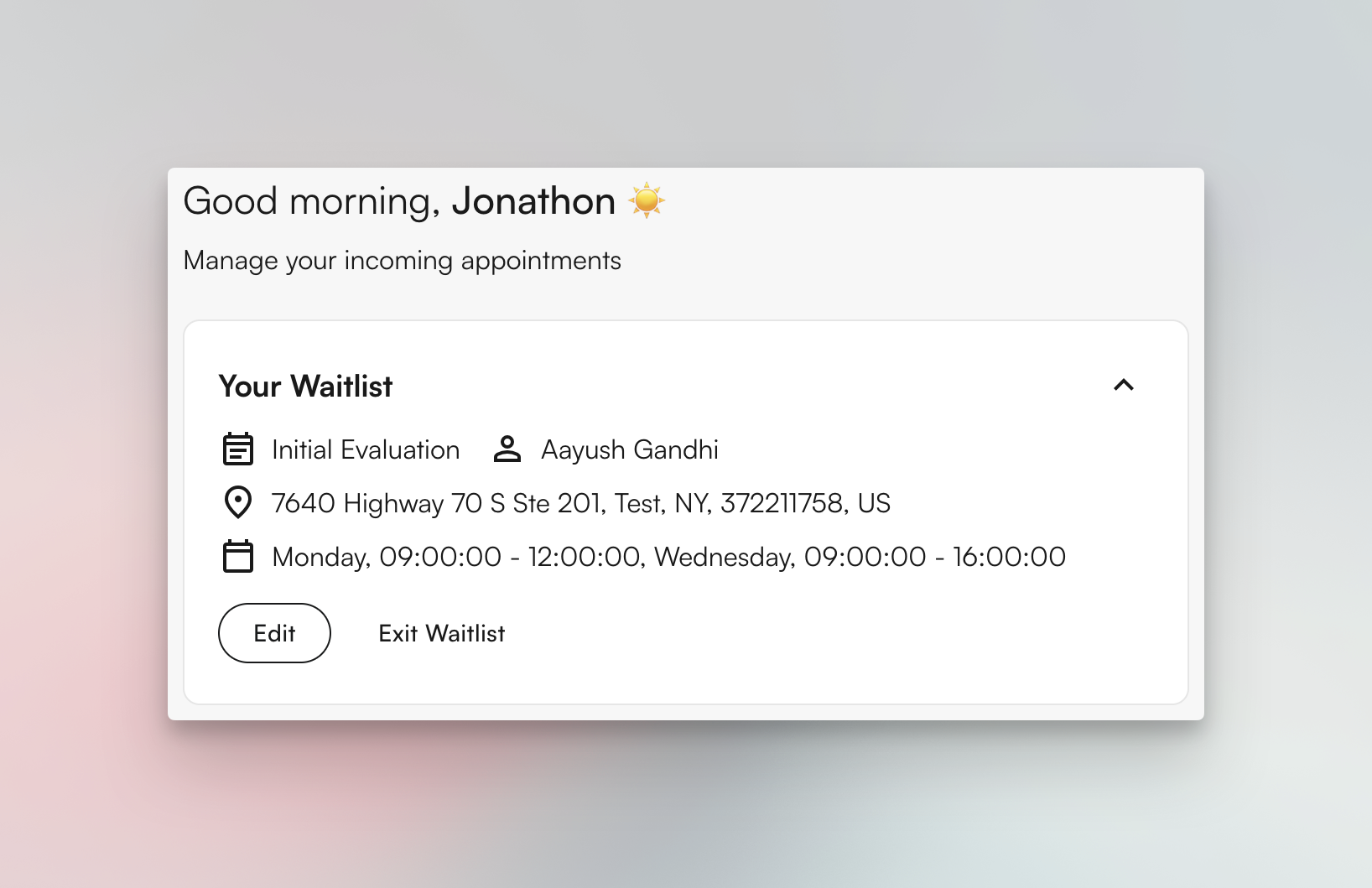
- Patients can now set an expiration date on their waitlist entry through the patient portal.
- Fixed the patient-pay link to show the customer’s marketing name rather than the legal site name.
- Fixed custom orders and letters PDFs that cut off content.
- Providers are now notified about new patient messages.
Insights
Facility Tracking on Collection
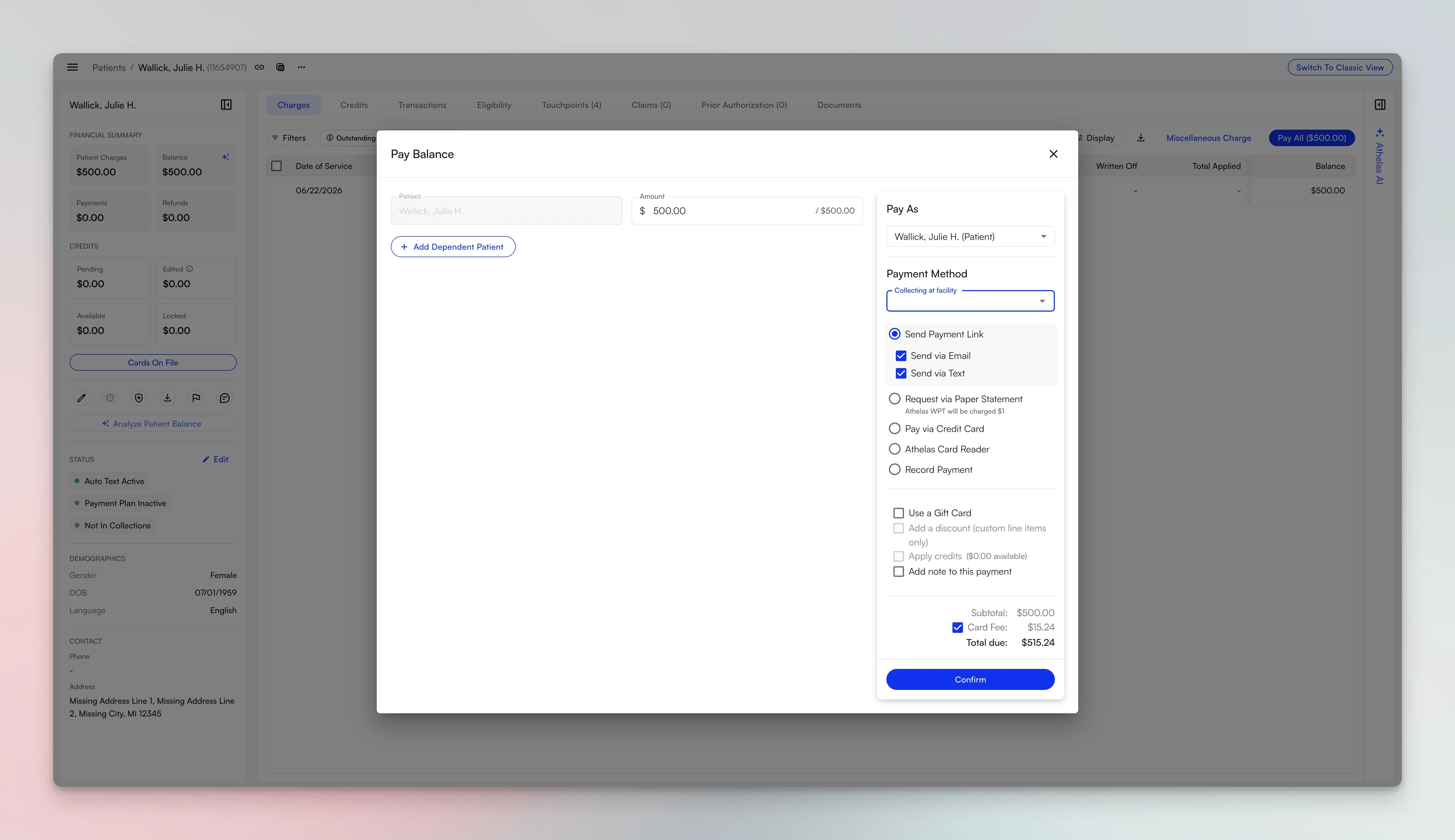
- A “Collecting at Facility” dropdown now appears on every payment screen. Single-facility customers auto-select it; multi-facility customers must pick before submitting, with the staff member’s last-used facility pre-filled as the default.
- Every in-office payment method is tracked — cash, check, card reader, saved card, kiosk, staff-applied credits, and manually sent statements — and every refund method gets a matching “Refunding at Facility” picker.
- The data surfaces as a new “Facility of Collection” column in the Site Transaction Report (Processed Transactions), and the Reconciliation page gains side-by-side Facility of Service and Facility of Collection filters and columns.
- Turn it on in My Practice → PR Settings → “Facility Tracking” — it takes effect immediately. Data is captured from the day it’s enabled; automated batch statement payments have no collecting staff, so they intentionally show blank.
Expanded Multi-Site Support for Parent & Child Organizations
We’ve added more capabilities for parent organizations working across their child sites from a single login, with parent/child relationships respected across claims, payments, and reporting:- Bank Deposit Recon reports run from a parent site now include data from every child site, so deposits reconcile across the whole organization instead of one location at a time.
- The parent appointments page now shows child-site appointments, and Cmd+K finds child-site patients and appointments from the parent.
- Billers can now run eligibility on child-site claims, upload attachments to child-site claims, and process refunds — all directly from the parent site.
- Child-site charge masters are viewable from the parent with a site column to distinguish similar charges across locations, and payments collected at the parent route to the correct child site’s payment account.
Bug Fixes and Improvements
Claims & Submission:- Denied reasons now appear by default in the payment-item table
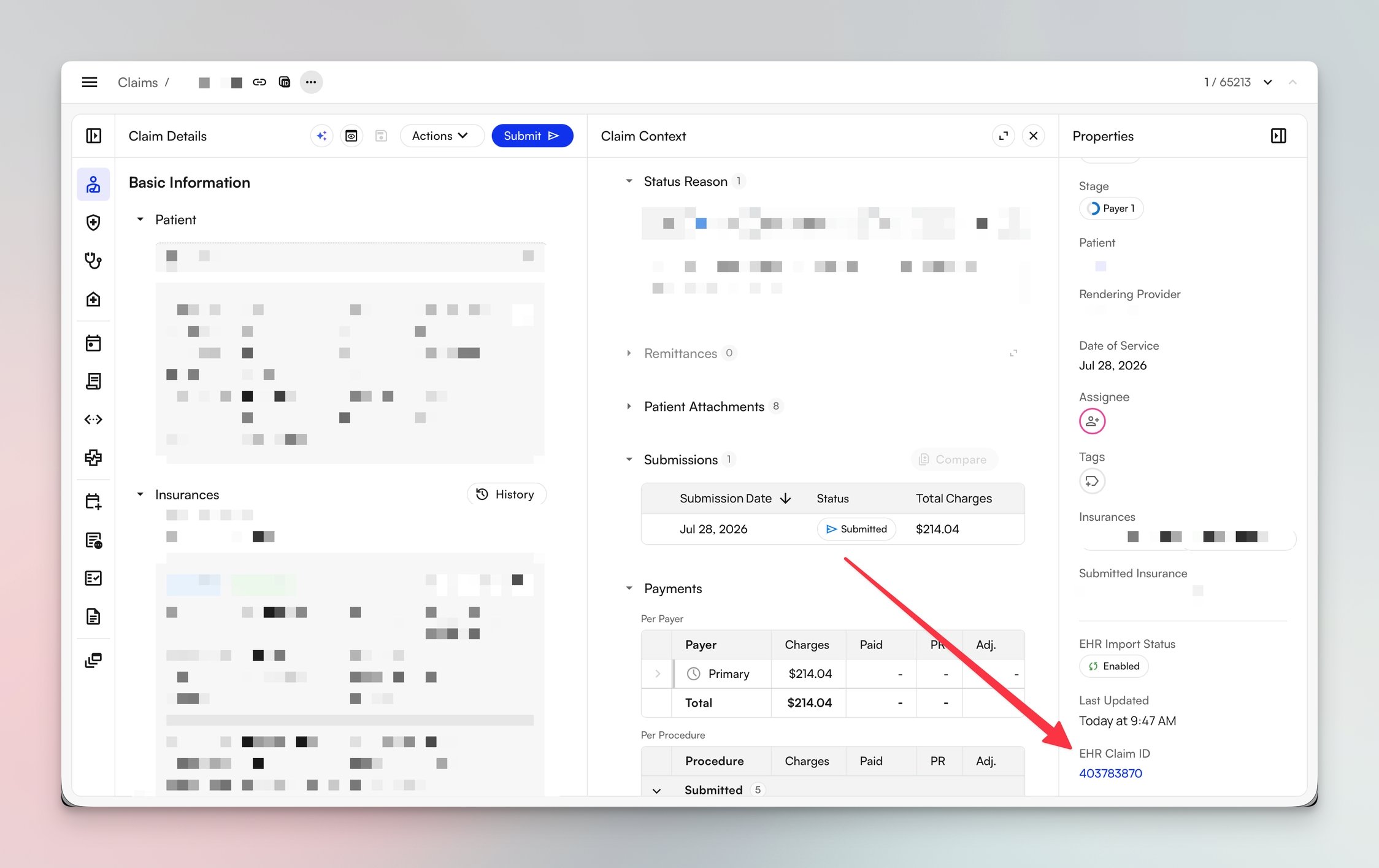
- Claims Page columns are now sortable, and all columns can be hidden or shown via Display Settings. You can toggle between views using the 1, 2, 3…0 hotkeys, and new filters have been added.
- Fixed invoices that were only reaching the primary email, so statements now reach all intended recipients.
- Provider adjustments are now included in invoice “Total Collections” and in the Bank Deposit Recon report.
- Corrected the year-to-date metric on the Revenue Analysis page.
- Added a dual-mode timezone banner to My Reports so report time boundaries are clear.
- Secondary claims now submit as soon as the primary remittance is balanced, instead of some being incorrectly blocked.
Air
Redesigned Patient Portal Sign-In & Registration
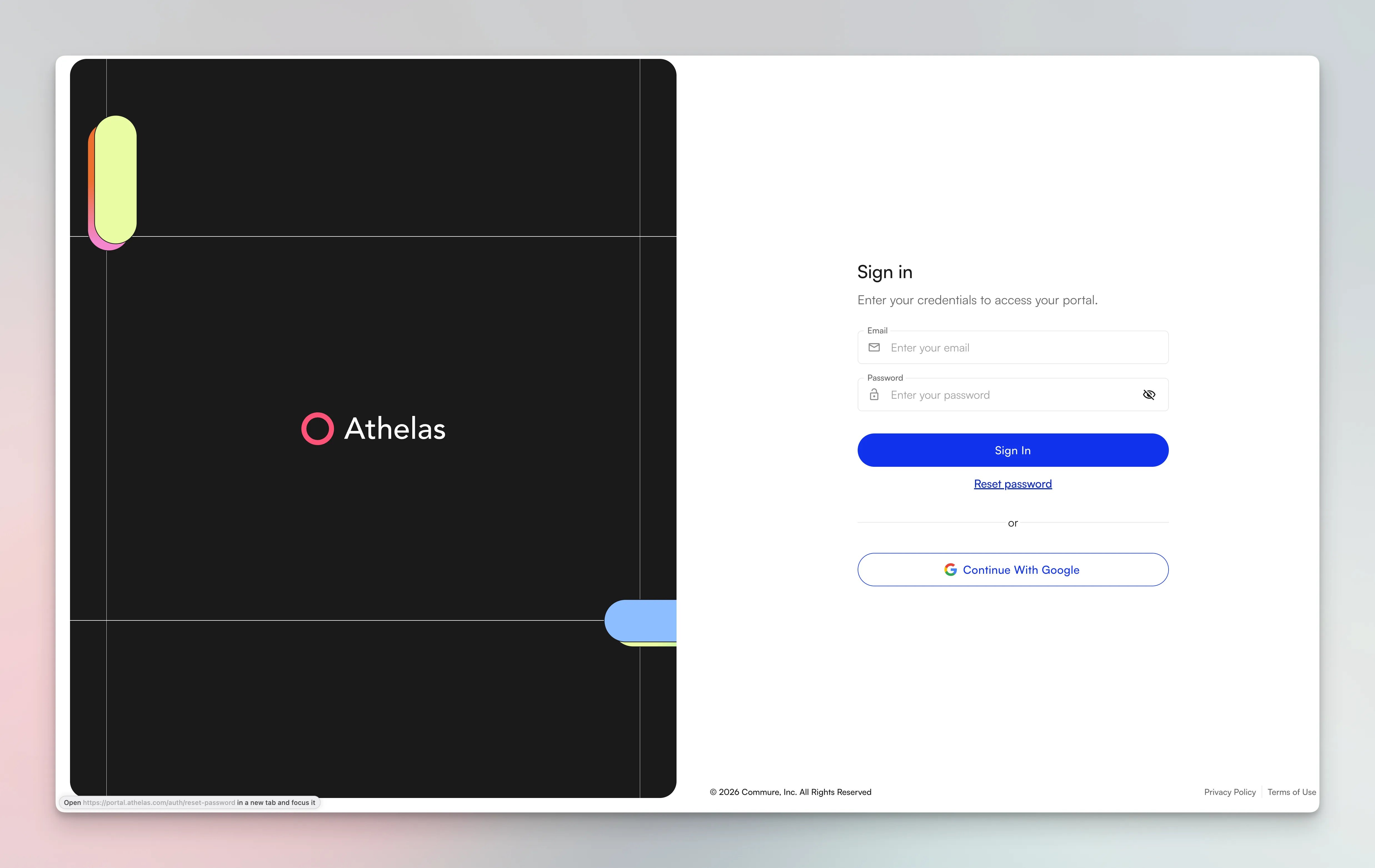
- Patients can now sign in with an email and password, or with one-click Sign in with Google.
- Registration no longer requires email or phone verification before access, and portal invites now send a personalized, coded sign-up link that opens a site-specific registration page pre-filled with the patient’s information.
- Patients who lose access can recover or re-link their account directly from the sign-in page, without needing to contact clinic support.
- Patients linked to multiple profiles — such as a parent managing children, or a patient seen at multiple practices — get a patient switcher to move between profiles in a single session.
- Authorized representative access: parents, guardians, and caregivers can now be granted their own portal access on a patient’s behalf.
- Staff designate an authorized representative from the Related Persons section of the patient chart and send them a portal invite directly from there.
- Representatives register and sign in with their own credentials — no shared logins — and can view and manage the patient’s information on the patient’s behalf.
- Someone who is both a patient and a representative, or who represents multiple patients, simply picks the right profile at sign-in via the patient switcher.
Redesigned Online Scheduling
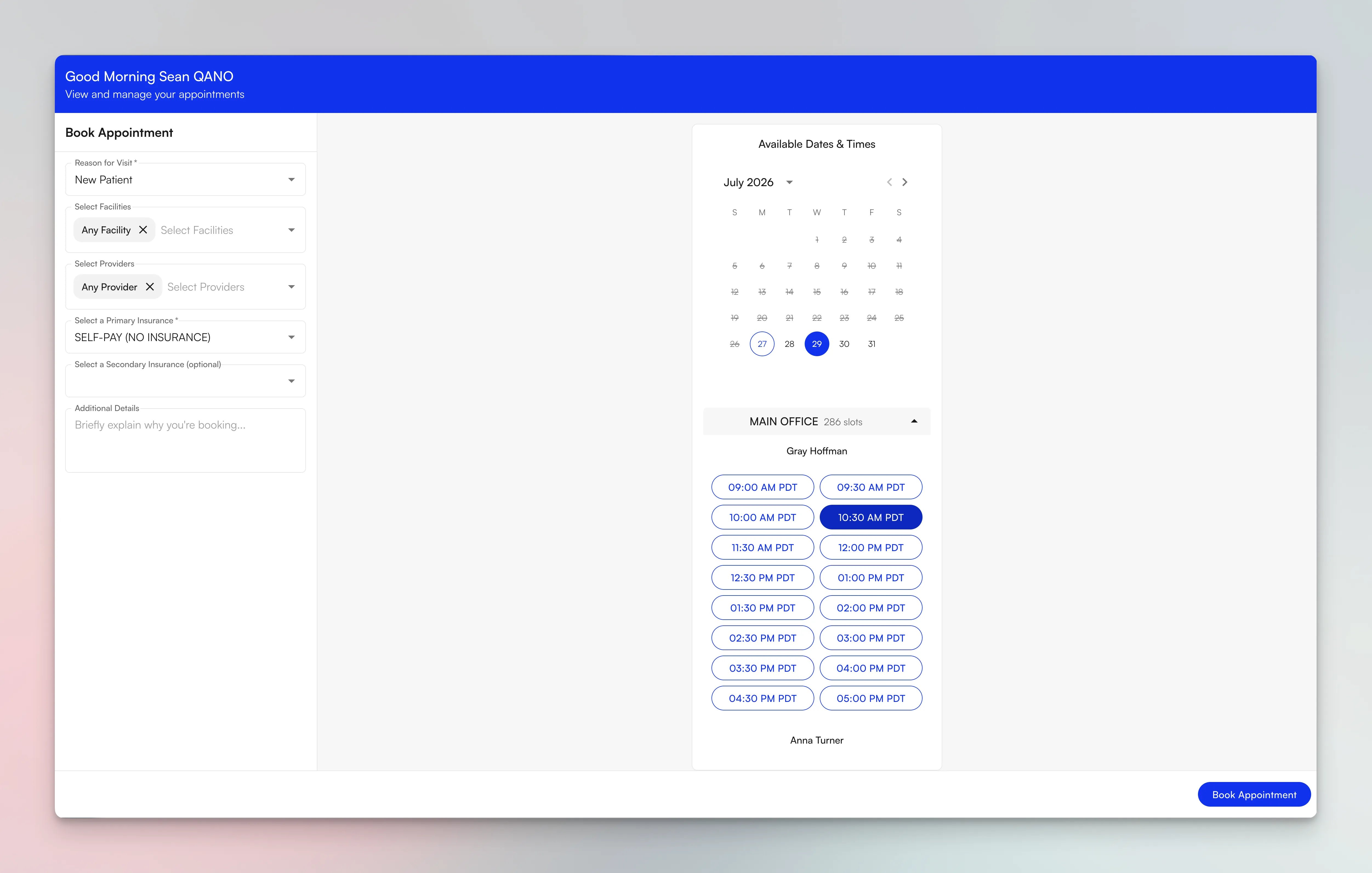
- The booking form is now guided: patients pick an appointment type first, which drives every downstream option so they only see relevant providers, locations, and times. New field order: Appointment Type → Location → Provider → Primary Insurance → Secondary Insurance.
- Patients can search the whole practice at once — selecting multiple providers and locations, or choosing “Any Provider” / “Any Facility” — with open times displayed grouped by provider and location, sorted by most availability.
- Primary insurance is now required at booking so claims are filed correctly, and the waitlist flow was updated to handle the new multi-provider/facility selection.
- Admins control exactly what patients see: toggle individual providers and facilities in or out of portal scheduling, or hide the Location/Provider fields entirely (patients auto-default to “Any”).
Order Sets for Medications, Labs, DME, Referrals, and Imaging
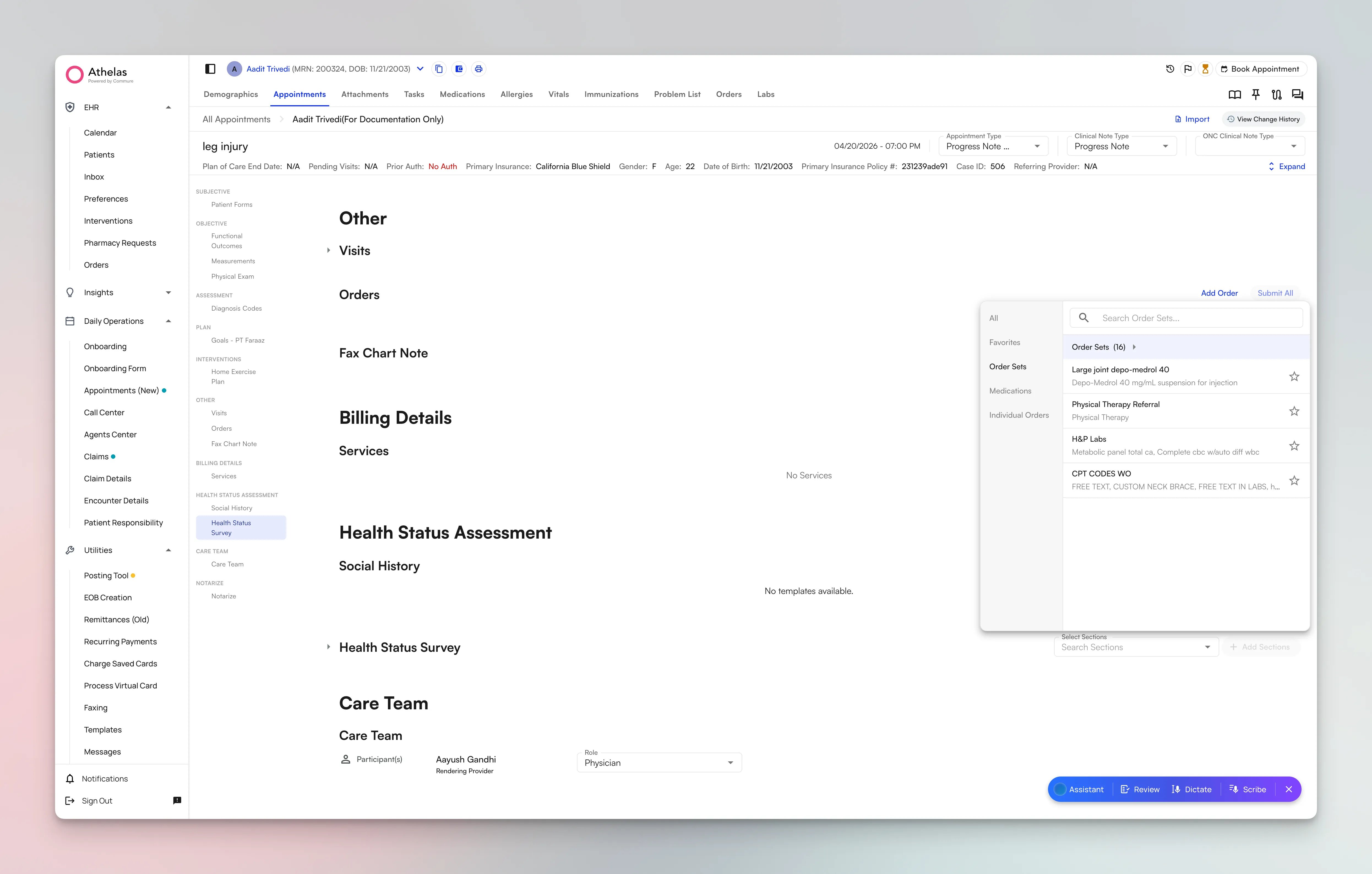
- Place and submit orders inline in the chart note — individually or all at once — with an auto-attached signature that removes the separate signature step.
- Place external orders that don’t map to a CPT code, such as referrals and DME, without entering a placeholder code.
- Order source now renders both on screen and on the printed PDF.
Bug Fixes and Improvements
Chart Notes:- The Unsigned Notes report now includes a “signed, not submitted” status, so staff can find notes stuck between signing and submission.
- Front-desk staff and clinicians can now save preferred calendar filters as defaults instead of reapplying them on each visit.
- Administrators now gained oversight of staff task queues.
Insights
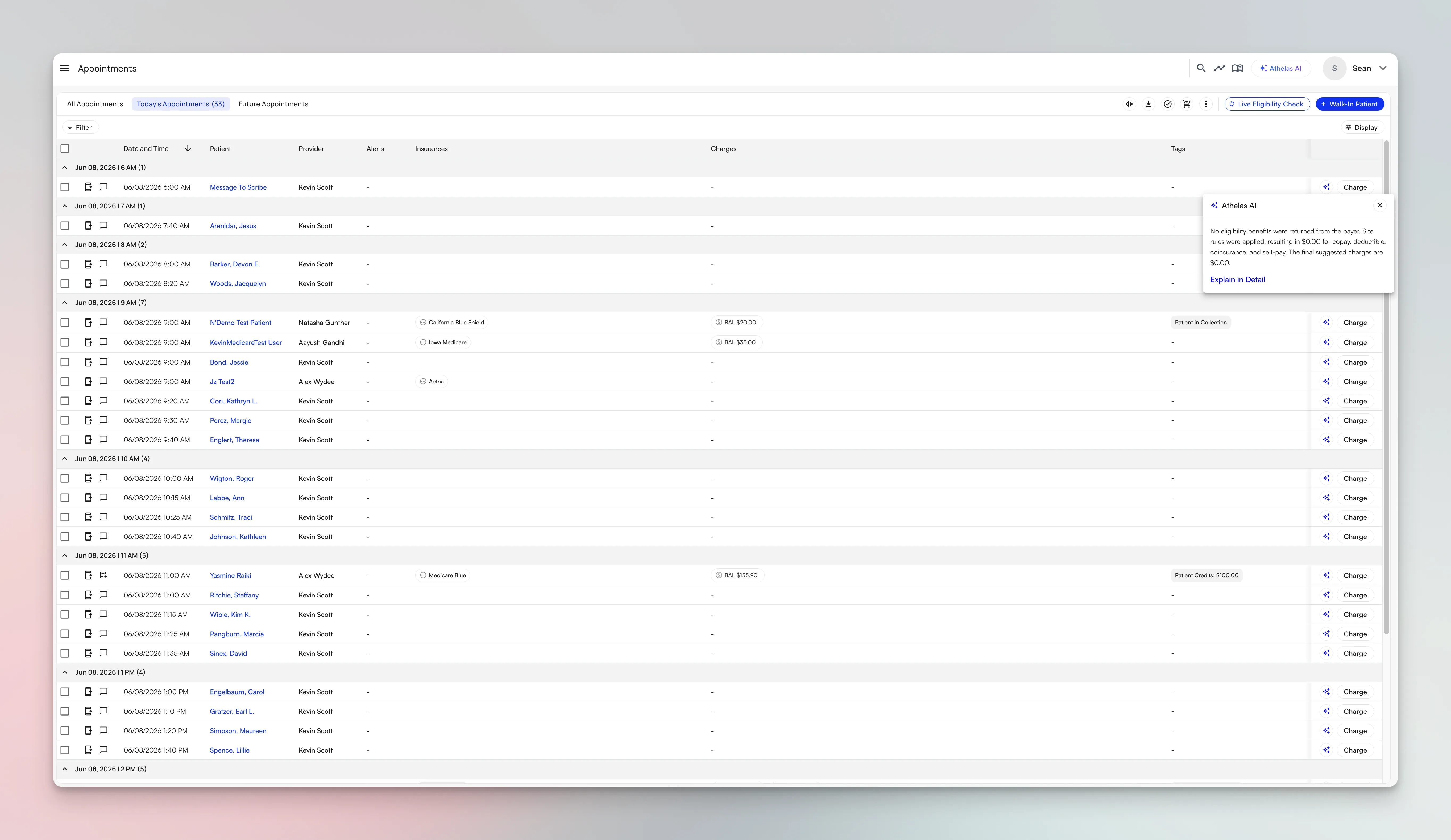
Appointments Page Available to All Users
Claims Page Features Available to Everyone
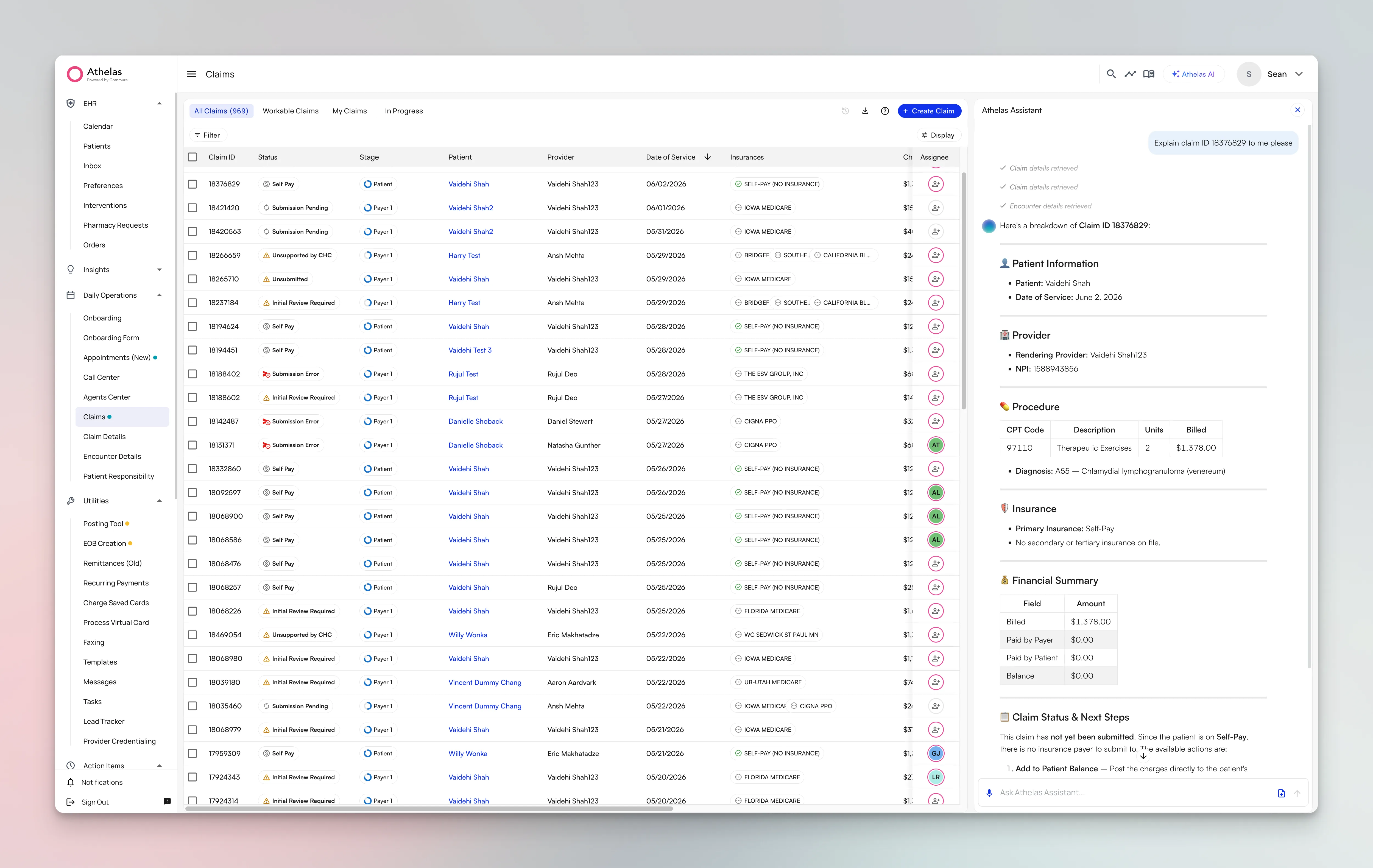
- Group-By on the claims table is now releasing to all sites. Group claims by site, insurance, week, month, and more, with right-click context menus and column-level sorting.
- Claim Context is now in production. The side panel brings Payments, Submissions, and Remittances together, with procedure-level payment breakdowns and AI-powered submission comparison.
- The comprehensive activity feed is now rolling out to all customers, giving every claim a complete audit trail of submissions, remittances, reconciliations, ERAs, appeals, patient responsibility, and assignee changes.
- Bulk Actions continue to expand, with Athelas Assistant now helping you navigate more ambiguous bulk actions across large sets of claims.
More Claims Page Improvements
- Clearinghouse status updates: See provisional claim status updates from clearinghouses directly on the Claims Page, available as both individual and bulk actions.
- Provider-level adjustments in the posting tool: Apply adjustments at the provider level while you post.
- A more unified worklist: Legacy billing pages are being folded into the Claims Page, so more of your work happens in one place.
Patient Profile Rollout
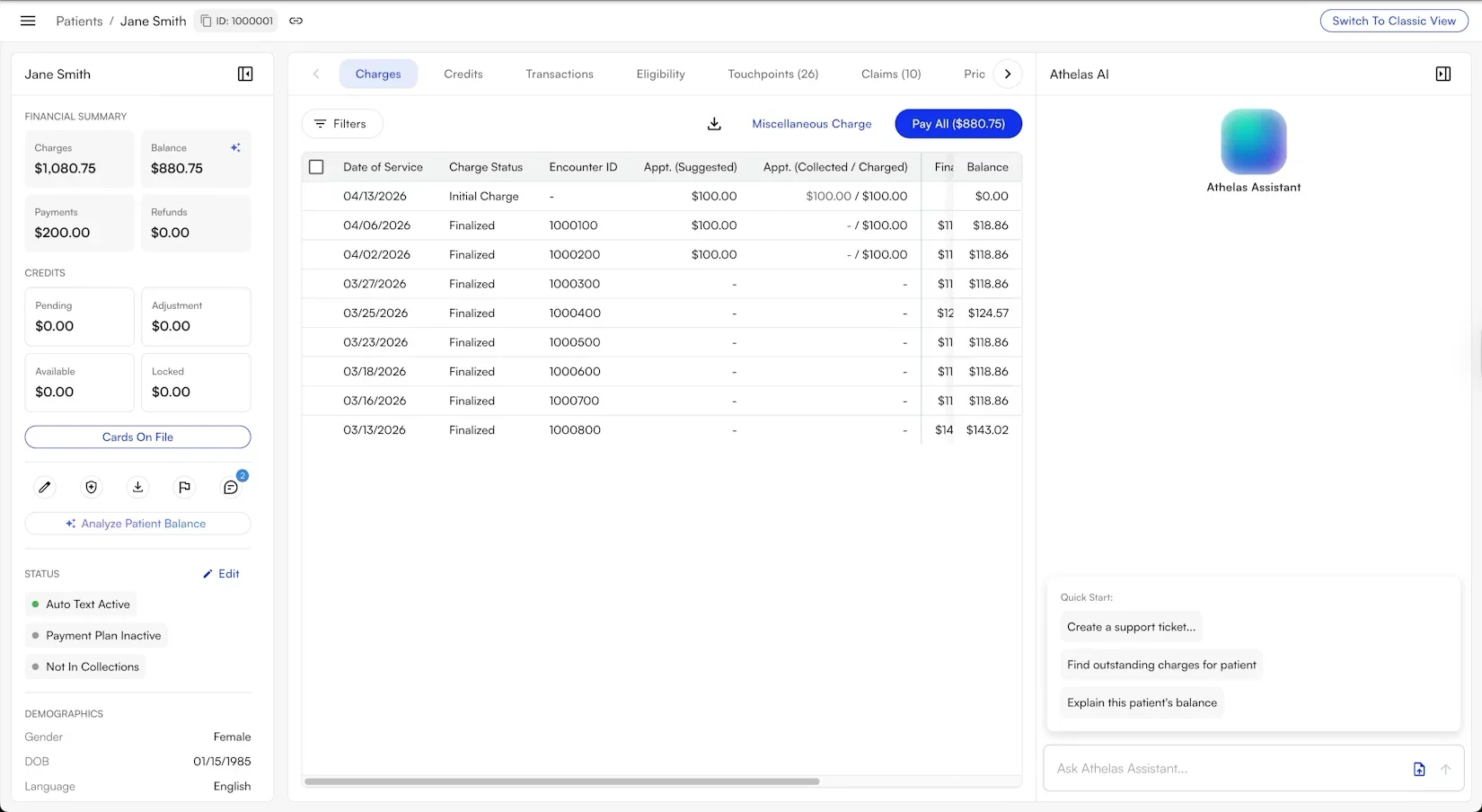
The new Patient Profile continues to roll out to more sites, giving billing teams one place to understand a patient’s balance, charges, transactions, and credits, with Athelas AI on hand to explain patient responsibility.Bug Fixes and Improvements
Claims:- Group-by views, claim context, and the activity feed received polish as they expanded to more sites
- Continued reliability improvements so fewer claims get stuck on resolvable errors
- Provider-level adjustments and additional refinements to the posting workflow
Air
[Beta Users Only] Flowsheets V2 Expands to More Clinics
Following its initial pilot, the rebuilt flowsheet experience is now rolling out to more clinics. This update adds customizable carry-forward behavior so each visit starts from the right baseline, support for credential modifiers such as KX and PTA/OTA so billing reflects who delivered care, and the ability for the AI Scribe to apply CPT codes directly to flowsheets, cutting down the manual work of coding each treatment.Site and Facility Branding Available to All Users
White-label branding is now available to all practices. Your logos and facility- or site-specific preferred names appear across every patient-facing touchpoint, including branded email, text messages, and the patient portal, so patients always see your practice’s brand instead of a generic one. Multi-location practices can tailor branding for each facility.Online Scheduling Improvements
Online scheduling keeps getting better for patients and front-desk teams alike. Patients can now see available times for single-appointment booking, providers they have previously seen are tagged in the provider list to make rebooking easier, and practices can configure whether patients are allowed to book appointments or update their insurance directly from the portal.Collections Alerts Now Live
Pop-ups now appear during scheduling and check-in when a patient has been sent to collections. Surfacing this at the moment staff are already working with the patient makes it easy to address an outstanding balance before the visit, instead of chasing it down with a separate follow-up.Multi-Site Access from a Single Account
Staff and providers who work across more than one location no longer need a separate login for each site. A single account can now access multiple sites, so you can search for patients, view the schedule, open chart notes, and manage prior authorizations across all of your locations without logging in and out.Prior Authorization Improvements
Managing prior authorizations is faster. The pre-certification dropdown now lets you filter by archived or active status so expired authorizations stay out of your way, and credential-group insurance search surfaces more results at once, making it quicker to find and attach the right authorization.[Beta Users Only] Patient Portal Authorized Representative Access
Caregivers and authorized representatives can now access the patient portal on a patient’s behalf, each with their own sign-in and notifications. This helps parents, guardians, and care partners stay on top of a patient’s appointments, forms, and records, and supports ONC requirements for proxy access.Bug Fixes and Improvements
Chart Notes:- Institutional (UB-04) chart note submission unblocked for applicable sites
- Flowsheet carry-forward and credential-modifier fixes for more accurate documentation
- Calendar eligibility status now refreshes correctly after a re-run
- Faxes can be split into multiple separate faxes, with custom coversheet support on the way
Air
[Beta Users Only] Clinical Document Exchange
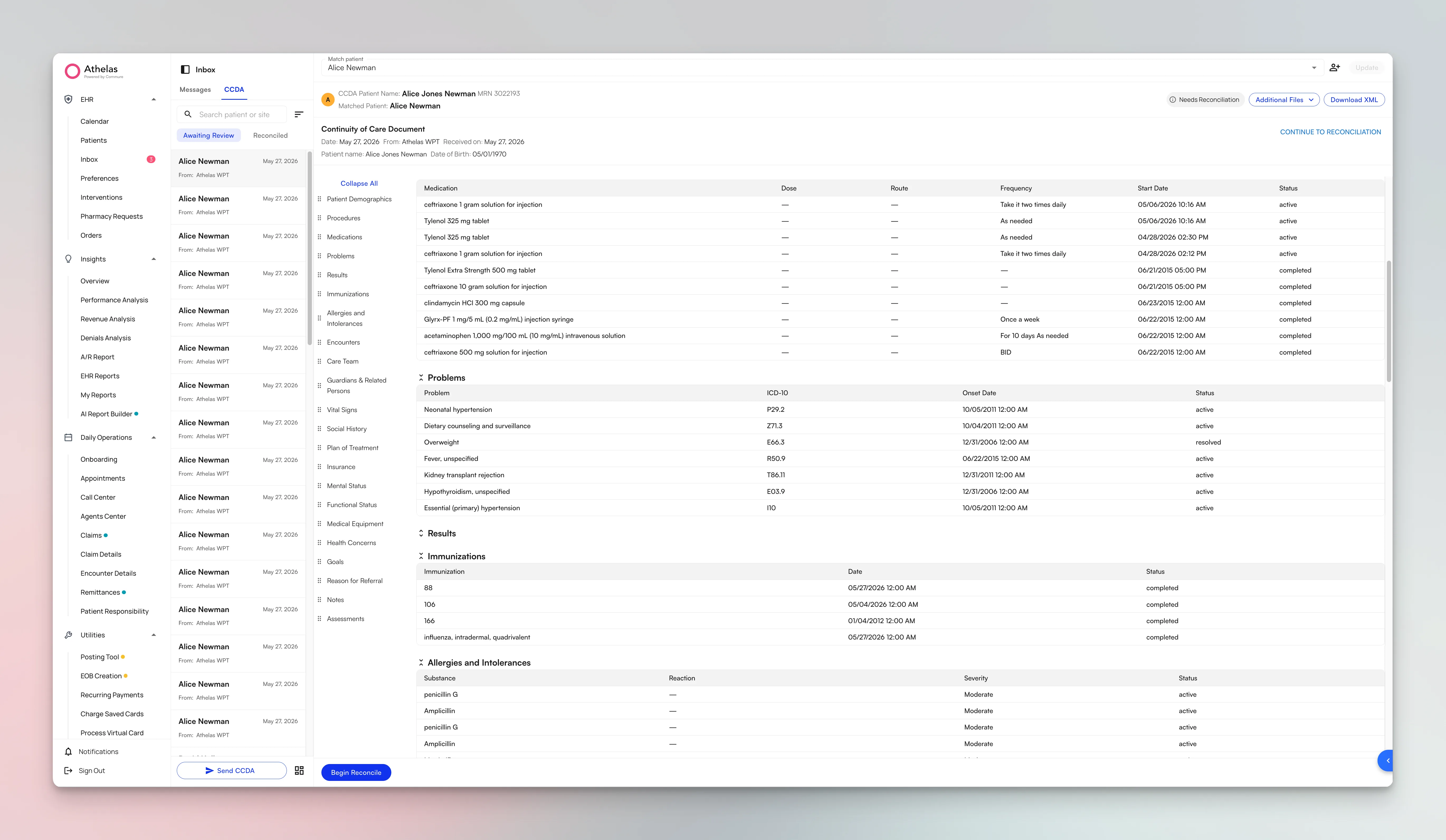
[Beta Users Only] Flowsheets V2
We have rebuilt the flowsheet experience to make documenting treatment faster and more accurate. You can add, update, reorder, and remove interventions and CPT codes within a procedure, and use the “Mark All as Done” shortcut at the treatment header to close out a visit in one click. The AI Scribe can populate flowsheets for you from the visit, and you can import interventions from a previous visit, including across cases, so recurring treatment plans take seconds to carry forward.Plan of Care Tracker Improvements
Configurable EHR Alerts
Practices can now build their own in-app alert rules with custom conditions. Matching alerts appear as banners directly inside the chart note, so clinicians get the right prompts, such as a missing piece of documentation or a care gap, at exactly the moment they are charting, without relying on outside checklists or reminders.[Beta Users Only] Site and Facility Branding
A new branding engine lets practices white-label their patient-facing communications. Logos and facility- or site-specific preferred names now flow through email, text messages, and the patient portal, so patients consistently see your practice’s brand rather than a generic one across every interaction.Online Scheduling Improvements
Online scheduling now shares the same availability engine as the rest of the calendar, so the times patients see always match what is truly open. Practices also get provider and facility visibility settings to control exactly who appears for booking, and patients move through a rebuilt, simpler sign-up flow.Collections Alerts at Scheduling and Check-In
When a patient has been sent to collections, a banner now surfaces during scheduling and check-in so staff can address the balance before the visit rather than after. Check-in will also prompt for a policyholder address when the patient’s own address is missing, keeping records complete for billing.Faxing Improvements
Faxing is more organized and reliable. You can assign a document type to fax attachments and filter the faxing page by it, reorder faxes within the create-fax drawer, and faxes sent from a chart note now carry the correct facility and provider attribution so the receiving office knows exactly where they came from.Bug Fixes and Improvements
Chart Notes:- Treatment justification and notes now appear in all chart note PDF exports
- Previous measurements now reference the prior Progress Note specifically
- Immunizations capture a structured vaccination group
- Dictation supports voice-triggered dynamic text snippets
- Create a new case directly from the appointment drawer
- Fixed an error when discharging a patient and cancelling all future appointments
- Insurance cards can now be deleted from the attachments view
- Added a “Required” toggle to single-choice questions in patient intake templates
- Outreach reminders now use the facility’s timezone, with NPS summary drill-downs and functional outcome forms available in outreach flows
- Facility addresses are hidden in the portal for telehealth-only practices
Insights
New Appointments Page
Claims Page Available to All Users
The Claims Page is now available to all users as the single, authoritative interface for managing claims end to end, bringing months of foundational work together in one place.- AI Copilot for Claims: Ask Copilot for a financial summary or procedure rollup, submit claims, run eligibility, and compare historical submissions, all from the Claims Page.
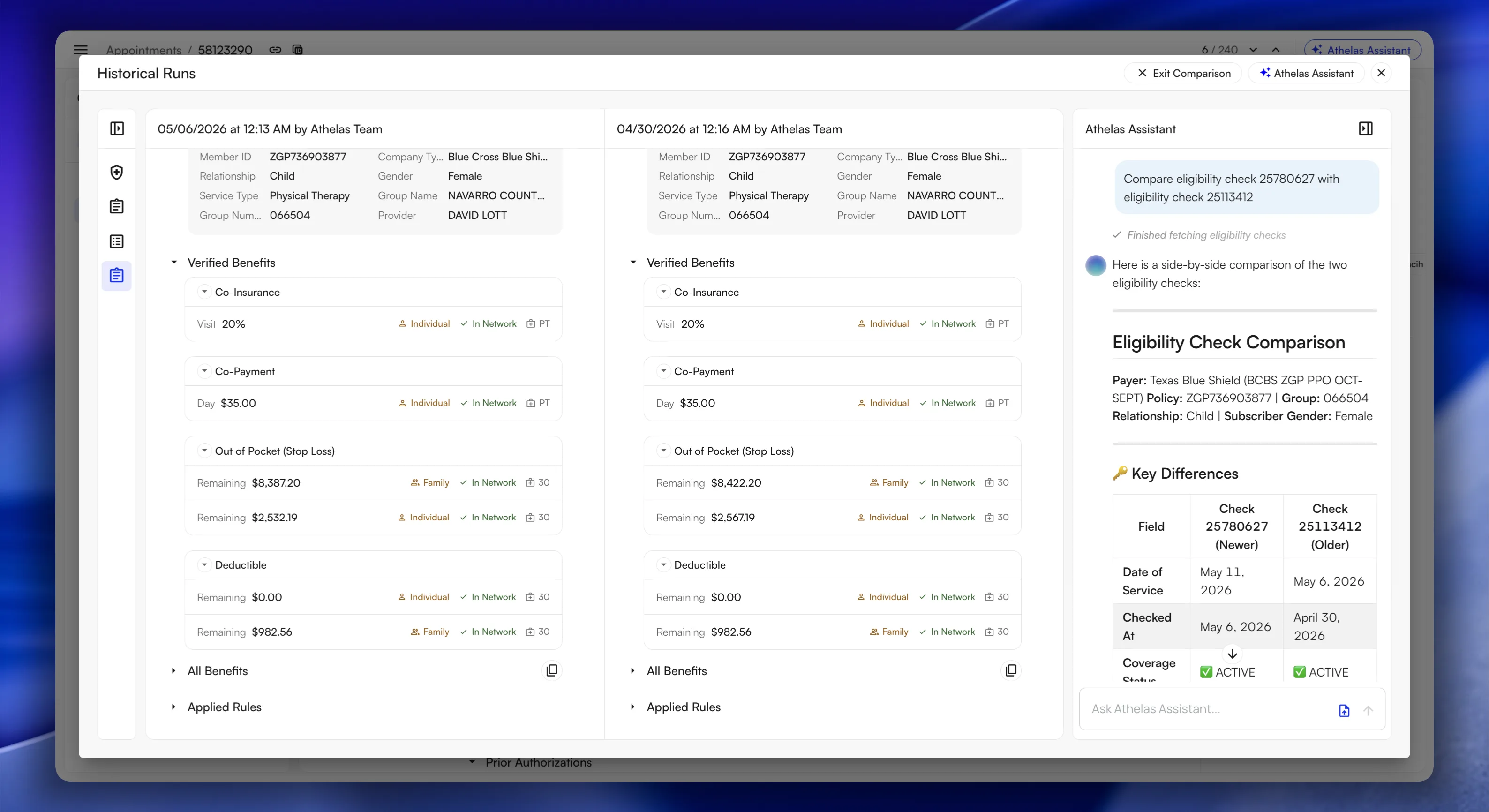
- Eligibility Check in Claims: Verify patient eligibility without leaving the claim. View and compare historical eligibility checks per payer, and modify the eligibility payload when needed.
- EHR Import Status & Sync: See when the last EHR import ran, when the next one is scheduled, and enable or disable sync per claim.
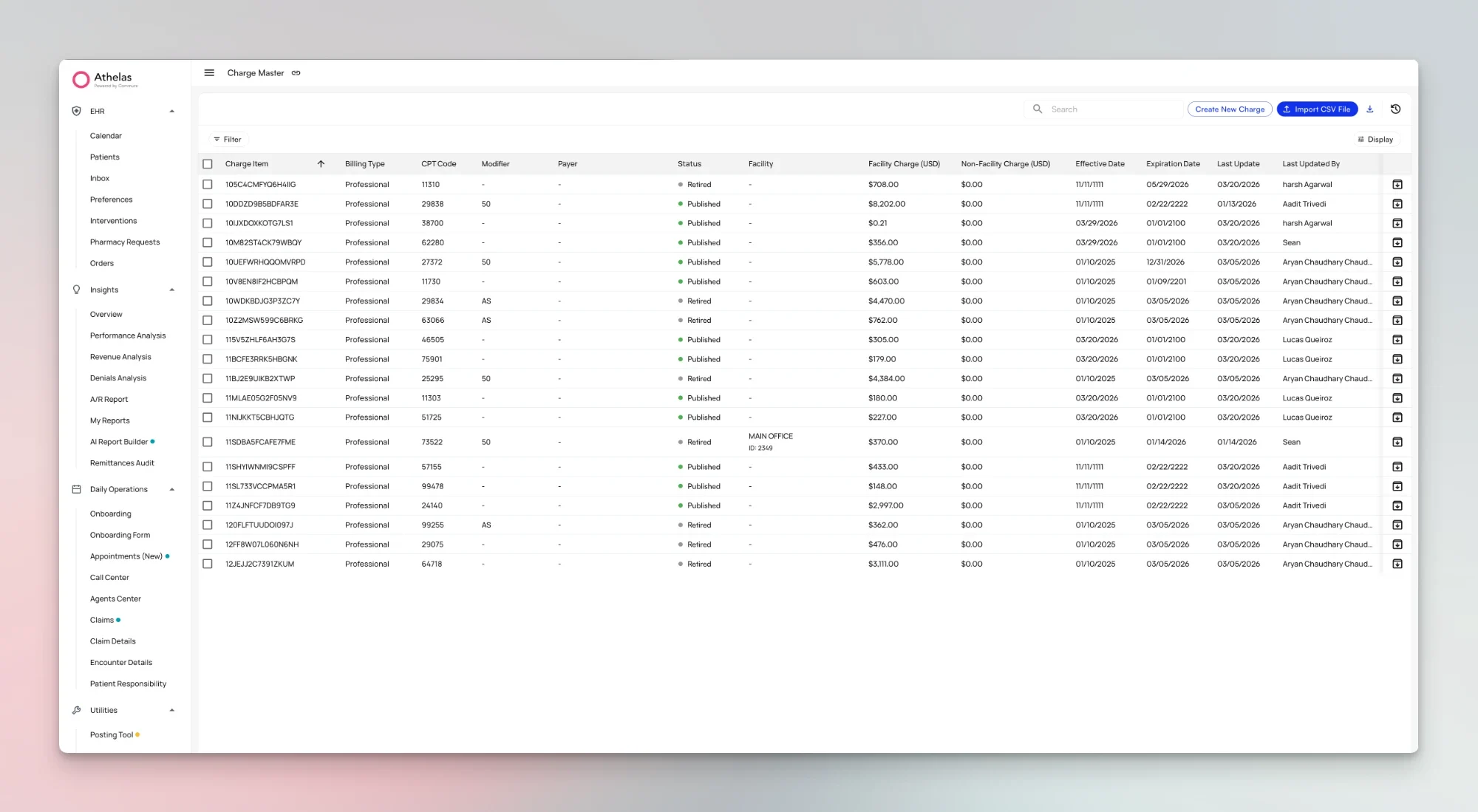
- Charge Master integration: Charges auto-populate when a procedure matches your fee schedule, with nearest-approximate suggestions when there isn’t an exact match.
- Rule-engine bypass: Manually bypass validation errors (CCI, LCD/NCD, and dental) when appropriate, so a claim is never stuck.
- UX polish: Customizable columns, claim templates, enhanced “Go to…” links, keyboard shortcuts (
CMD+/), and guided tours.
Charge Master Released to All Users
New Patient Profile
Remittances and Deposit Verification
The posting workflow received major improvements. A new remittances overview supports bulk CSV and EDI export, fuzzy deposit search, and bank account management. Posted payments now group dynamically, check-matching status filters make reconciliation faster, parent and child sites are fully supported, and ERA/EOB PDFs can be delivered directly by email.Reporting Upgrades
- Report History: Get clear visibility into past report runs and quickly spot any that failed.
- Revenue Activity Report: Now generalized for all customers, with customer-facing documentation to help you get started.
- Faster reports: The Posting Log report is roughly 50× faster, and the Claim Details Export has been optimized to run smoothly even for high-volume sites.
[Beta Users Only] Bulk Actions on Claims
Work entire sets of claims at once from the Claims Page. Bulk actions include assign, tag, comment, submit and resubmit, update insurance, update providers, update intent-to-bill and prior auth, write off, and push to next payer, all with undo support.[Beta Users Only] More Claims Page Tools
Several additions make the Claims Page even more powerful for beta users:- Group-By views: Group the claims table by site, insurance, week, month, and more, with right-click context menus and column-level sorting.
- Create Claim: Create claims directly on the Claims Page, from filters, from a previous claim, or using claim templates.
- Claim Context panel: A side panel that brings Payments, Submissions, and Remittances together, with procedure-level payment breakdowns and AI-powered submission comparison.
- Comprehensive activity feed: A complete audit trail for each claim, covering submissions, remittances, reconciliations, ERAs, appeals, patient responsibility, and assignee changes.
Bug Fixes and Improvements
Claims:- Improved charge entry accuracy by validating procedures against the Charge Master before they are added to a claim
- Strengthened claim validation reliability so fewer claims get stuck on resolvable errors
- Added fuzzy deposit search and dynamic grouping of posted payments to speed up matching
- Improved support for parent and child sites throughout the posting workflow
- The eligibility parser now captures 100% of clearinghouse benefits, replacing the previous selective parsing
- Verified benefits and the rules applied to them are now shown clearly alongside each suggested charge
- Credit movements are now traceable end to end, making patient balances easier to explain
- Payment reliability improvements reduce the risk of duplicate payments
- Significant performance improvements across the Posting Log report and Claim Details Export
Air
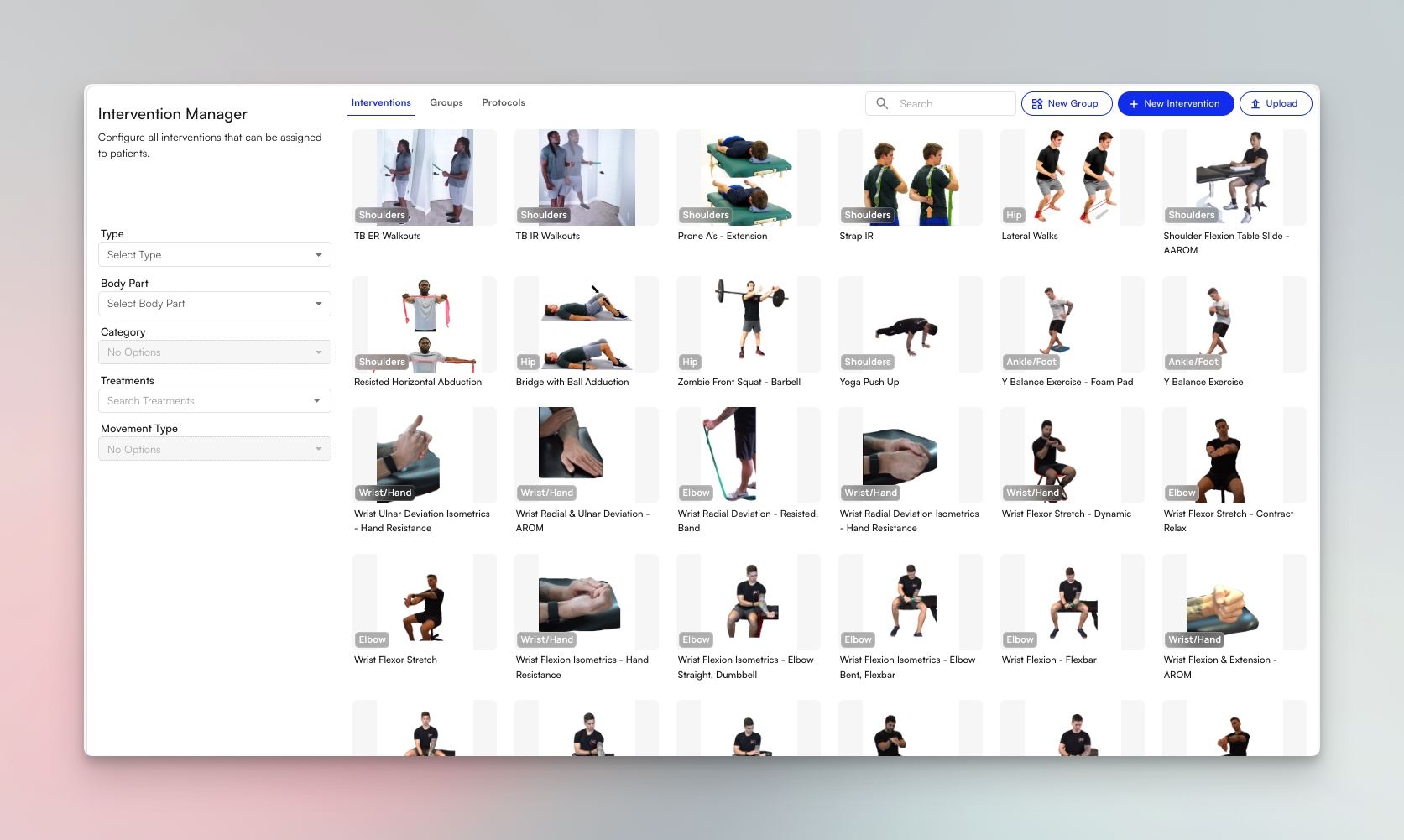
HEP Library Upgrades
[Beta Users Only] Simplified Online Scheduling Access
Updating from the patient waitlist from the last change log, patients can now schedule appointments and join the waitlist without needing to create a patient portal account. The new Name + Date of Birth access model lets patients book directly from your practice’s scheduling page, making it easier for new and returning patients to get on the calendar without front desk assistance.Practices can display their site name on the scheduling landing page, and appointment notes are now supported so patients can provide context when booking online.[Beta Users Only] Plan of Care Tracker
[Beta Users Only] Post-Visit Outreach and NPS Surveys
Automated NPS surveys can now be sent to patients after their visits to collect feedback on their care experience. The outreach flows engine has been expanded to support appointment-number-based messaging, so you can configure rules like “send a check-in message after the 3rd visit” or “trigger a satisfaction survey after the 10th appointment.”Message variables for appointment context are now available, and the sent messages table includes additional columns to help you track delivery and engagement.For more information, check out the Outreach Flows User Guides.[Beta Users Only] Provider-Specific Waitlist
[Beta Users Only] Order Sets (Medication Templates)
Providers can now build reusable order sets — pre-configured bundles of medications, labs, imaging, and referrals — and apply them directly within the chart note workflow. The Order Sets Manager lets you create, edit, favorite, and search order sets from a centralized view.An Import Order Set pop-over allows quick selection from within a note, and optional fields for quantity, refills, and duration give providers flexibility when applying sets with variable dosing. Imaging, labs, referrals, and DME are now available in order sets, with optional CPT codes where applicable.[Beta Users Only] Custom Face Sheets
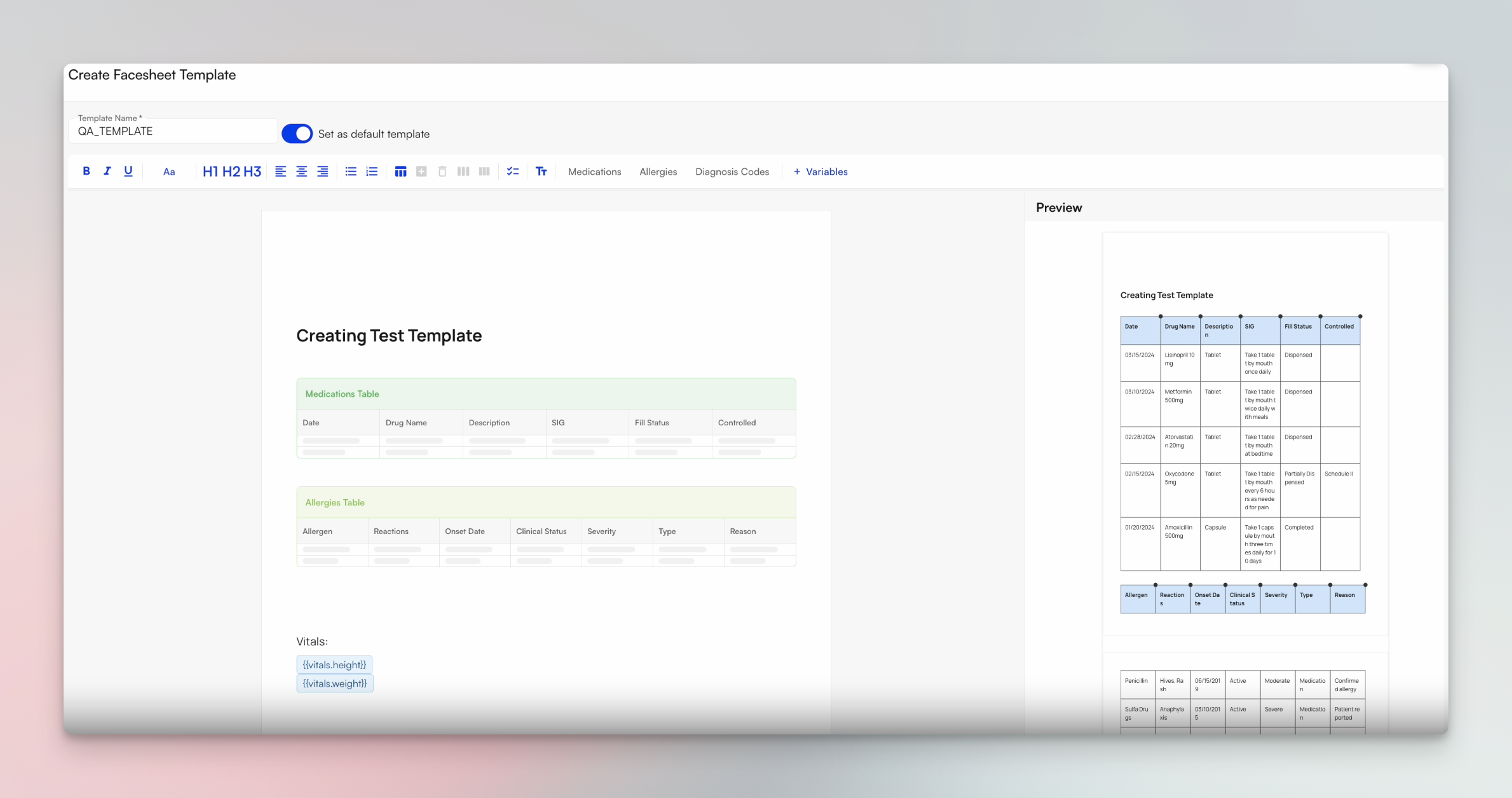
[Beta Users Only] Dynamic Text Snippets
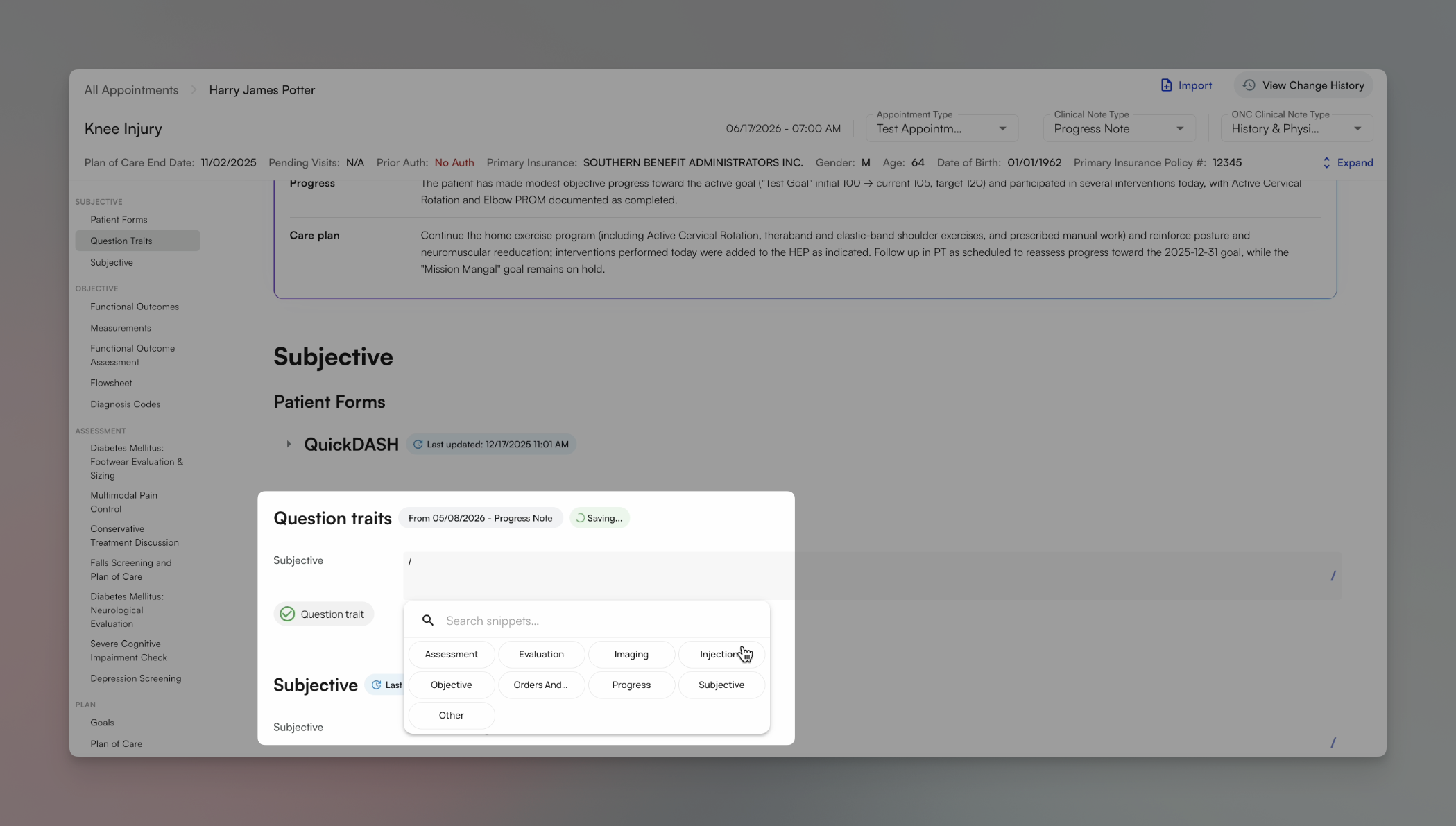
/, ., or +). Snippets support inline alternate word dropdowns, carry forward into subsequent notes, and render accurately in exported PDFs — reducing repetitive typing across high-volume documentation workflows.[Beta Users Only] Bulk Chart Note Export
Chart notes now appear automatically on the Patient Attachments page once signed, eliminating the need to manually download and re-upload individual PDFs. Staff can select chart notes alongside other attachments — imaging documents, faxes, insurance cards, and more — for bulk download or fax in one action.A per-row button on the Appointments view also lets staff manually push any specific chart note into the attachments page.Bug Fixes and Improvements
Scheduling:- Scheduling reserve blocks can now be capped by appointment type, giving practices finer control over how many patients can be booked into reserved slots
- Chart notes now automatically generate versioned PDF attachments at submission that can be downloaded, faxed, and assigned via tasking
- Providers can create configurable text shortcuts with variable dropdown options that insert structured content directly into chart note sections, reducing repetitive documentation
- Fixed a regression where chart note billing fields (minutes, units, CPT modifiers) could not be edited after unlocking a note
- Resolved an issue where chart note attachments were not being created on submission
- Fixed an issue where HEP could not be sent when a chart note was locked
- Unread patient message threads now appear in bold, and staff can manually mark conversations as unread to flag them for follow-up
- Site logos now appear on all order types, and appointment date of service and facility fax number are available as template variables in custom letters
Insights
[Generally Available] Claims Page
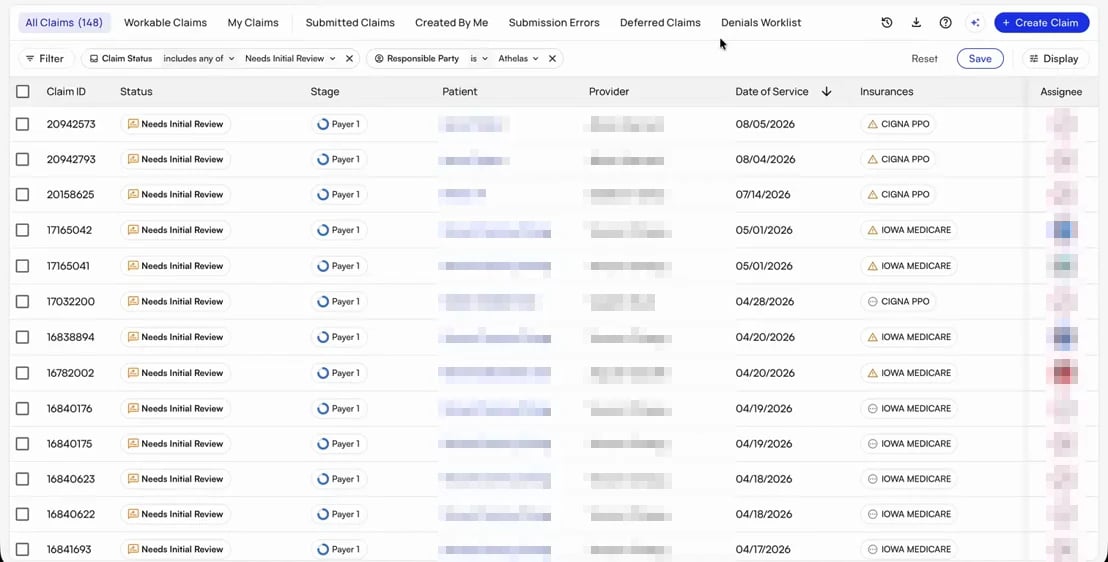
CMD + . on Mac and CTRL + . on Windows. CMD/CTRL + C also copies a link to the claim to the clipboard.To get started, check out the Claims Page guide.Appointments List Page
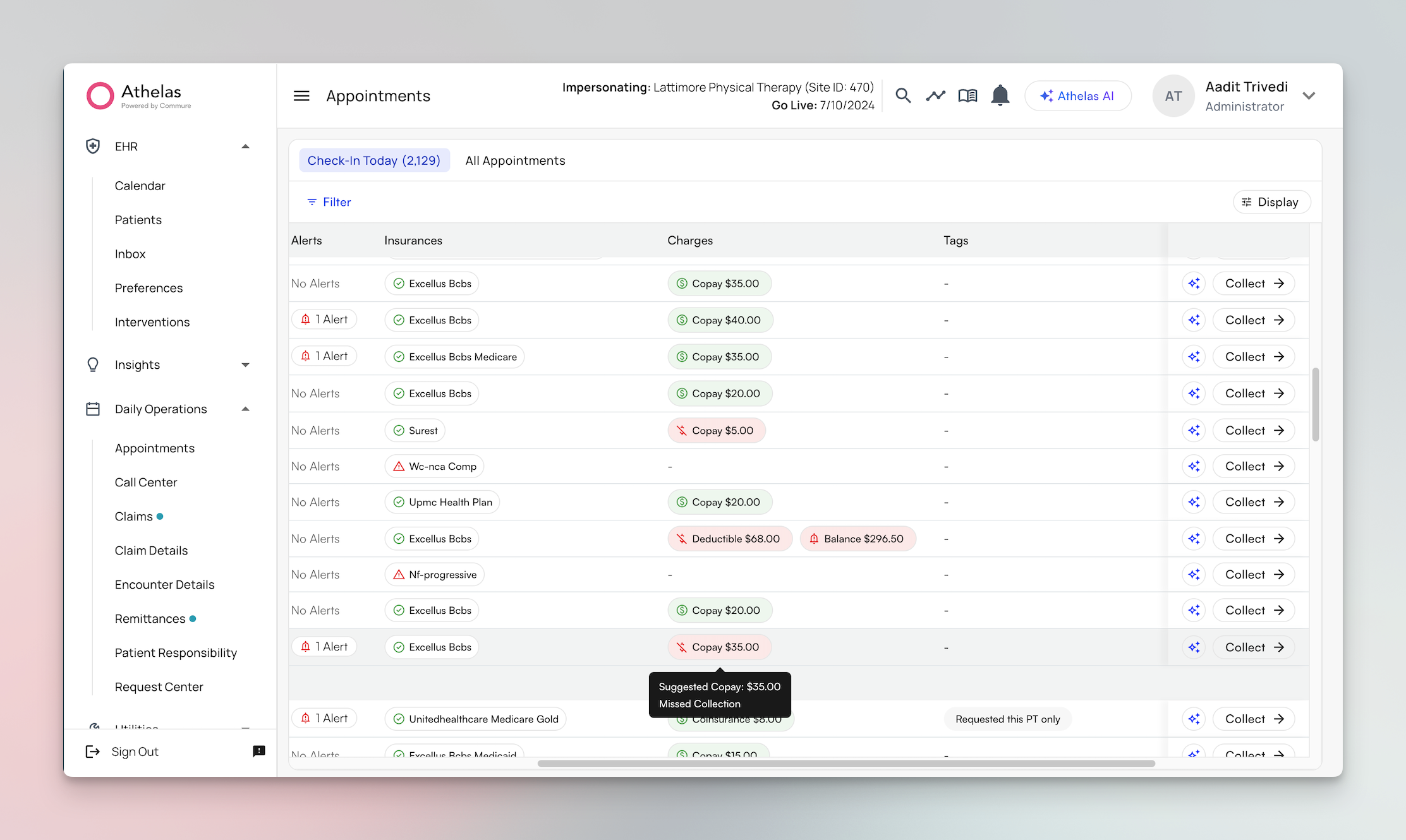
[Beta Users Only] Patient Profile Update
The redesigned Patient Profile includes an improved charges and transactions view. The layout now surfaces cancelled charges while filtering out $0 rows to reduce noise, and Charge Details have been expanded to include provider, facility, and encounter ID — each linking directly to Transaction Details.Both tables support infinite scroll, a “Who facilitated the payment” column has been added for visibility into payment history, and staff can now reverse accidentally cancelled patient responsibilities. Payment terminology throughout Copilot has also been updated to be more patient-friendly.Bug fixes and improvements
Patient Demographics:- You can now edit all patient demographic information including name, email, phone, address, gender, and date of birth.
- Extended report download link expiration from 12 to 24 hours, giving staff more flexibility when sharing reports
- Added inline documentation links directly within the Aging AR, UDS 9D, and Provider Line Item reports for faster reference
- Added automated alerts for payment plan failure rates, surfacing issues proactively before they impact collections
- Fixed an issue where eligibility checks were overwriting a patient’s date of birth on the Appointments page, causing incorrect demographic data to display
- Fixed a bug where the “Other Payer Exists” eligibility condition wasn’t evaluating correctly in all scenarios, causing pre-visit rules to apply incorrectly
Insights
Claims Page
We’ve shipped a number of updates to the Claims Page this month, here’s everything that’s new:Downloading All Claims
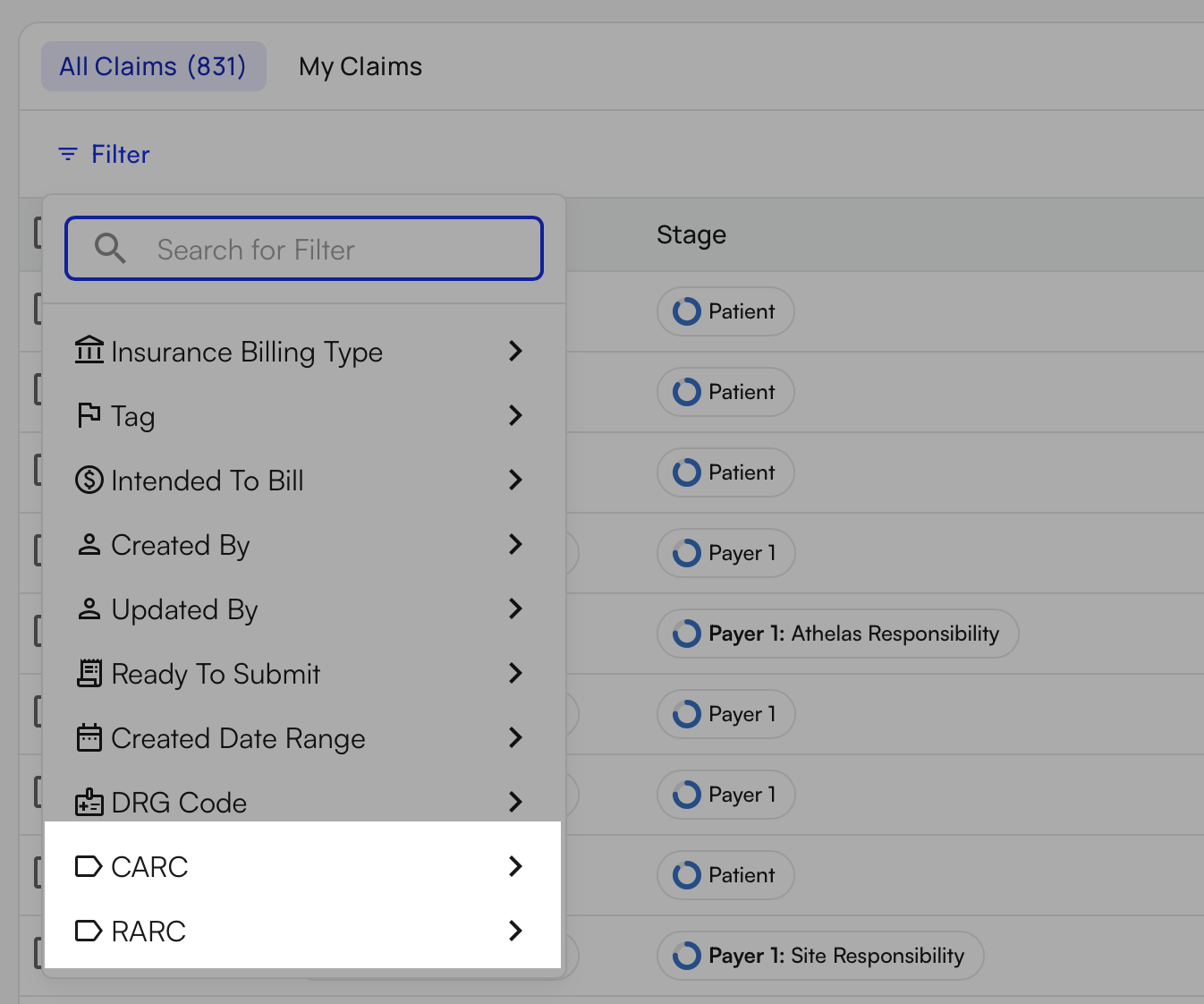
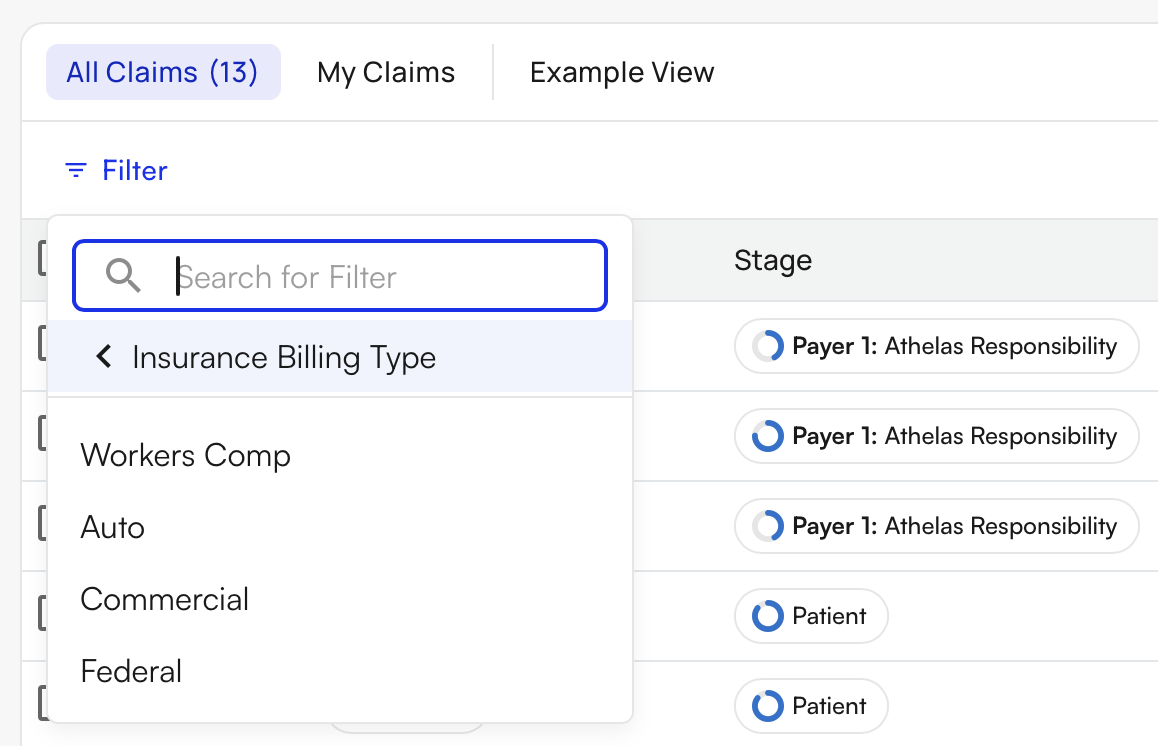
Insurance Billing Type filter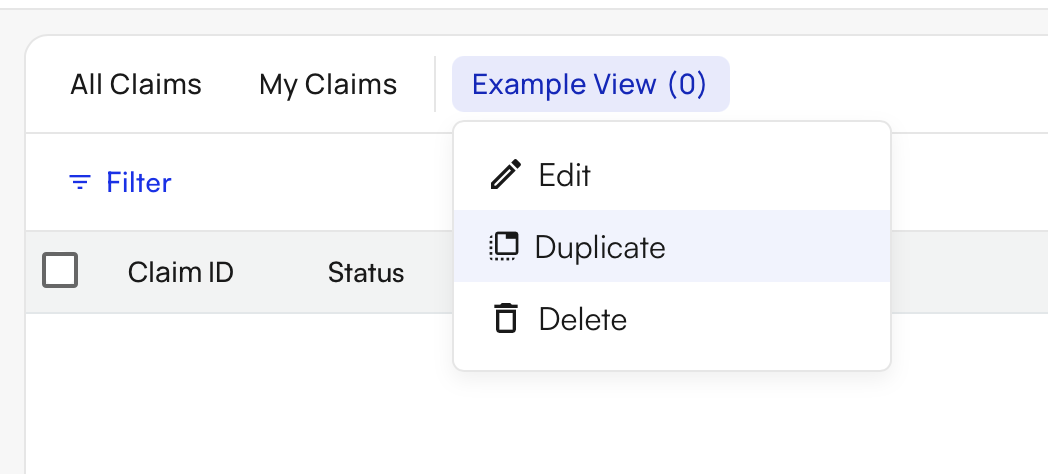
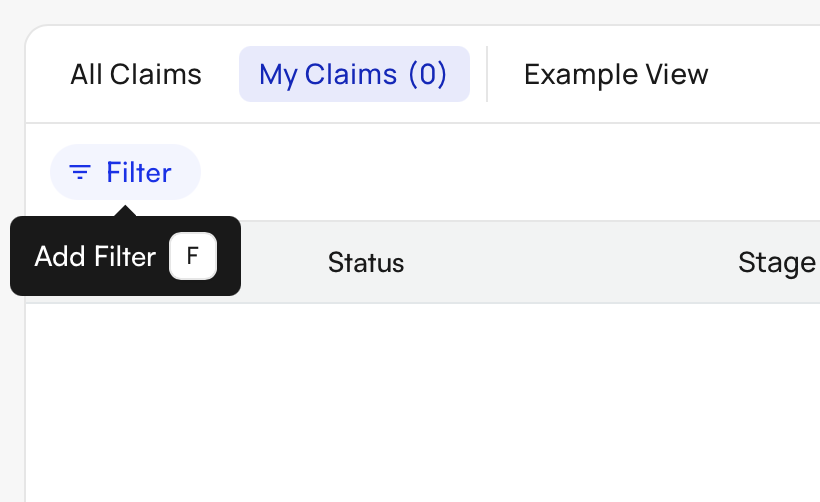
F key- Added an additional filter for Submission ID (referred to as Claim ID on the Denials Worklist and Rejections)
- Updated the logic of the Charges column to align with the Claim Charge Amount inside the claim itself for consistency
- Reduced the number of clicks it takes to save a custom view
- Parent/child sites now have the ability to assign claims to parent/child users
- Improved load times when filtering by insurance
Editing a Claim
- Updated Athelas Assistant to now support:
- Resubmission and submission
- Fetching the claim’s financial summary
- Updating patient and claim information
- Reviewing the claim against CCI and billing rules
- And more

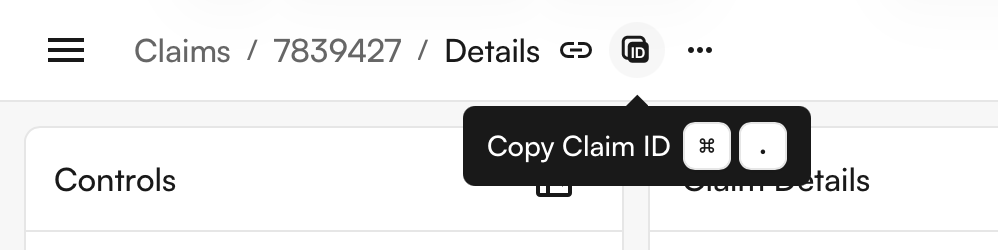
CTRL + . (CMD + . on Mac)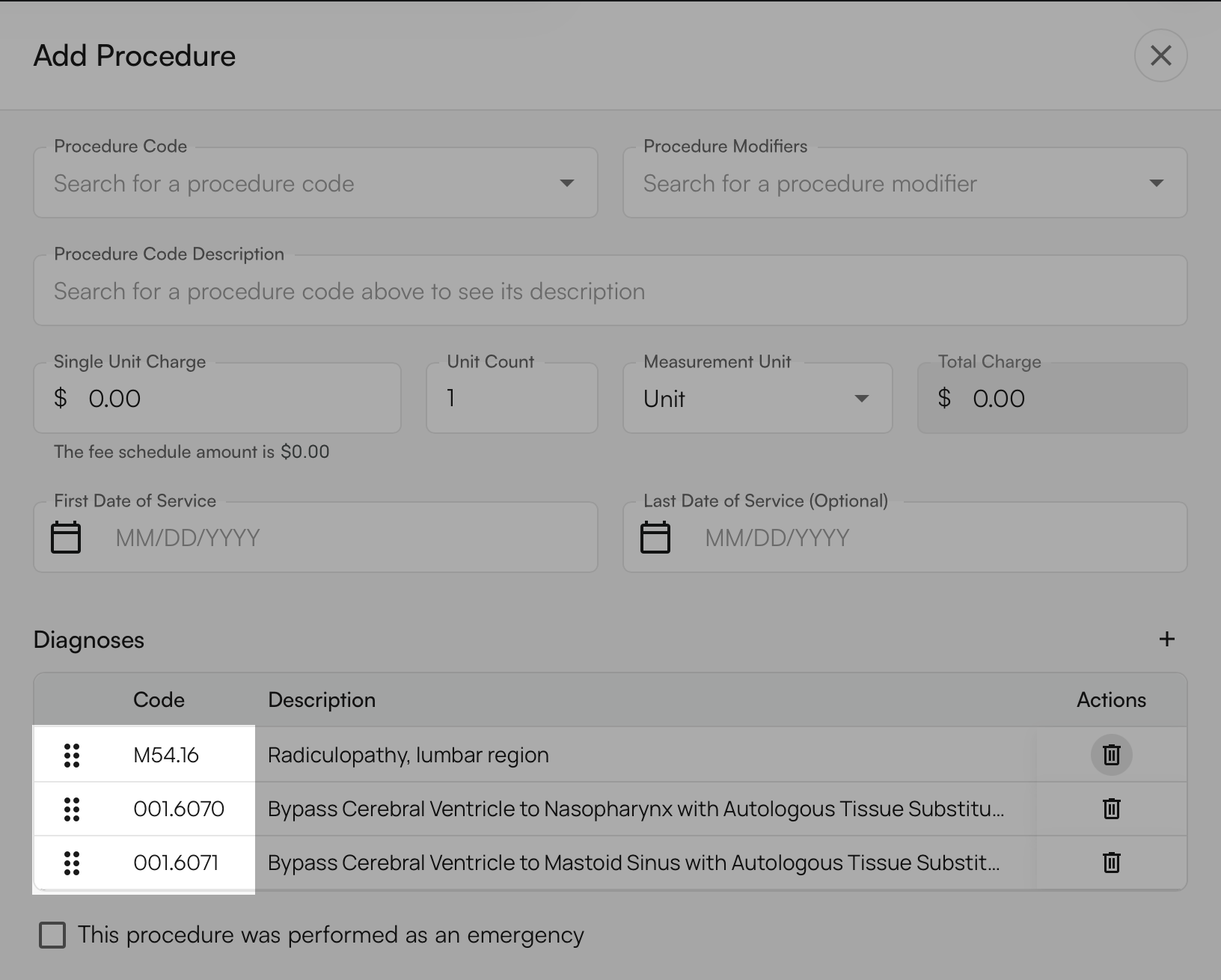
- Updated the main button on the Claim edit screen to say
Resubmitinstead ofSubmitif a submission already exists - For sites using a charge master, you can now see the Charge Item in the Procedures table in its own column without clicking into the procedure
- Improved the assignee selection popover to be alphabetical and to filter out inactive users
- Improved the Diagnoses table by giving more space to the Description column for easier reading
- Added an error notification if a claim was imported from an external EHR with too many diagnosis codes
- Fixed a bug where you couldn’t create a procedure after clearing all diagnosis pointers
- Improved the automatic collapsing behavior of the Properties and Controls panels on dynamic window sizes
- Fixed a bug where long comments without spaces did not wrap correctly in the Activity Feed
Institutional Claims
- Updated the logic behind the Discharge Date field to allow discharges after the claim’s end date
- Updated the flow of adding diagnosis codes to simplify the addition of POA indicators and additional diagnosis labels
- Fixed a bug where you couldn’t remove an occurrence code once added to an institutional claim
Dental Claims
- Updated dental claims to allow submission with no diagnoses
- Fixed an issue where duplicate diagnosis codes were appearing on dental claims, causing submission errors
Air
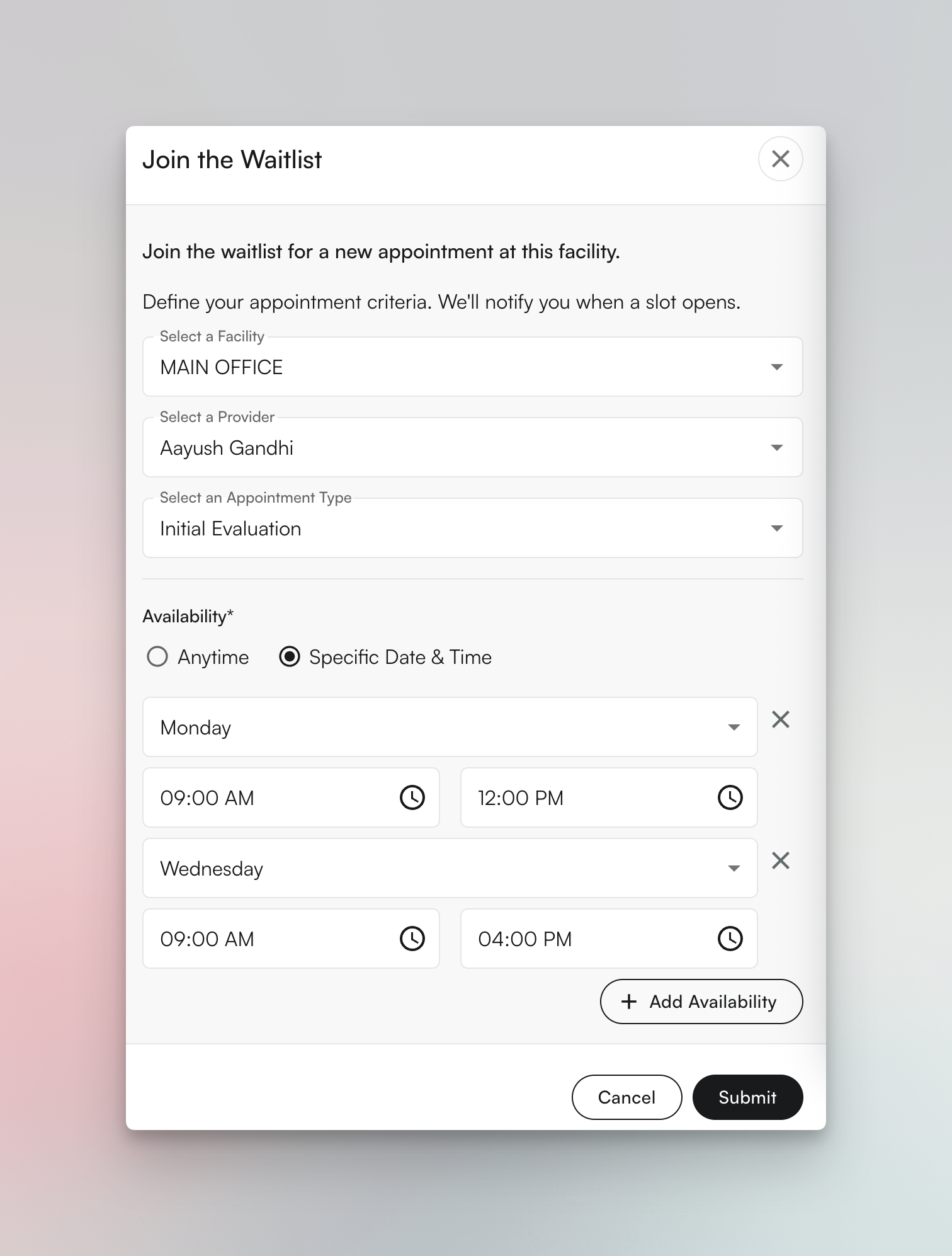
[Beta user only] Patient Waitlist
[Beta user only] Custom Orders and Letters
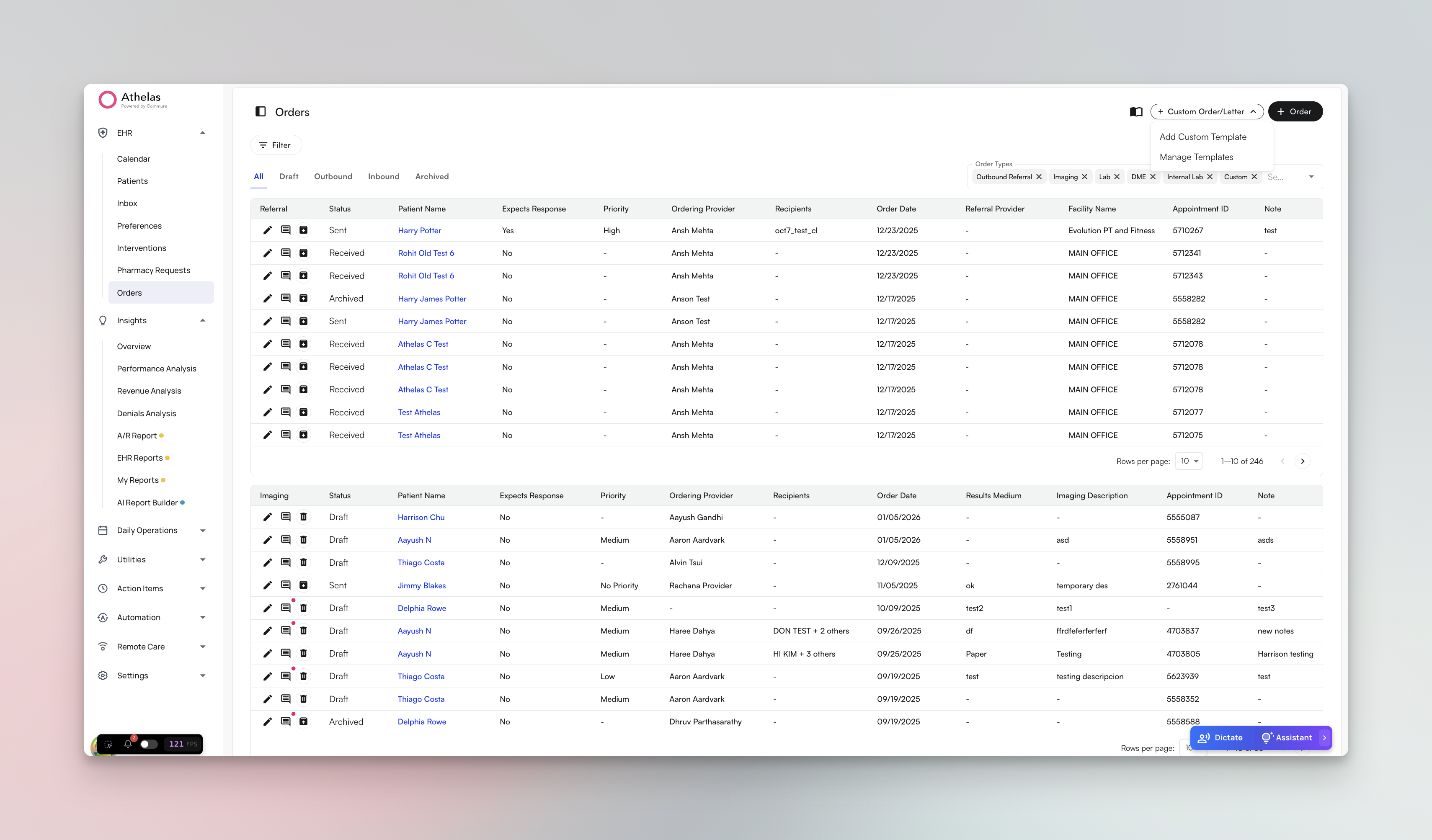
- Template builder with rich text editor supporting formatting, tables, and interactive fields
- Variable system that automatically populates patient, provider, facility, and insurance information
- Auto-fill of diagnosis codes and procedures from appointments
- Interactive fields (text inputs, text areas, diagnosis code fields) for customizing each order
- Live preview panel to see how templates will appear when printed or sent
- Draft saving to continue editing orders later
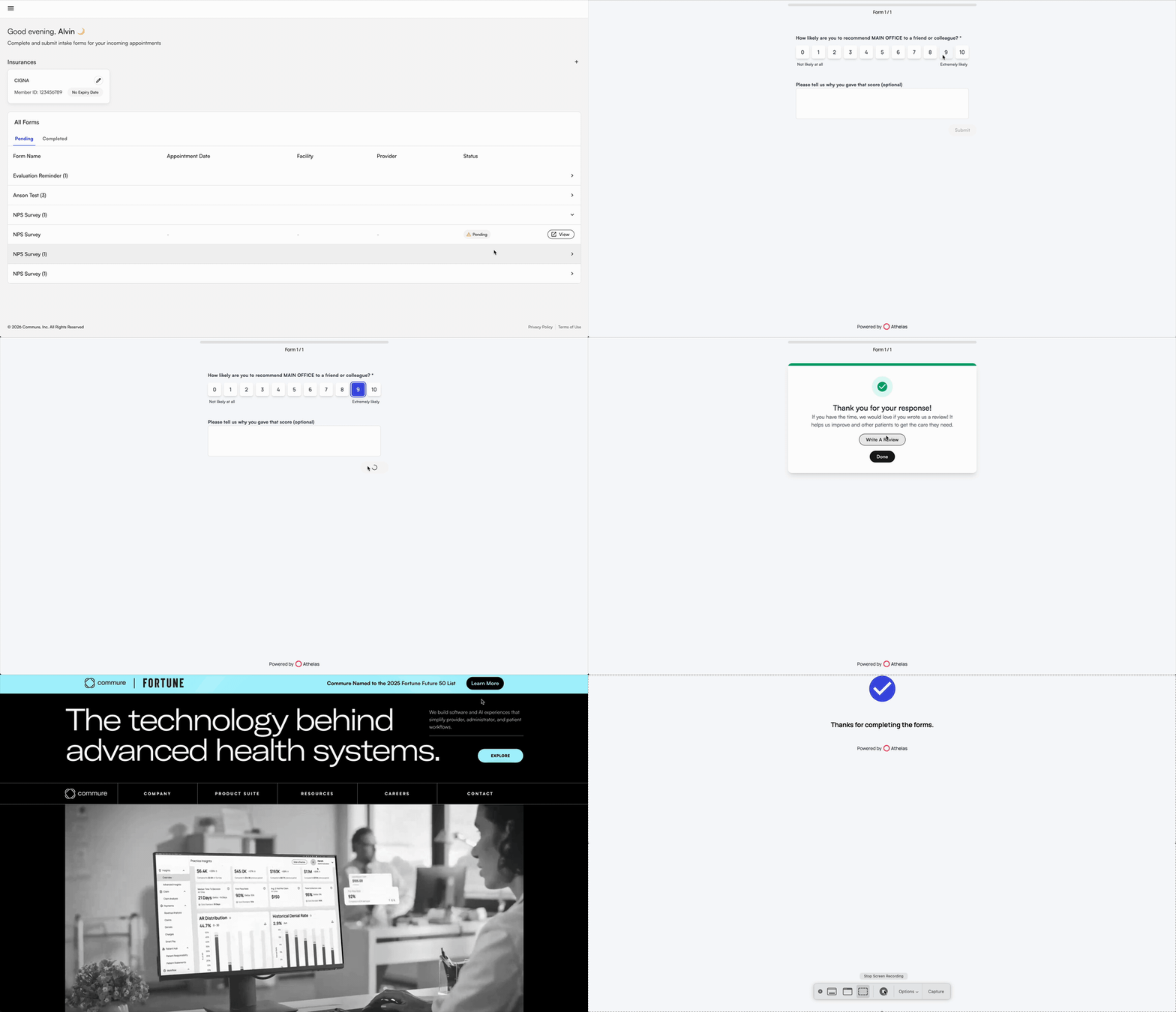
[Beta user only] NPS Survey for post-visit feedback
Bug fixes and improvements
Appointments & Scheduling:- Fixed an issue where waitlist pop-up messages didn’t display the patient’s name, making it unclear which patient was being offered an appointment
- Fixed a problem where external appointment type IDs were missing, causing scheduling errors when booking appointments through the patient portal
- Resolved multiple quality measure alerting issues affecting BMI screening, depression screening, diabetes mellitus, controlling high blood pressure, falls screening, medication documentation, and post-fracture communication, ensuring alerts now appear consistently in chart notes for proper patient care tracking
- Completed migration for Time In/Out storage in chart notes to support Medicare compliance requirements for documenting visit duration
- Fixed an issue where discharge notes didn’t automatically discharge the patient case upon submission, requiring manual discharge steps
- Fixed KX modifier visibility in the flowsheet, ensuring that the auto-applied KX modifier for therapy cap exceptions is properly displayed
- Implemented automatic task creation for failed fax transmissions, ensuring staff are notified when faxes don’t go through successfully
- Fixed an error where the prior authorization report was broken for a customer, preventing staff from viewing authorization statuses
- Resolved an issue where users were unable to create or save measurements in the EHR, blocking documentation of patient vitals and assessments
Insights
[Beta user only] Charge Master released to pilot customers
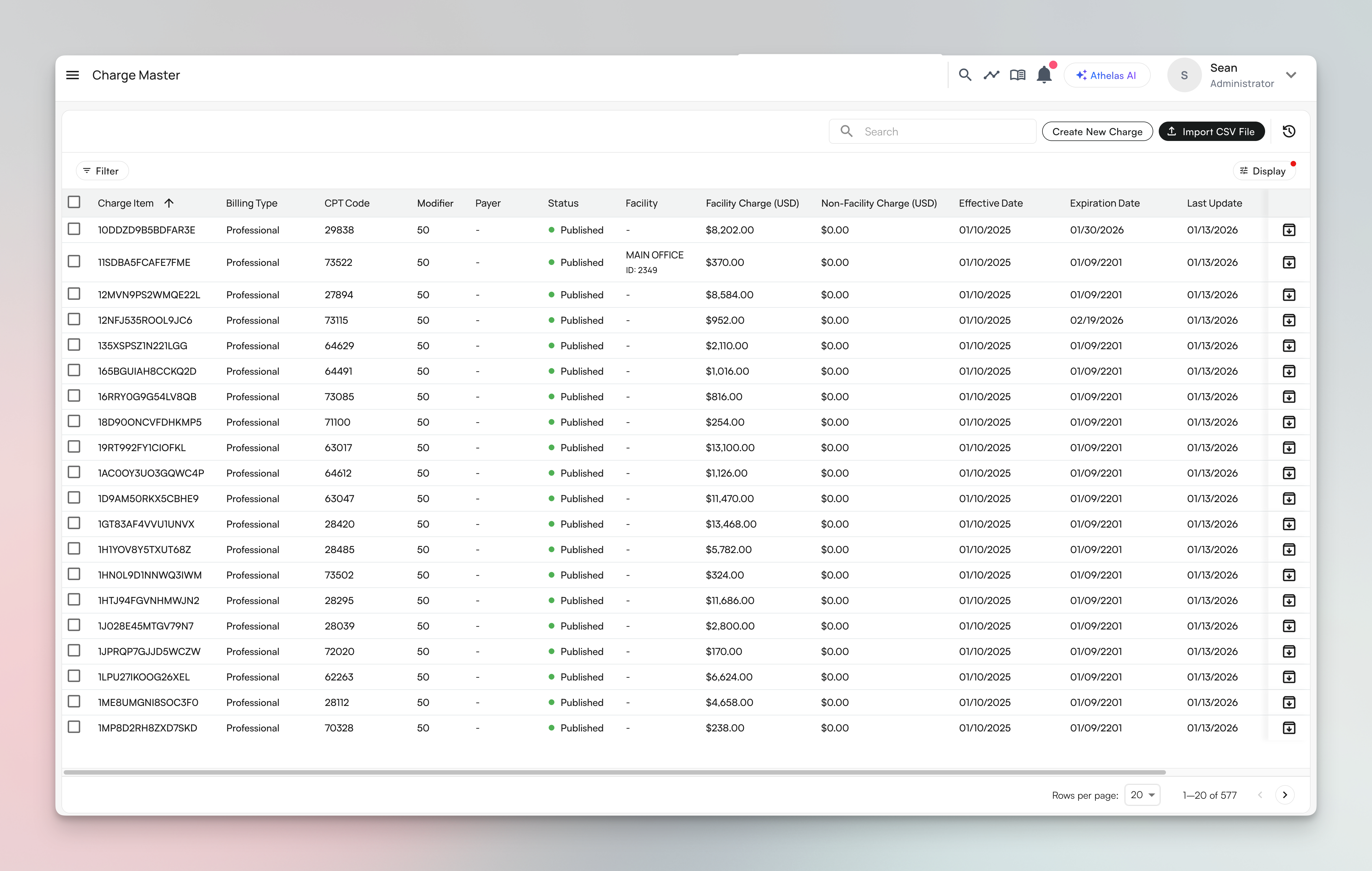
- CSV upload with intelligent column mapping and payer identification
- Manual charge master creation for individual entries
- Bulk editing and retirement of charge masters
- Copy charge masters across facilities
- Complete activity logging for audit trails
- Multiple effective dates with date range management
- NDC (National Drug Code) support
- Search across main table and activity log
[Beta user only] AI Report Builder beta release
We launched the AI Report Builder to selected external beta customers. Teams can ask questions in plain English and get instant reports backed by their data, with natural language queries, automatic SQL generation with security post-processing, patient-level security enforcement, saved reports library, CSV downloads, and quality checking system.[Beta User Only] Patient Profile redesign
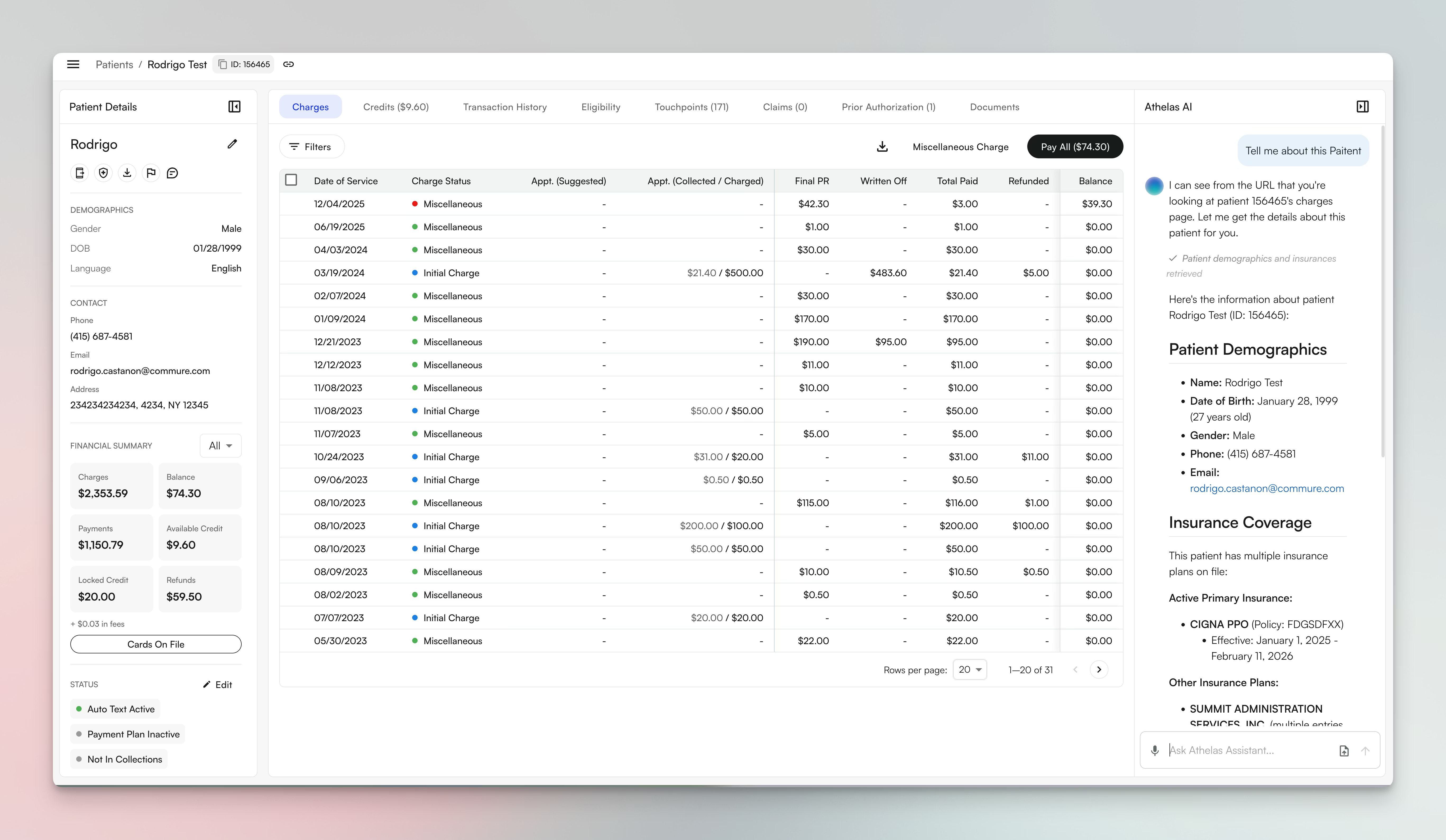
Improved eligibility infrastructure
We’ve completed major infrastructure improvements for eligibility:- Historical eligibility records table storing full payload and parsed benefits
- Site and payer-level source configuration (choose Waystar, Change Healthcare, etc.)
- Rule change detection triggering automatic eligibility updates
- Unified benefit parsing across clearinghouses
Remittances Dashboard updates
We’ve added filtering capabilities to help you analyze payment patterns. New features include deposit source filters across Waterfall, Checks, and Deposits views, provider-based deposit breakdowns showing payouts per check by rendering provider, and improved empty states.Bug fixes and improvements
Eligibility & Benefits:- Fixed an error where insurance deductibles and remaining benefits were being calculated incorrectly, causing inaccurate patient responsibility estimates
- Resolved an issue where appointment eligibility counts were displaying incorrect numbers to staff members
- Fixed eligibility timestamps to properly display in the user’s local timezone instead of UTC
- Improved eligibility parsing to better handle complex scenarios with benefits from multiple insurance carriers, reducing errors when patients have secondary coverage
- Fixed query performance issues on the appointments endpoint, making appointment pages load significantly faster
- Fixed an error where outstanding balances in end-of-day emails were being calculated incorrectly
- Corrected patient exclusion logic in daily collections reports, ensuring the right patients are included in collection metrics
- Resolved A/R Report discrepancies where Insights calculations didn’t match external reports, improving data accuracy for financial reconciliation
- Enhanced report documentation and migrated all reporting guides to our new documentation platform for easier access
- Fixed an error where diagnosis codes would fail to save properly in certain scenarios
- Resolved date range filtering issues across multiple pages, ensuring filters work consistently throughout the application
- Fixed various errors in the posting tool and encounter details pages that were preventing users from completing their workflows
- Added monitoring alerts for payment plan success rates to proactively identify and resolve issues, ensuring reliable automated payments for patients
Insights
Accounts Receivable Report dramatically faster
We’ve achieved dramatic performance improvements on the A/R Report Page through query optimization and infrastructure changes.The improvements use optimized query patterns while maintaining backwards compatibility for all calculation methods.Bug fixes and improvements
Claims & EOB:- Fixed an error where currency values were being converted incorrectly during EOB remittance posting, causing payment amounts to be wrong
- Improved claims history query performance to load significantly faster, reducing wait times for users reviewing claim timelines
- Fixed a performance issue where claim form generation was taking too long, making it 2x faster to generate claim PDFs
- Resolved an error where EOB posting would fail or time out when processing large files, now successfully handles files with 2,800+ remittances
- Fixed an issue where the denials page would not scroll properly and navigation buttons were not working correctly
- Resolved an error where users were being logged out unexpectedly when working with deposit transactions
Insights
Financially Responsible Party support
We’ve enhanced payment handling to properly support Financially Responsible Parties (FRP). This allows you to designate and manage different responsible parties for patient accounts, ensuring payments and statements go to the correct person or entity. The feature includes improved payment processing, statement routing, and balance tracking for FRP scenarios.[Beta user only] Patient Responsibility Explainability: Charges Details
We’ve released Charges Details to pilot customers, helping patients understand exactly what they owe. The new view shows detailed procedure breakdowns for each date of service, current balance and payment history, available refund amounts, and direct access to payment and refund actions. Staff can now refund payments, write off charges, cancel patient responsibility requests, and view remittance details—all from a single interface.FQHC Revenue Activity Report
For FQHC customers, we’ve built a comprehensive Revenue Activity Report showing month-over-month financial performance:- Charges, payments, and adjustments broken down by category
- Sliding fee adjustments properly categorized
- Contractual adjustments and net transfers
- Delta version showing changes versus absolute values
UDS 9D federal reporting tool
We’ve created the UDS 9D report required for FQHC federal reporting submissions. The report properly splits charges across payers, handles bad debt and sliding fees according to federal guidelines, and excludes specific code ranges per UDS requirements.Bug fixes and improvements
Payments & Refunds:- Fixed an error where credit card refunds were failing to process correctly, preventing staff from completing refund transactions
- Resolved an issue where subscription balances were calculating incorrectly, showing wrong amounts owed by patients
- Fixed an error that prevented staff from canceling patient responsibility requests when needed
- Fixed a timing issue where verification codes were expiring too quickly, blocking patients from completing online payments
- Resolved workflow errors that were preventing patients from successfully completing the check-in process
Air
E-prescribing with controlled substances
We completed DEA certification for controlled substance prescribing through the Drummond Group.You can now prescribe both controlled and non-controlled substances directly from the EHR with secure identity verification through ID.me. The system tracks prescription status, refills, and pharmacy submissions automatically.Scribe integration with redesigned EHR
The AI Scribe now works seamlessly with the redesigned EHR and dynamic template system. Notes generated by Scribe automatically populate the correct template sections, saving providers time on documentation. Existing customers can now migrate to the new EHR design with full Scribe functionality.Insights
Stripe Separate Charges & Transfers migration
We’ve migrated customers to Stripe’s Separate Charges & Transfers (SC&T) infrastructure, providing better payment handling and financial controls:- Customer mapping for customers with Stripe accounts per facility or provider
- Auto-retry mechanism for failed transfers
- Race condition fixes when creating or reversing transfers
- Manual transfer capability for advanced payment scenarios
- Improved payout tracking in ledgers
Patient workflow improvements
We’ve enhanced patient workflows and intake forms with better validation and reliability:- Improved validation error messages for patient intake forms
- Better network error handling and display
- Fixed form ordering alignment issues
- Enhanced patient update template submissions
Suggested charges automatically stay in sync
We rebuilt the suggested charges infrastructure to use event-driven architecture instead of queue-based processing. Now when eligibility changes, suggested charges update automatically through listeners rather than waiting in a queue.This resolves the slow-draining queue issue from early October and ensures patients always see the most current cost estimates based on their latest eligibility information.Report performance optimizations
We’ve moved multiple resource-intensive operations to read replicas, reducing load on the primary database:- All KPI metrics queries
- Revenue Analysis page endpoints (now fully cached)
- Patient Breakdown queries
- Claims count queries
Bug fixes and improvements
Payments:- Fixed an error where patient account credits were being incorrectly applied to subscription balances instead of the intended charges
- Resolved timeout issues that were causing payment processing to fail, preventing patients from completing their transactions
- Fixed errors that prevented gift card payments from being processed successfully
- Resolved an issue where patients across multiple customers were not receiving their statements due to delivery failures
- Fixed a display problem where mailing addresses were showing incorrectly or incompletely on statements
- Fixed errors in the statement scheduling system that prevented statements from being sent on their scheduled dates
- Corrected calculation errors in batch history where balance amounts were displaying incorrectly
Air
Complete EHR redesign launched
We completed a major redesign of all core EHR pages with a modern, intuitive interface. The new design includes improved calendar views, streamlined patient search, cleaner demographics displays, organized attachments, and a completely rebuilt chart note system with dynamic templates.Labs ordering complete
Lab ordering is now fully integrated into the chart note. You can order labs from Quest, Pathgroup, and other vendors through HealthGorilla, with results automatically captured and displayed in the EHR. The system supports both third-party lab orders and in-house lab billing for practices with their own lab facilities.Messaging and tasking
Internal messaging allows your team to communicate within the practice, while external messaging connects directly to patients using the Interact system. The new tasking feature lets you create task lists for team members with status tracking and priority levels, including group-level task assignment.Patient Check-in and check-out
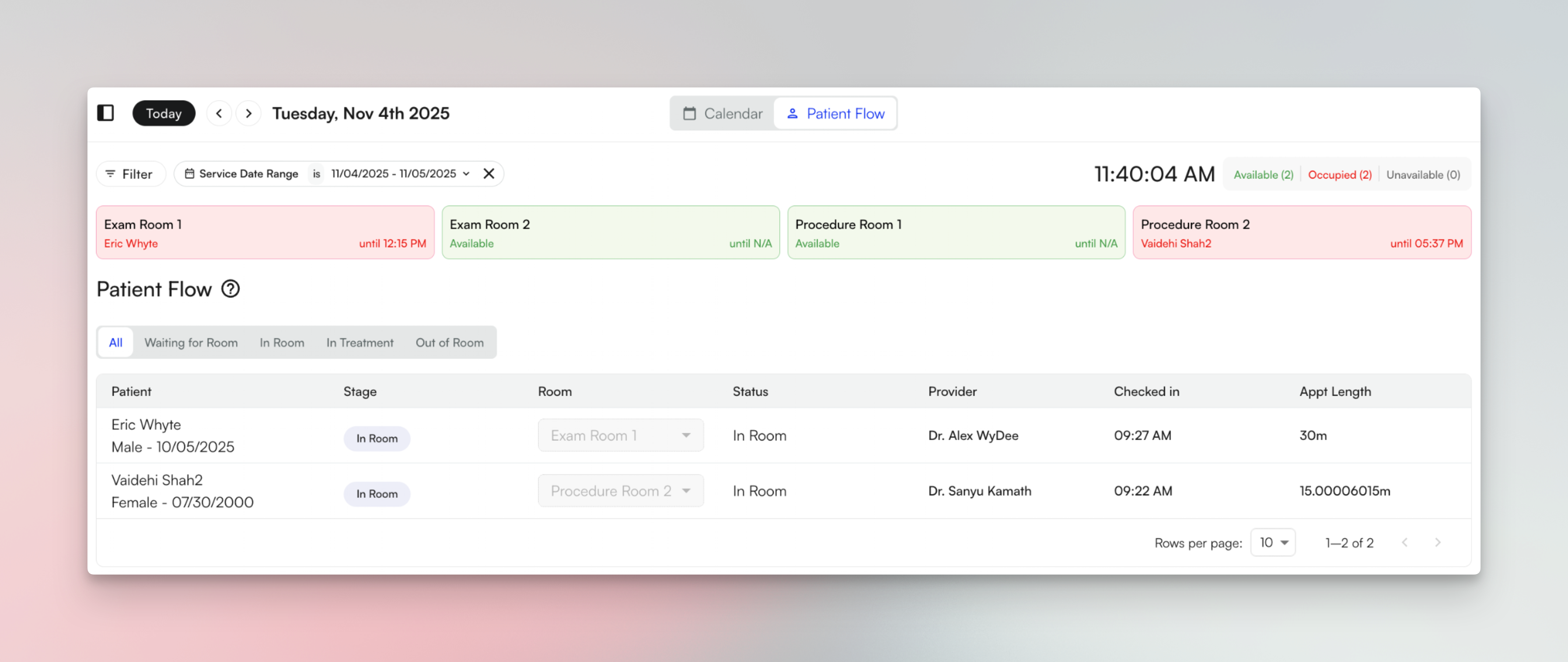
DME billing support
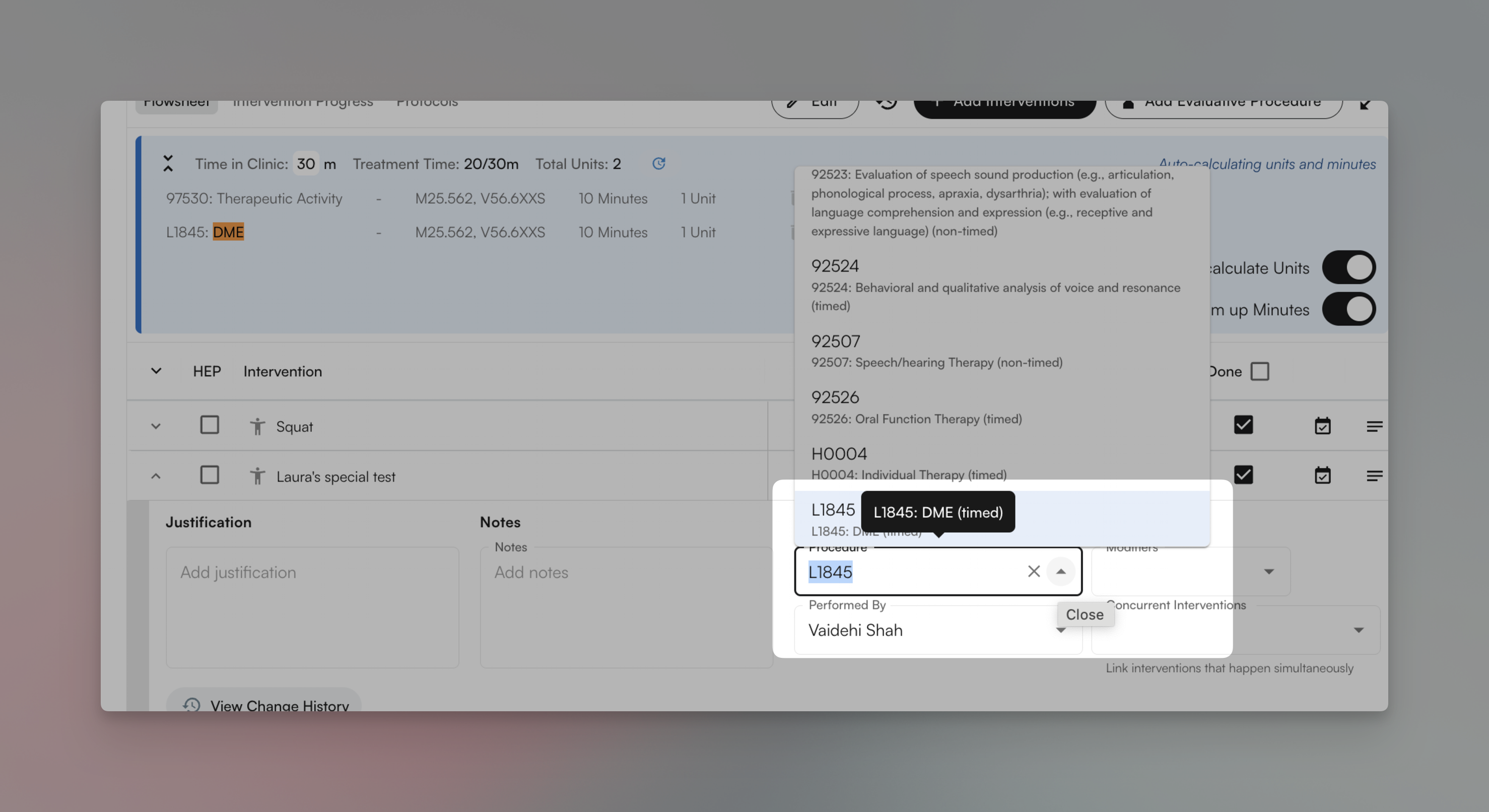
Data migration improvements
We’ve dramatically improved the data migration process for new customers. Migrations from WebPT, Raintree, and Empower now complete in 15-30 minutes instead of 6-8 hours. We’ve successfully migrated over 20,000 chart notes across 14 customers with minimal manual intervention.Performance improvements
Chart note pages load significantly faster with improved typing responsiveness. Flowsheets now load approximately 39% faster, and we’ve added batch update capabilities for more efficient data entry.Bug fixes and improvements
Chart Notes:- Fixed an issue where chart notes were not auto-saving reliably, causing providers to lose their work
- Resolved errors that occurred when editing or converting chart note templates, which prevented template modifications
- Improved how dynamic templates render to eliminate display issues and ensure all fields show correctly
- Added the ability for billing managers and admins to edit and submit chart notes, expanding access beyond just providers
- Enhanced role-based access controls to provide more granular permission settings across the system
- Added the ability to delete and archive cases, insurances, and prior authorizations that are no longer needed
- Fixed errors that prevented users from editing appointment details after they were created
Insights
[Beta user only] Kiosk patient check-in
Your patients can now check in for appointments and pay outstanding balances using the self-service Kiosk. The Kiosk verifies patient identity, checks insurance eligibility in real-time, and processes payments—reducing front desk workload and improving patient flow.Available at select customers. Contact your account manager to join the beta program.[Beta user only] Check Deposit Manager
Patient Statements Redesign
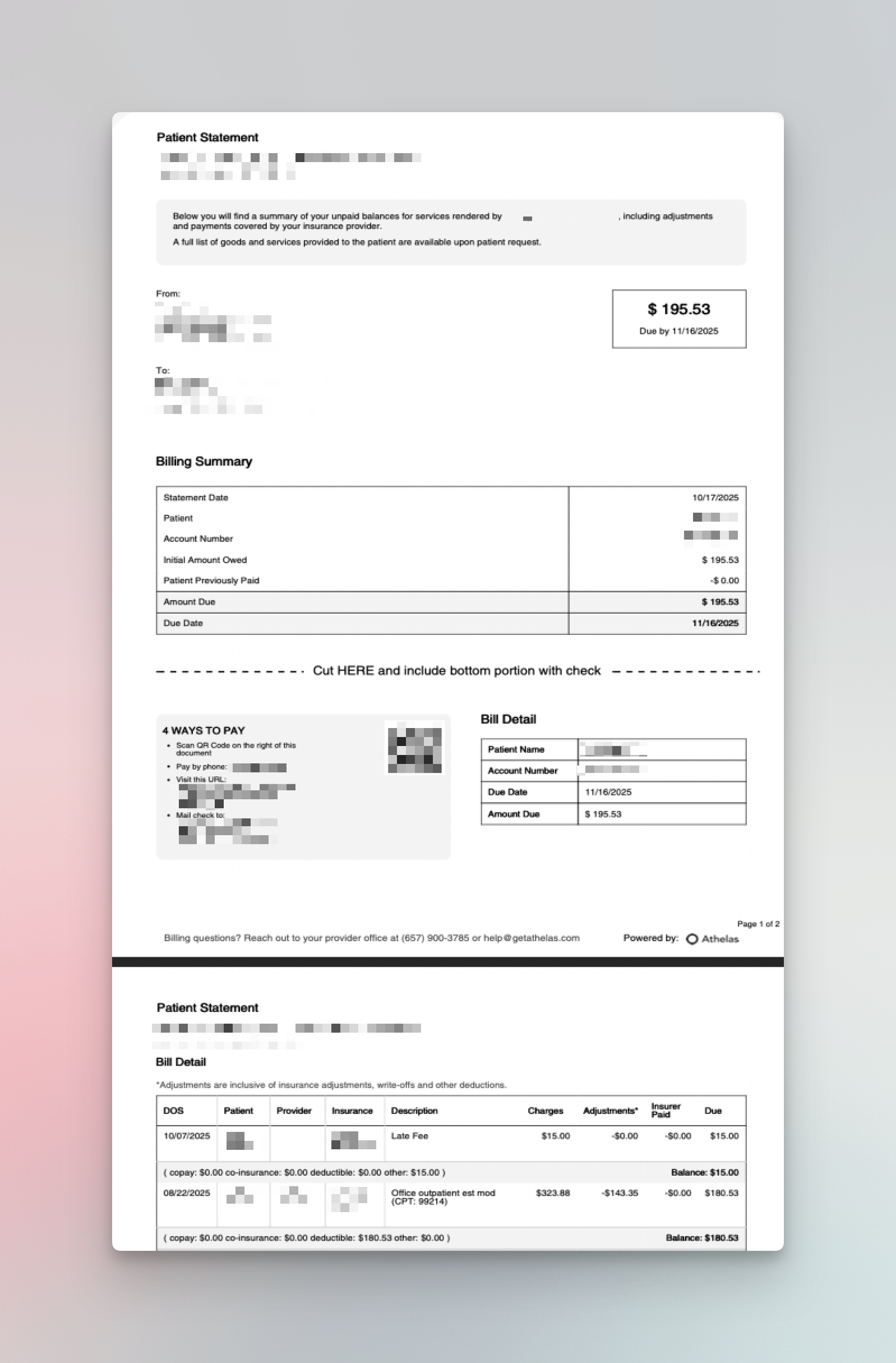
- Mail check address added to first page
- Patient ID and name on every date of service
- Reduced page count to lower postage costs
- Revenue codes added for hospital statements
Performance improvements
We resolved a critical database connection pool issue that was causing timeouts across multiple services. The fix reduced mean query times from 15 seconds to sub-second performance, stabilizing the system during high-traffic periods.We also stabilized the eligibility batch job queue after an overload incident, implementing better resource allocation and scheduling to prevent future backlogs.Bug fixes and improvements
Patient Statements:- Fixed an issue where statements were not being sent to financial guarantors who had dependents, leaving families without billing information
- Resolved a problem where duplicate copies of the same statement were appearing in downloaded ZIP files
- Fixed errors that were preventing electronic statements from being delivered successfully to patients via email
- Fixed an error where copay amounts were calculating incorrectly for self-pay appointments, showing wrong amounts due
- Corrected calculation errors in Stripe transaction fees that were resulting in incorrect fee amounts being recorded
- Improved the reliability of appointment reminder delivery to ensure patients consistently receive their reminders on time
Air
Template Builder
Create custom chart notes, patient intake forms, and scribe templates using the new Template Builder. This tool allows you to configure templates specific to your practice needs without requiring engineering support. The builder is now available across Scribe, EHR, and Interact products for flexible form creation.Patient outcome tracking
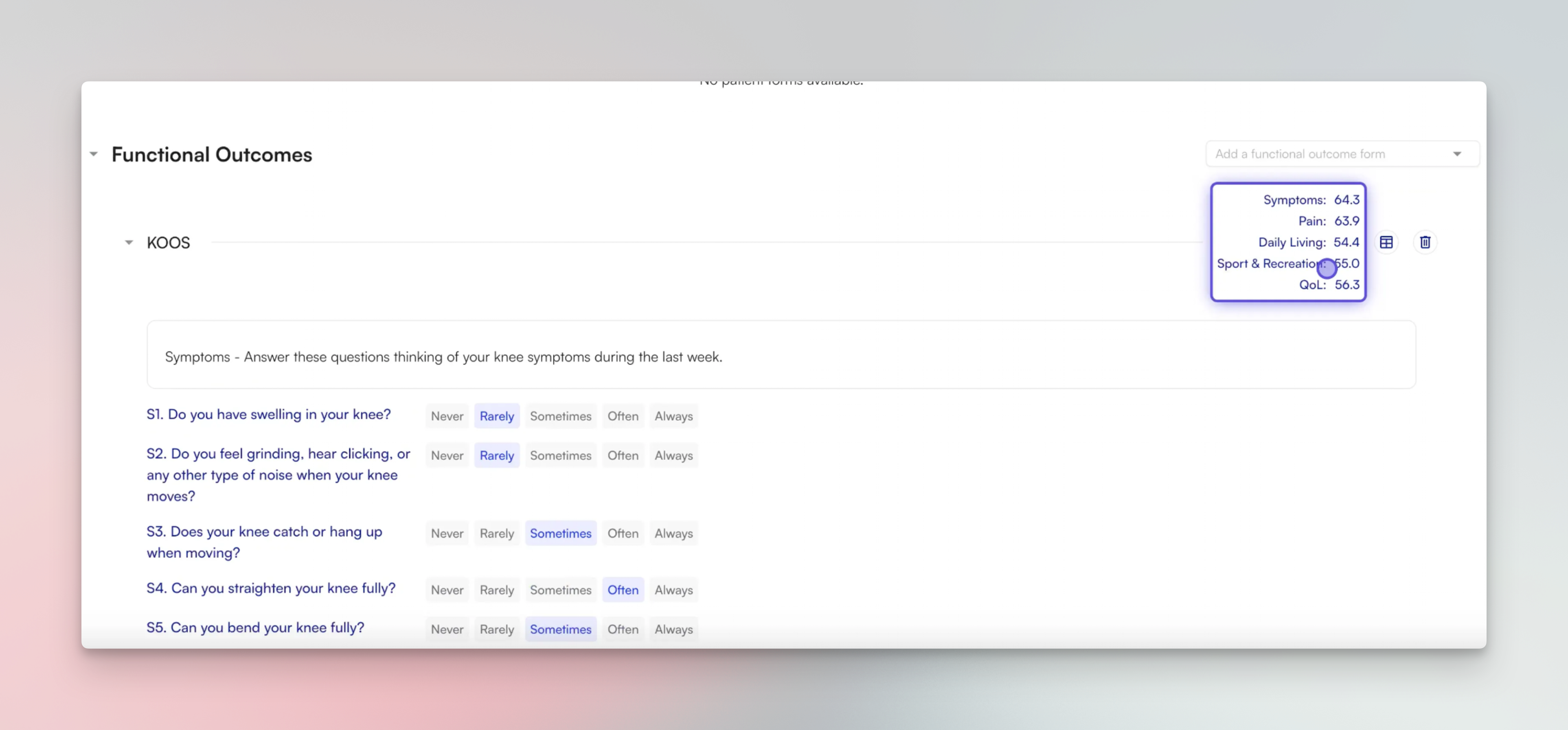
Lead management and credentialing
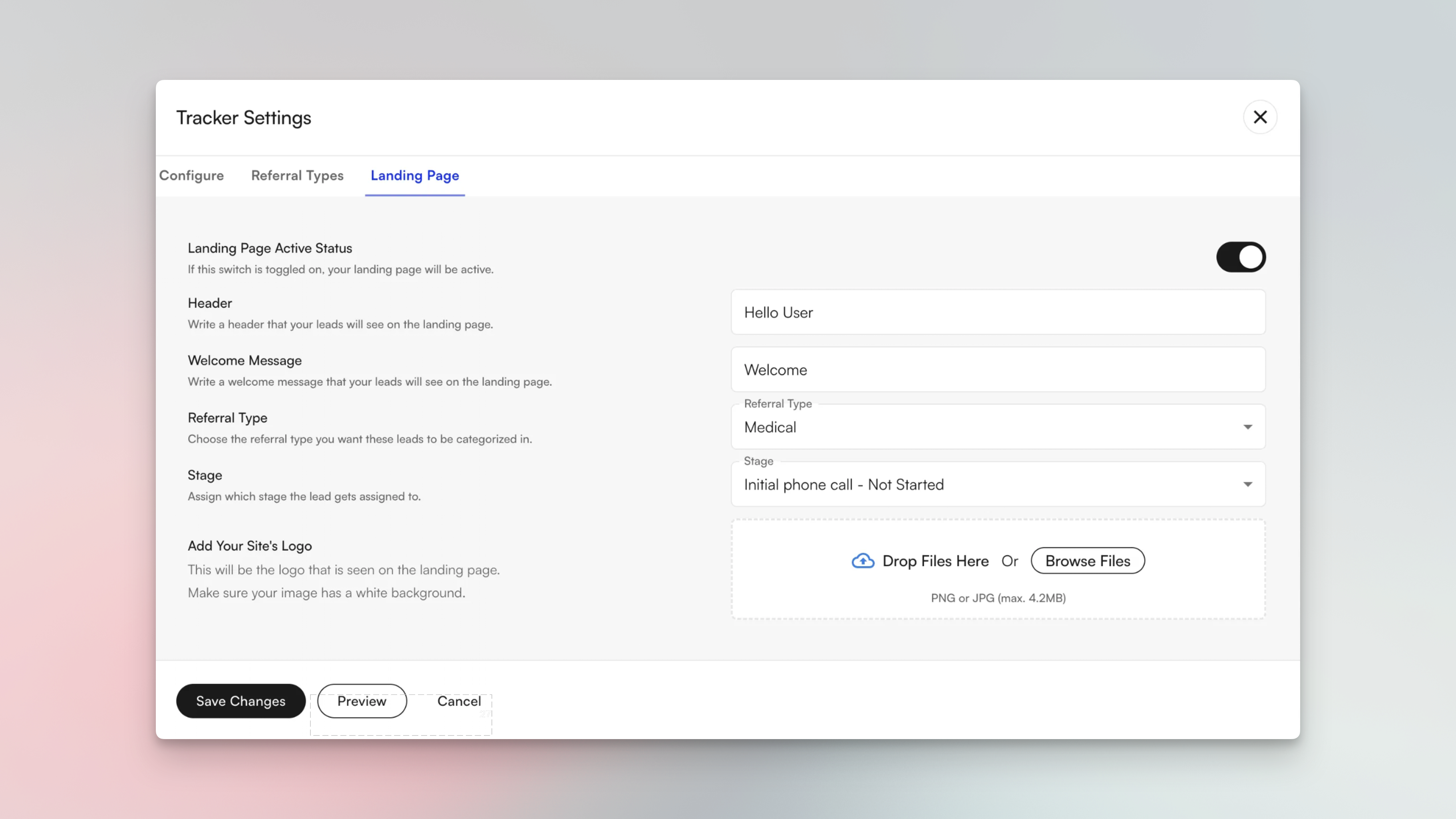
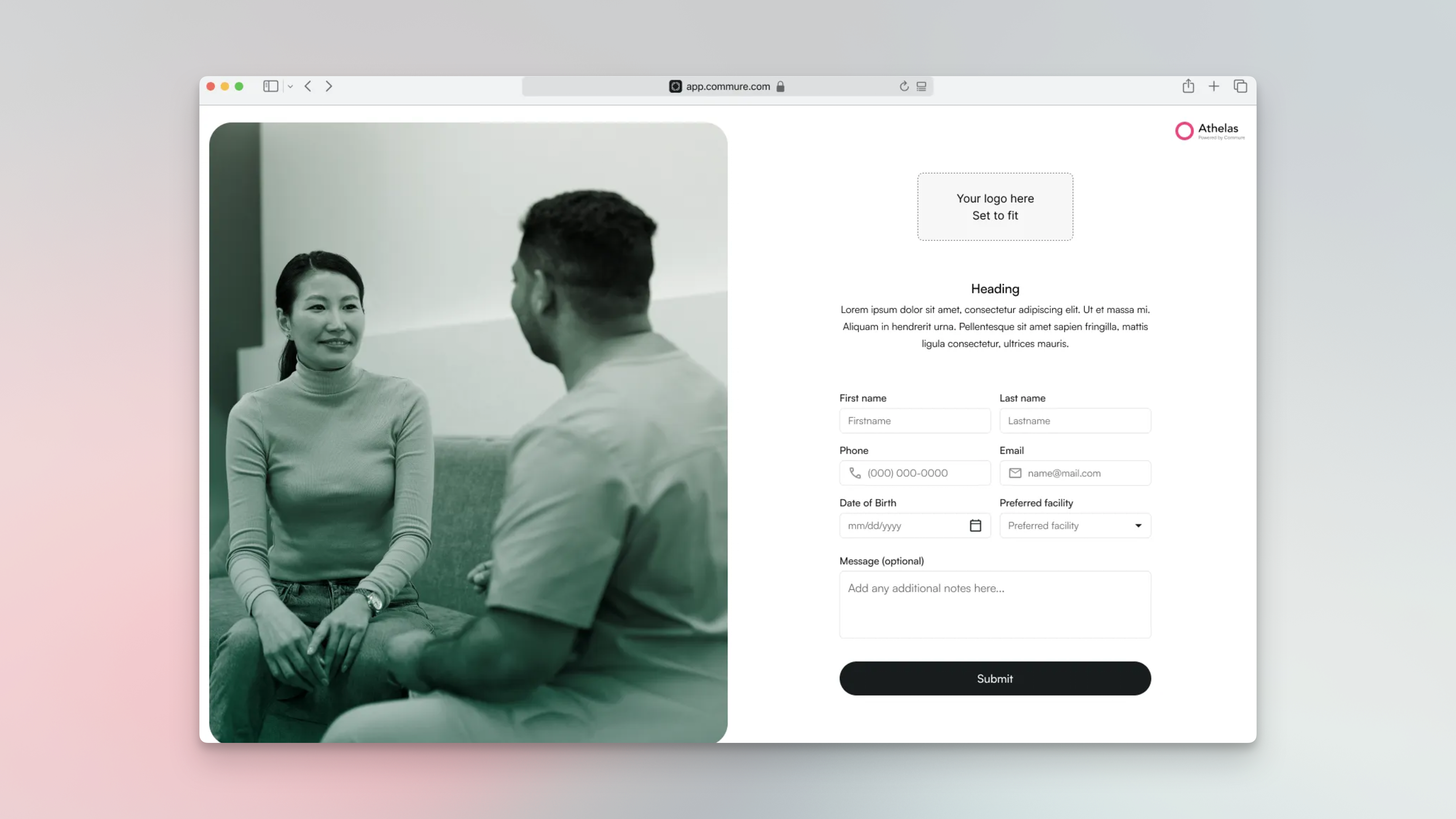
Bug fixes and improvements
Forms & Intake:- Added Spanish language versions of patient intake documents to better serve Spanish-speaking patients
- Fixed an error where duplicate insurance entries were being created when patients submitted intake forms
- Added the ability to send multiple files in a single fax transmission instead of requiring separate faxes
- Improved Plan of Care fax tracking and increased delivery success rates by addressing reliability issues
- Implemented a seamless zero-downtime fax service transition process for new customers migrating to the platform
Insights
Insights now fully supports creating and updating the financially responsible party for any patientThis means that you can designate a parent or guardian to be in charge of all outstanding balances for their dependent.You can manage the financial guarantor-dependent relationships in Insights through the patient profile:
- Click on edit in the top right corner
- Select “Someone else is financially responsible”
- Select the parent or create a financially guarantor if they are not already a patient in our system
- Checking in families just got a whole lot easier! Once the relationship is established, you will be able to pay off the entire family’s balance anywhere you’d collect balances today
Air
Provider user improvements
- Flowsheets intervention search is now sorted by the user’s most-used interventions: Vs. currently, it’s sorted by the global last-edited, which often returned results which felt random. This should significantly improve how long it takes a provider to get to the intervention they are actually looking for.
Admin user improvements
- Bulk scheduling flow can now search an alternate provider in addition to the original provider: You can now bulk-schedule with a primary and a backup (alternate) provider. The calendar shows availability for both, you can pick who covers each date, and the system creates the right appointments under the right provider. There’s a new, simple picker for choosing providers/patients, and (when your policy allows) you can note credentialing exceptions during scheduling.
- Bulk Credentialing Group Creation: Users can create named groups of insurance companies and reuse them across multiple providers
- Group-Based Provider Credentialing: When adding credentials for a provider, users can select credentialing groups instead of individual insurances, automatically creating credentials for all insurances within those groups
- Centralized Group Management: Users can edit existing credentialing groups to add/remove insurance companies, with changes affecting future credentialing operations
- Advanced Filtering: Users can filter the credentialing matrix by specific credentialing groups to focus on relevant provider-insurance relationships
- Tasks created from the Attachments page
- Attachments auto-linked to the Task page
- Providers send functional outcome forms to patients
- Patients fill out the form remotely
- Providers view the results from within the chart note
- Providers can see the longitudinal history of the measure
Air
Assistant workflow richness: Assistant has been enhanced with additional data fetching support for common user flows, like appointment default, patient referrals, patient claims, patient prior auth, patient demographics, providers’ unsigned visits, and provider metrics.Scribe offline mode: If a user loses their internet connection before the Scribe successfully completes or uploads, Scribe will be locally saved to their computer in order to be able to retry upload when the connection is regained.Flowsheet group interventions search improvements: Users can now choose to only search individual interventions, excluding Groups. When included, Flowsheets interventions search will now also auto-collapse group interventions.Primary signature-required inbox filter: Inbox can be filtered to only notes “Ready for Primary Signature”, meaning the signature of the credentialed rendering provider. This will make it much faster for providers to find the notes requiring their primary signature.Active Patient Tracker provider can now be an assigned “Case-owning provider”: Instead of only the initial appointment’s rendering provider, the associated provider can be any assigned “Case owner”. Users will now be able to assign the correct provider for tracking, even if they were not the first rendering provider. This will additionally improve accuracy of retrospective performance metrics.Scribe “Fast mode” generates 5-7x fasterIn exchange for a very slight drop in accuracy, users can choose to generate their Scribe 5-7x faster than normal mode. Scribe will also stream the Scribe sections into the note as they are generated, so the perception of speed is faster as well.Provider credentials can be bulk editedUsers can now update credentials in bulk, vs. one-by-one.Custom lead management landing page creates a home for potential new patientsNew custom landing page creates a beautiful entry point for potential new patients into our customers. This will also then create new Leads in our Lead Tracker, configurable in settings.AI text quick-editing accessed through “Command-K”Users can quickly AI edit highlighted text selections, simply by typing “Command-K” and their instructions or preferences for the text.
Air
Filter your inbox to notes requiring signatureInbox can now be filtered to only notes requiring the provider’s signature.Create tasks directly from your Fax page and refer back to those auto-linked faxes in the Tasks pageTasks can now be created directly from the Fax page. These faxes are then auto-linked to the task in the Task page, for easy access when you are working your Tasks.Tasks created from the fax page below:Faxes auto-linked to the Task page:Intelligent AI Fax ingestion will auto-generate leads from faxesLeads can now be auto-generated from faxes. Air will extract the referral information from inbound faxes, and automatically create leads in the Lead Tracker using the context, including
first_name, middle_name, last_name, date_of_birth and phone_numberLeads created with this flow will default to “Fax” as the referral source, and the first stage will be assigned as “Lead”.Flowsheets are now 39% lower latency (faster) across the boardFlowsheets are now meaningfully more performant.Average Before time to request an endpoint was 2.023 s. Now it’s 1.02 s.Average improvement is 39% faster response.Before, 95% of endpoint requests would take a full 4 s. This is now 1.6 sCalendar redesign creates quick-glance payer, eligibility, appointment status, key detail clarityThis calendar update preserves all existing functionality while delivering a richer, more modern experience. Compact blocks now show patient, time, status, case, and alerts at a glance—letting you fit more context in the same space. Hovering opens a streamlined tooltip with status and actions. We’ve also refreshed colors and icons to match the clean, familiar feel of modern calendars.Key improvements:
- Calendar blocks are more information dense
- Appointment status is clear upon first glance
- Hover over the appointment to see all key information (Appointment status, case and appointment type, eligibility and payer, authorization status, next visit scheduled status)
- Change the appointment status directly from the tooltip! No more needing to go to the drawer
- Alerts flag key information through icons and in the tooltip
- Look and feel is overhauled to be cleaner, modern, and intuitive View our Blog post here.