> ## Documentation Index
> Fetch the complete documentation index at: https://docs.athelas.com/llms.txt
> Use this file to discover all available pages before exploring further.

# Auto-apply KX Modifier

#### Overview

The KX HCPCS modifier signals that “requirements specified in the medical policy have been met” and that services are medically necessary beyond a payer’s threshold (most commonly Medicare outpatient therapy thresholds for PT/OT/SLP). It attests that supporting documentation exists in the medical record. (Sources: [APTA](https://www.apta.org/your-practice/payment/medicare-payment/coding-billing/therapy-cap), [NGS Medicare](https://www.ngsmedicare.com/web/ngs/physical-therapy/occupational-therapy/speech-therapy?selectedArticleId=305496))

#### Why we need it

* Compliance: Medicare requires KX on claim lines once the beneficiary’s annual therapy threshold is exceeded (PT+SLP combined, and OT separately). Without KX, claims at/above the threshold can be denied.
* Payment continuity: KX allows medically necessary therapy to continue beyond the threshold, with the understanding those services may be subject to targeted medical review (generally over \$3,000).

#### Types of Thresholds for Medicare

**PT/SLP vs OT Medicare threshold remaining**

* PT/SLP and OT are tracked in two separate “buckets” each calendar year. For CY2026 the thresholds are (indexed annually to the Medicare Economic Index):

* PT + SLP combined: \$2,480

* OT: \$2,480

* Deductible and coinsurance count toward these amounts.

* “Threshold remaining” = threshold amount − total allowed therapy spend to date in that bucket (per calendar year)

#### CPT Codes that require a KX Modifier

**Physical & Occupational Therapy**

| CPT Code  | Description                                                                                  |
| --------- | -------------------------------------------------------------------------------------------- |
| **97110** | Therapeutic exercise (per 15 min)                                                            |
| **97112** | Neuromuscular reeducation                                                                    |
| **97116** | Gait training therapy                                                                        |
| **97140** | Manual therapy techniques                                                                    |
| **97530** | Therapeutic activities                                                                       |
| **97535** | Self-care/home management training                                                           |
| **97542** | Wheelchair management training                                                               |
| **97750** | Physical performance test or measurement                                                     |
| **97760** | Orthotic fitting and training                                                                |
| **97761** | Prosthetic training                                                                          |
| **97763** | Orthotic/prosthetic management & training (follow-up)                                        |
| **97150** | Group therapeutic procedures (must document medical necessity individually for each patient) |
| **97597** | Selective debridement (when part of therapy plan)                                            |

**Speech-Language Pathology (SLP)**

| CPT Code  | Description                                         |
| --------- | --------------------------------------------------- |
| **92507** | Treatment of speech, language, voice, communication |
| **92508** | Group speech therapy                                |
| **92526** | Treatment of swallowing dysfunction                 |
| **92609** | Therapeutic use of speech-generating device         |

**Common Occupational Therapy CPT Codes That Require the KX Modifier (when over threshold)**

| CPT Code  | Description                                       |
| --------- | ------------------------------------------------- |
| **97110** | Therapeutic exercise                              |
| **97112** | Neuromuscular re-education                        |
| **97116** | Gait training therapy                             |
| **97150** | Group therapy                                     |
| **97140** | Manual therapy                                    |
| **97530** | Therapeutic activities (e.g., reaching, grasping) |
| **97535** | Self-care/home management training                |
| **97537** | Community/work reintegration training             |
| **97542** | Wheelchair management training                    |
| **97750** | Physical performance test                         |
| **97755** | Assistive technology assessment                   |
| **97760** | Orthotic training                                 |
| **97761** | Prosthetic training                               |
| **97763** | Orthotic/prosthetic follow-up                     |

#### When would be KX modifier auto-applied?

* Patient has Medicare benefits applicable to outpatient therapy for the encounter
* **Auto-apply KX modifier preference** is enabled
* Rendering provider’s discipline maps to PT/SLP or OT for Medicare service type
* The CPT code is in the qualifying therapy list for that service type (PT/SLP vs OT)
* The calculation year is the appointment’s calendar year
* The patient’s Medicare therapy threshold remaining for that service type is ≤ 0 (i.e., threshold exceeded)
* KX isn’t already on the line; it’s appended alongside other therapy modifiers (e.g., GP/GO/GN)
* If a precomputed “threshold remaining” value is supplied and indicates exceeded, it’s used

#### Configuration

Setting PT/OT threshold on a per-patient level

1. On EHR > Calendar, click on any calendar cell.
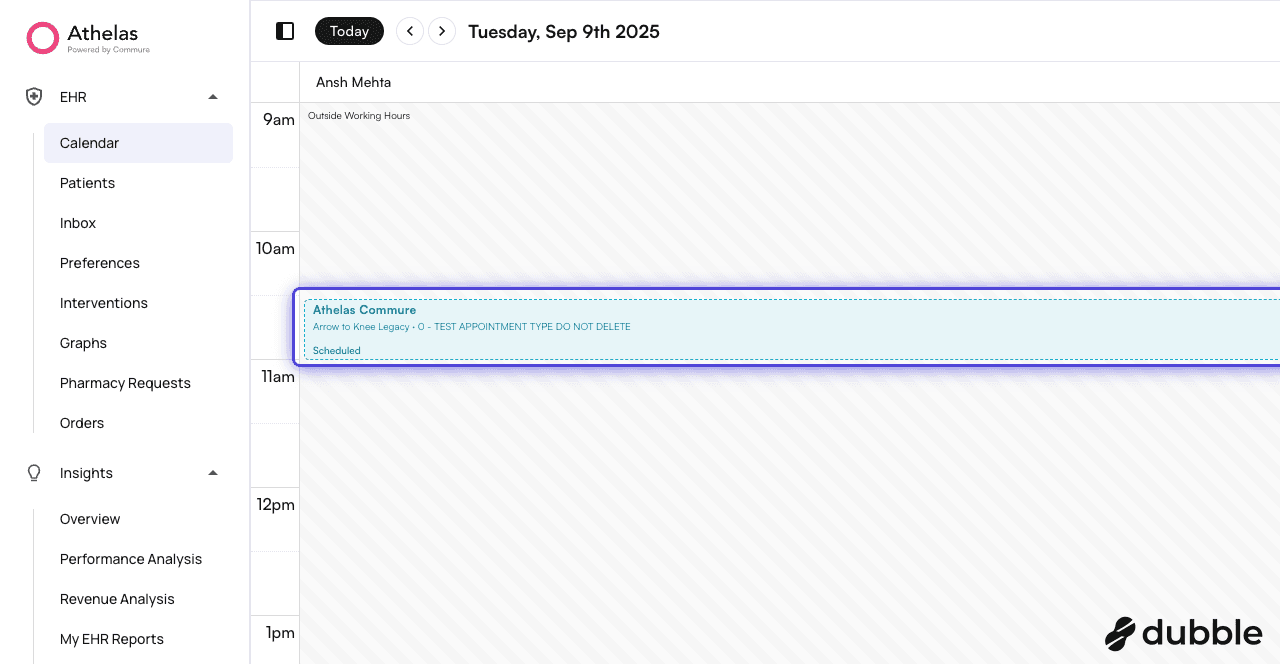
<img src="https://mintcdn.com/air_athelas/KyhrvQLLT-eww2co/images/insights_provider/chart_notes/auto_apply_kx_modifier/auto_apply_kx_modifier_1.png?fit=max&auto=format&n=KyhrvQLLT-eww2co&q=85&s=a0eef6ef2e03de873bf9b2daf6471e3e" alt="" width="1280" height="664" data-path="images/insights_provider/chart_notes/auto_apply_kx_modifier/auto_apply_kx_modifier_1.png" />

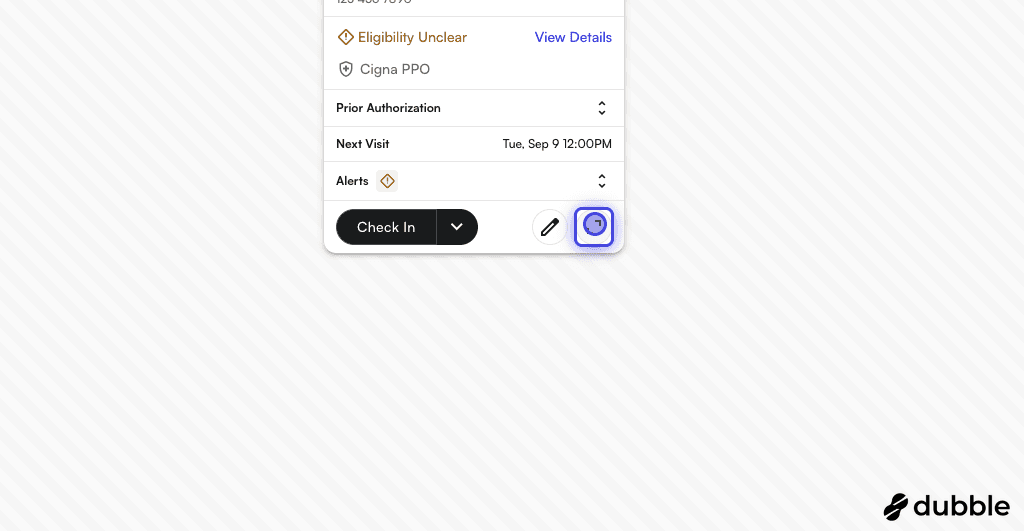
2. Click on the expand content

<img src="https://mintcdn.com/air_athelas/EOSU2-xYM7ToxOAX/images/insights_provider/chart_notes/auto_apply_kx_modifier/auto_apply_kx_modifier_2.png?fit=max&auto=format&n=EOSU2-xYM7ToxOAX&q=85&s=e393cac8743e5e9d088fdc1d5bdc3b0c" alt="" width="1024" height="531" data-path="images/insights_provider/chart_notes/auto_apply_kx_modifier/auto_apply_kx_modifier_2.png" />

3. On Appointment Details drawer > visits, expand the "Medicare Threshold Remaining"
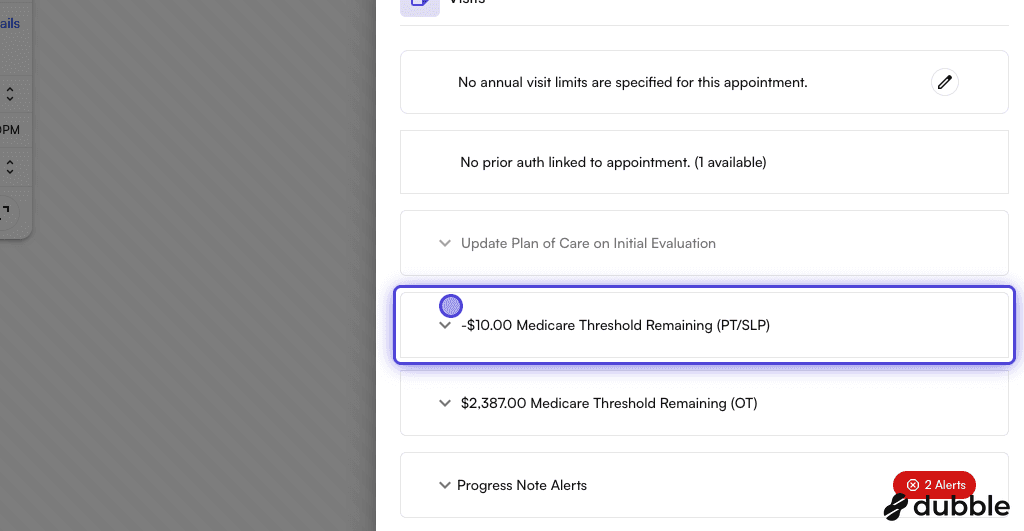
<img src="https://mintcdn.com/air_athelas/EOSU2-xYM7ToxOAX/images/insights_provider/chart_notes/auto_apply_kx_modifier/auto_apply_kx_modifier_3.png?fit=max&auto=format&n=EOSU2-xYM7ToxOAX&q=85&s=7e91014df5fa46d752c003f3f3d07c49" alt="" width="1024" height="531" data-path="images/insights_provider/chart_notes/auto_apply_kx_modifier/auto_apply_kx_modifier_3.png" />

4. Click on "Other Medicare Threshold Used".

You can modify the value according to your preference.
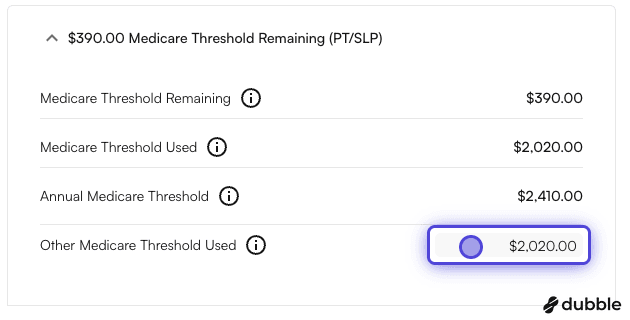
<img src="https://mintcdn.com/air_athelas/EOSU2-xYM7ToxOAX/images/insights_provider/chart_notes/auto_apply_kx_modifier/auto_apply_kx_modifier_4.png?fit=max&auto=format&n=EOSU2-xYM7ToxOAX&q=85&s=edb19a4ecfad395fd3a9c54851e85a88" alt="" width="630" height="320" data-path="images/insights_provider/chart_notes/auto_apply_kx_modifier/auto_apply_kx_modifier_4.png" />

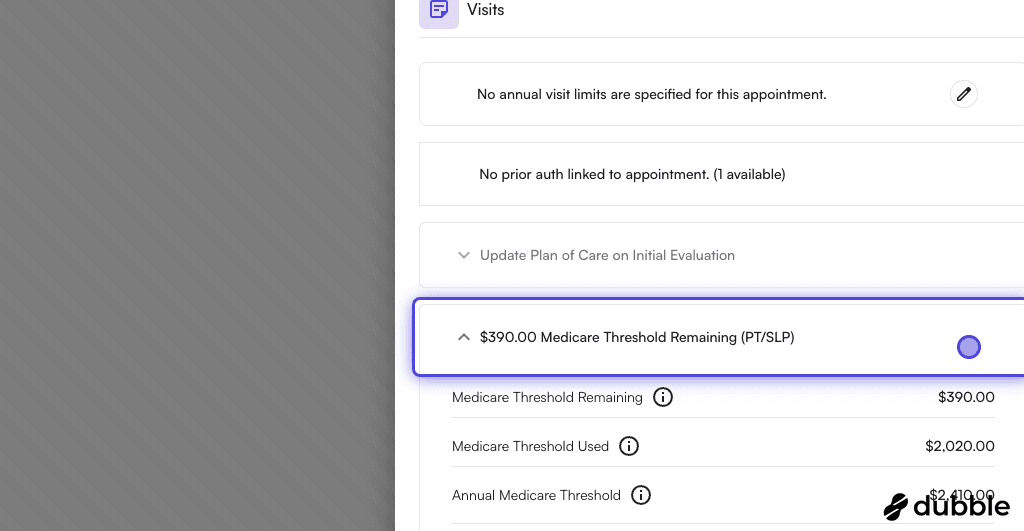
5. You can see the updated remaining value

\$390.00 Medicare Threshold Remaining (PT/SLP)
<img src="https://mintcdn.com/air_athelas/EOSU2-xYM7ToxOAX/images/insights_provider/chart_notes/auto_apply_kx_modifier/auto_apply_kx_modifier_5.png?fit=max&auto=format&n=EOSU2-xYM7ToxOAX&q=85&s=2385ed6b8d5880d441ed2004d64eff2b" alt="" width="1024" height="531" data-path="images/insights_provider/chart_notes/auto_apply_kx_modifier/auto_apply_kx_modifier_5.png" />

#### Enabling auto-apply KX modifier preference

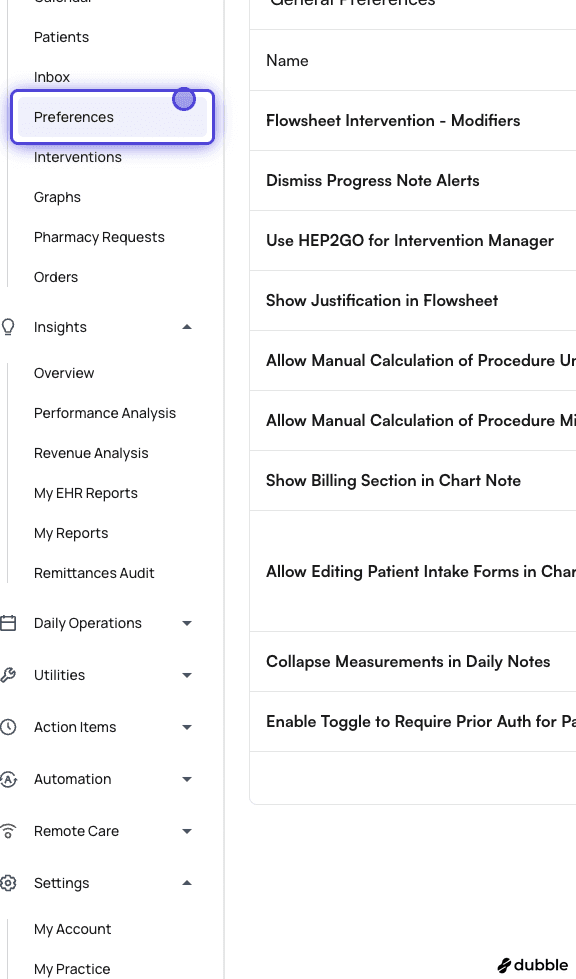
1. Go on EHR > Preferences
<img src="https://mintcdn.com/air_athelas/EOSU2-xYM7ToxOAX/images/insights_provider/chart_notes/auto_apply_kx_modifier/auto_apply_kx_modifier_6.png?fit=max&auto=format&n=EOSU2-xYM7ToxOAX&q=85&s=b9a0d457df1ffde770c89b8e9e614966" alt="" width="576" height="979" data-path="images/insights_provider/chart_notes/auto_apply_kx_modifier/auto_apply_kx_modifier_6.png" />

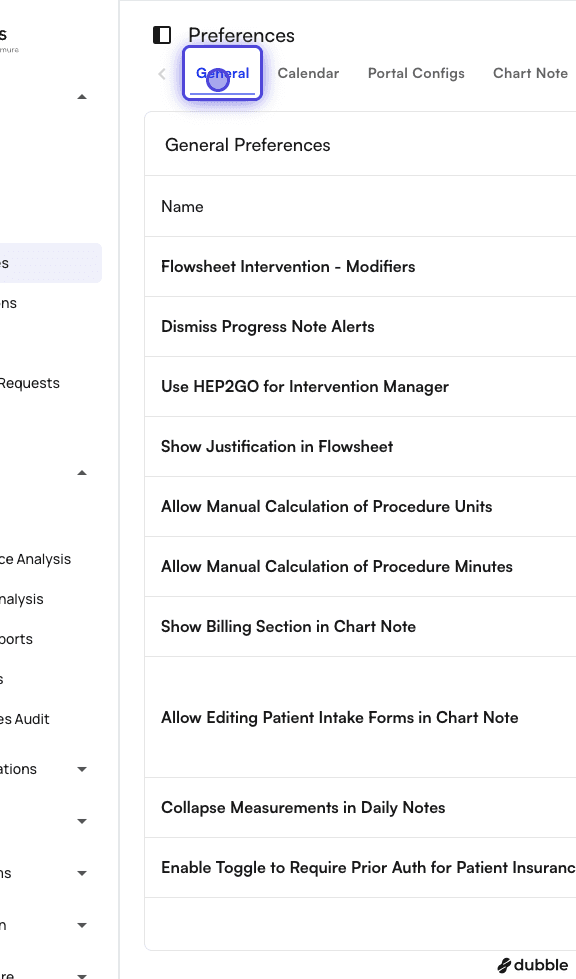
2. Click on General Tab

<img src="https://mintcdn.com/air_athelas/EOSU2-xYM7ToxOAX/images/insights_provider/chart_notes/auto_apply_kx_modifier/auto_apply_kx_modifier_7.png?fit=max&auto=format&n=EOSU2-xYM7ToxOAX&q=85&s=d7258cf9c73be94c974a7ea2c581bcdf" alt="" width="576" height="979" data-path="images/insights_provider/chart_notes/auto_apply_kx_modifier/auto_apply_kx_modifier_7.png" />

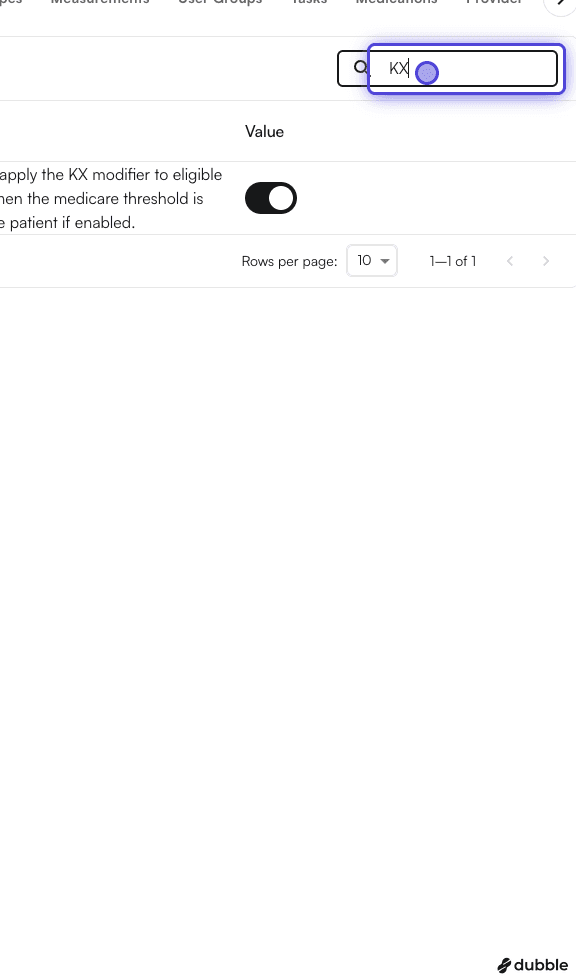
3. In the search box, type "KX"

<img src="https://mintcdn.com/air_athelas/EOSU2-xYM7ToxOAX/images/insights_provider/chart_notes/auto_apply_kx_modifier/auto_apply_kx_modifier_8.png?fit=max&auto=format&n=EOSU2-xYM7ToxOAX&q=85&s=2df76c187b967f7119e512be817526cf" alt="" width="576" height="979" data-path="images/insights_provider/chart_notes/auto_apply_kx_modifier/auto_apply_kx_modifier_8.png" />

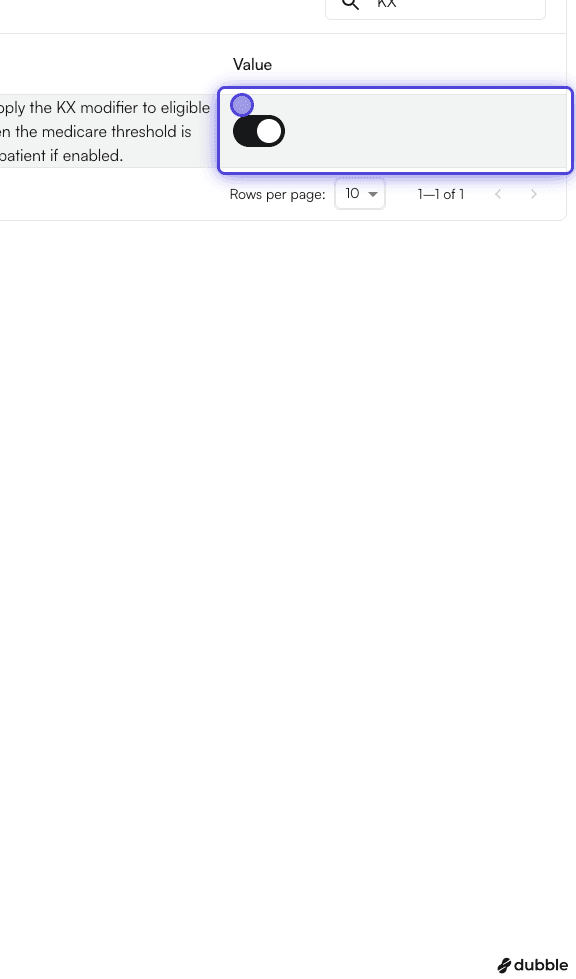
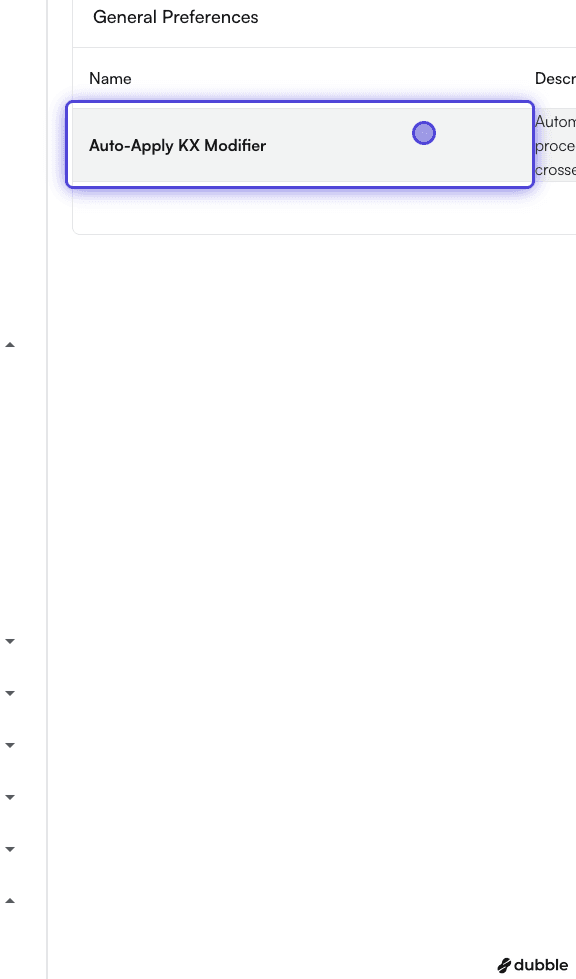
4. You would see an entry titled "Auto-Apply KX Modifier"
<img src="https://mintcdn.com/air_athelas/EOSU2-xYM7ToxOAX/images/insights_provider/chart_notes/auto_apply_kx_modifier/auto_apply_kx_modifier_9.png?fit=max&auto=format&n=EOSU2-xYM7ToxOAX&q=85&s=95439f08c8c519a42ce6238f6811b154" alt="" width="576" height="979" data-path="images/insights_provider/chart_notes/auto_apply_kx_modifier/auto_apply_kx_modifier_9.png" />

5. Click on the switch to enable it

<img src="https://mintcdn.com/air_athelas/KyhrvQLLT-eww2co/images/insights_provider/chart_notes/auto_apply_kx_modifier/auto_apply_kx_modifier_10.png?fit=max&auto=format&n=KyhrvQLLT-eww2co&q=85&s=cbef70329debf5b494ca5e634fd345a5" alt="" width="576" height="979" data-path="images/insights_provider/chart_notes/auto_apply_kx_modifier/auto_apply_kx_modifier_10.png" />

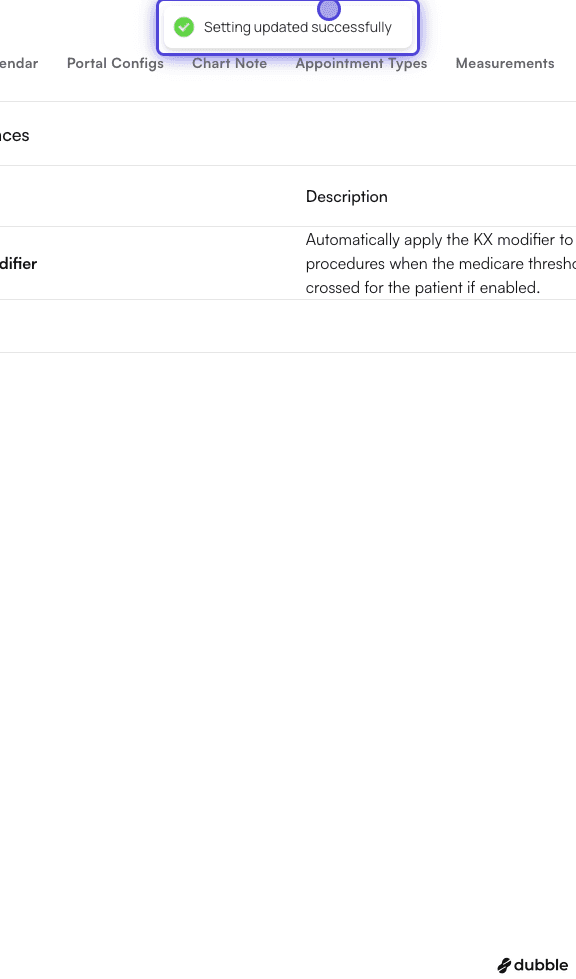
6. Once you click it, you will see the message "Setting updated successfully"

Click on the switch again if you want to turn it off.
<img src="https://mintcdn.com/air_athelas/EOSU2-xYM7ToxOAX/images/insights_provider/chart_notes/auto_apply_kx_modifier/auto_apply_kx_modifier_11.png?fit=max&auto=format&n=EOSU2-xYM7ToxOAX&q=85&s=b26f26576e4d7bd6de5b7844412f8a59" alt="" width="576" height="979" data-path="images/insights_provider/chart_notes/auto_apply_kx_modifier/auto_apply_kx_modifier_11.png" />

#### Setting KX modifier traits on a template

1. Go to Templates Page
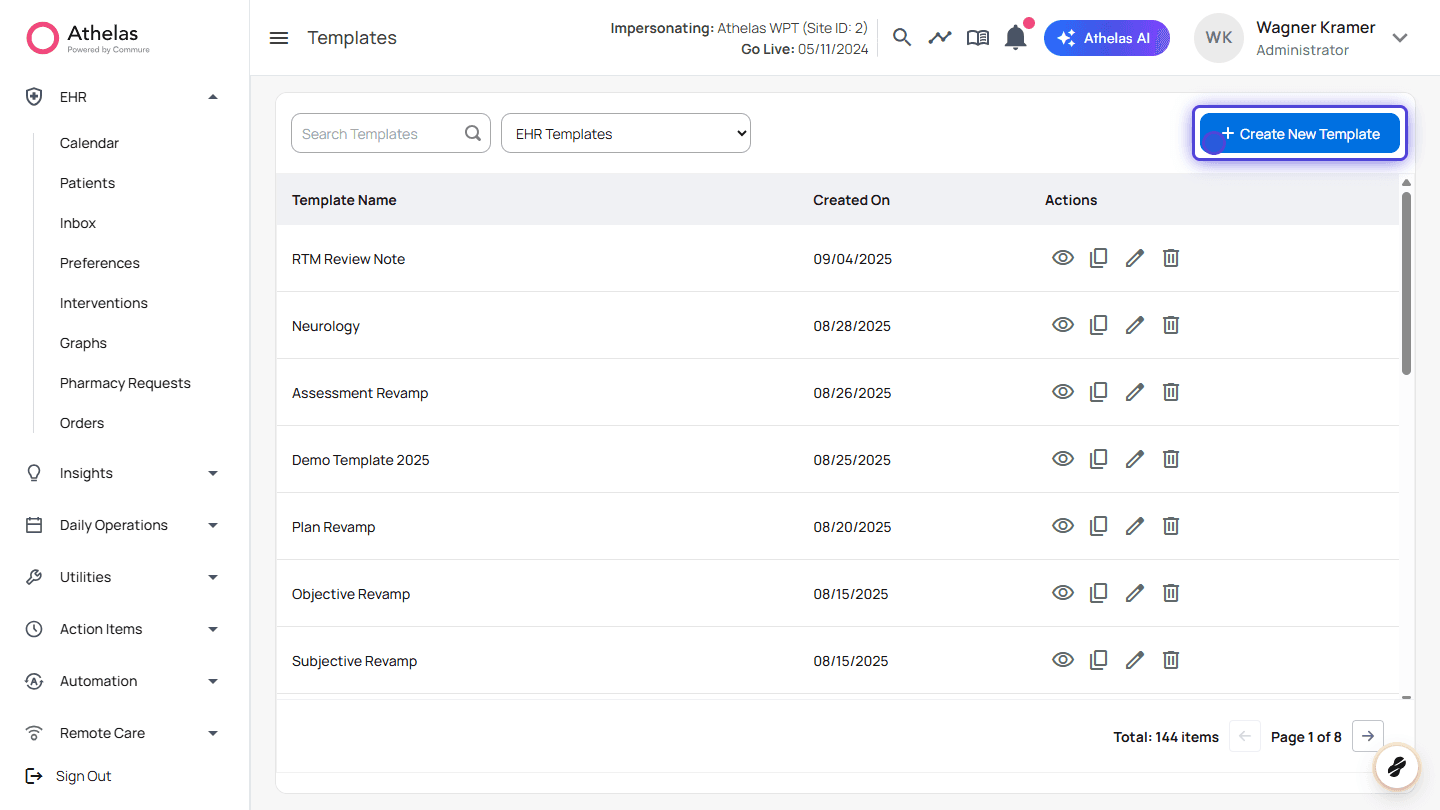
<img src="https://mintcdn.com/air_athelas/EOSU2-xYM7ToxOAX/images/insights_provider/chart_notes/auto_apply_kx_modifier/auto_apply_kx_modifier_12.png?fit=max&auto=format&n=EOSU2-xYM7ToxOAX&q=85&s=50058fc70e8eb7e620bdb6aa034ef1a7" alt="" width="1440" height="810" data-path="images/insights_provider/chart_notes/auto_apply_kx_modifier/auto_apply_kx_modifier_12.png" />

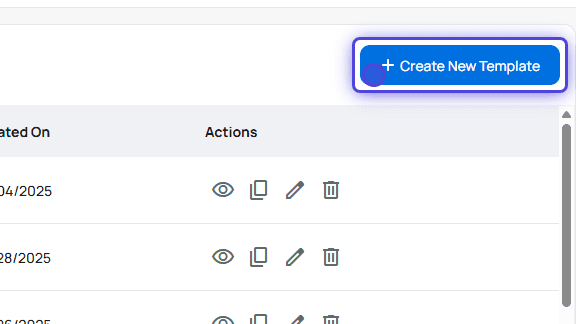
2. Create or edit a Template

<img src="https://mintcdn.com/air_athelas/EOSU2-xYM7ToxOAX/images/insights_provider/chart_notes/auto_apply_kx_modifier/auto_apply_kx_modifier_13.png?fit=max&auto=format&n=EOSU2-xYM7ToxOAX&q=85&s=1278bb0a3bb62cdb0b734799f644bc2b" alt="" width="576" height="324" data-path="images/insights_provider/chart_notes/auto_apply_kx_modifier/auto_apply_kx_modifier_13.png" />

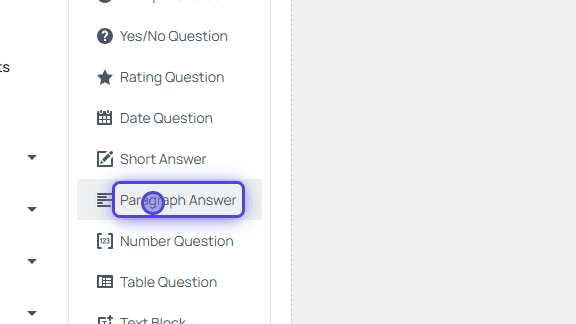
3. Drag and drop Paragraph Answer

Only “Paragraph Answer” supports question traits at the moment
<img src="https://mintcdn.com/air_athelas/EOSU2-xYM7ToxOAX/images/insights_provider/chart_notes/auto_apply_kx_modifier/auto_apply_kx_modifier_14.png?fit=max&auto=format&n=EOSU2-xYM7ToxOAX&q=85&s=17c9591935d9d397ac9777212fe9abf8" alt="" width="576" height="324" data-path="images/insights_provider/chart_notes/auto_apply_kx_modifier/auto_apply_kx_modifier_14.png" />

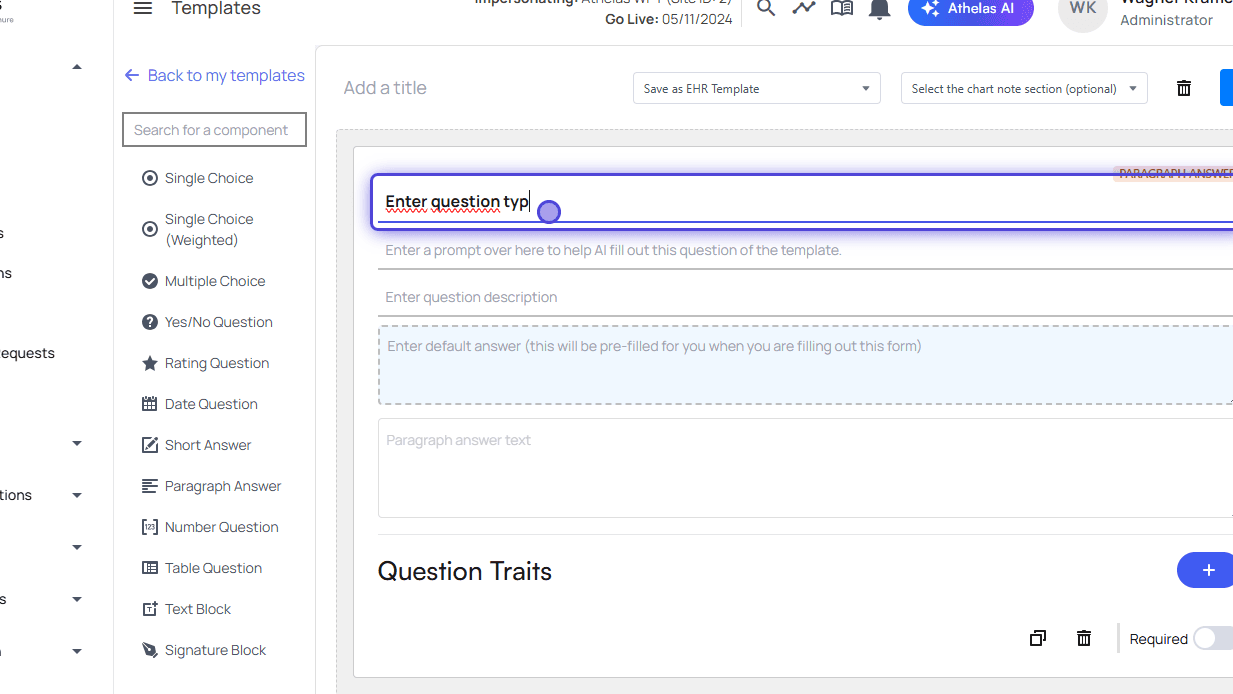
4. Fill the form

<img src="https://mintcdn.com/air_athelas/EOSU2-xYM7ToxOAX/images/insights_provider/chart_notes/auto_apply_kx_modifier/auto_apply_kx_modifier_15.png?fit=max&auto=format&n=EOSU2-xYM7ToxOAX&q=85&s=41320833012e283bec26d45fa996414a" alt="" width="1233" height="694" data-path="images/insights_provider/chart_notes/auto_apply_kx_modifier/auto_apply_kx_modifier_15.png" />

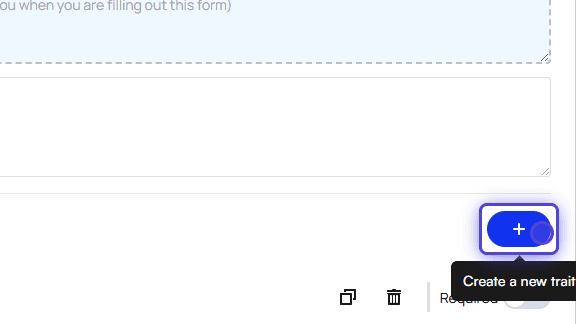
5. Click on Create a new trait

<img src="https://mintcdn.com/air_athelas/EOSU2-xYM7ToxOAX/images/insights_provider/chart_notes/auto_apply_kx_modifier/auto_apply_kx_modifier_16.png?fit=max&auto=format&n=EOSU2-xYM7ToxOAX&q=85&s=04ab0107cdddab9d73a31627327b2a14" alt="" width="576" height="324" data-path="images/insights_provider/chart_notes/auto_apply_kx_modifier/auto_apply_kx_modifier_16.png" />

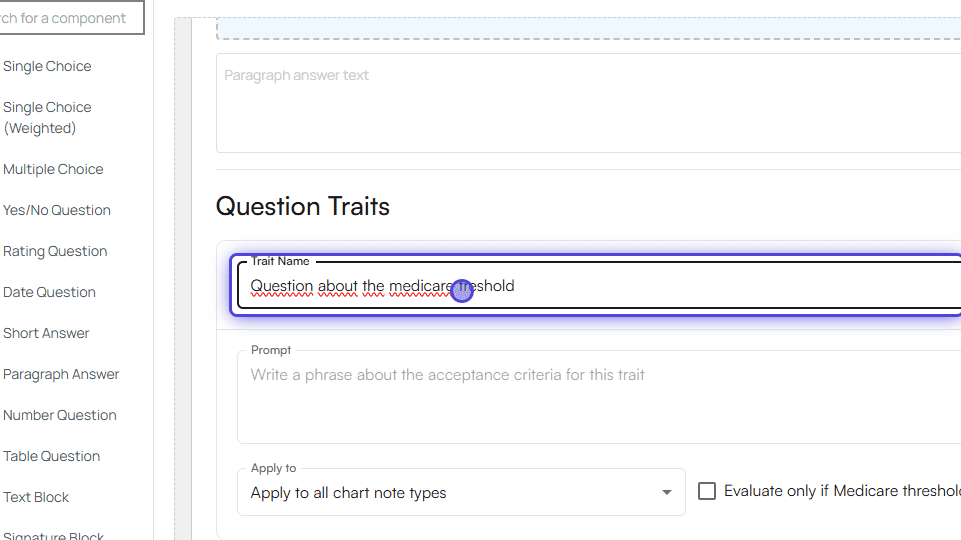
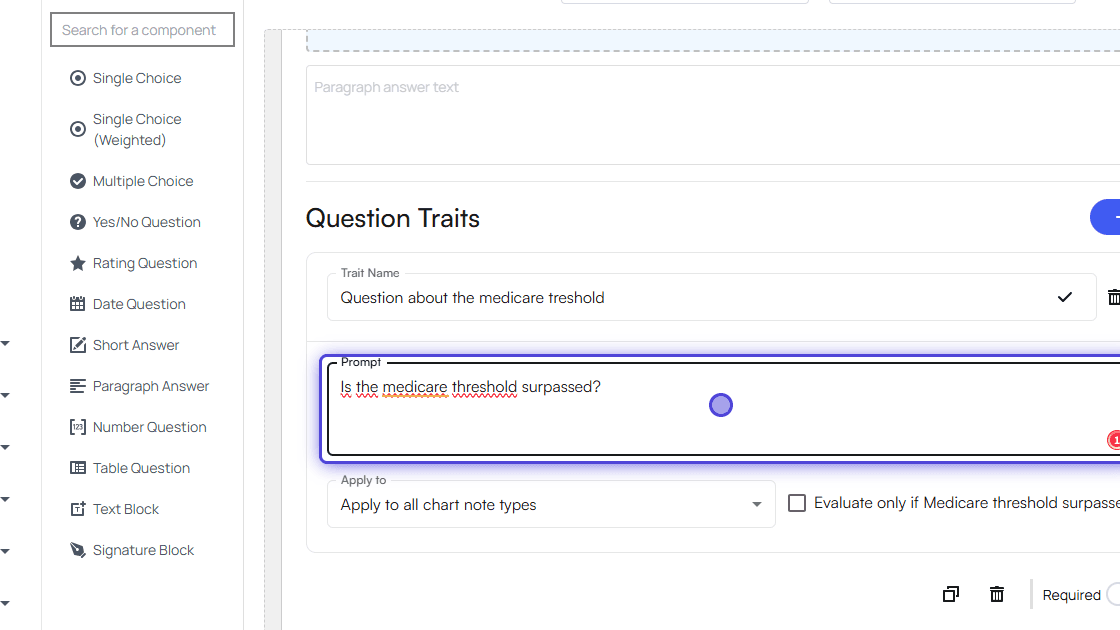
6. Type in the trait name

<img src="https://mintcdn.com/air_athelas/EOSU2-xYM7ToxOAX/images/insights_provider/chart_notes/auto_apply_kx_modifier/auto_apply_kx_modifier_17.png?fit=max&auto=format&n=EOSU2-xYM7ToxOAX&q=85&s=04b7fbea017b6ee47c24a2ce08ef3a43" alt="" width="961" height="540" data-path="images/insights_provider/chart_notes/auto_apply_kx_modifier/auto_apply_kx_modifier_17.png" />

7. Type in a prompt that should be evaluated
<img src="https://mintcdn.com/air_athelas/EOSU2-xYM7ToxOAX/images/insights_provider/chart_notes/auto_apply_kx_modifier/auto_apply_kx_modifier_18.png?fit=max&auto=format&n=EOSU2-xYM7ToxOAX&q=85&s=4f446b17e72ec2b0d3e6c4250671517c" alt="" width="1120" height="630" data-path="images/insights_provider/chart_notes/auto_apply_kx_modifier/auto_apply_kx_modifier_18.png" />

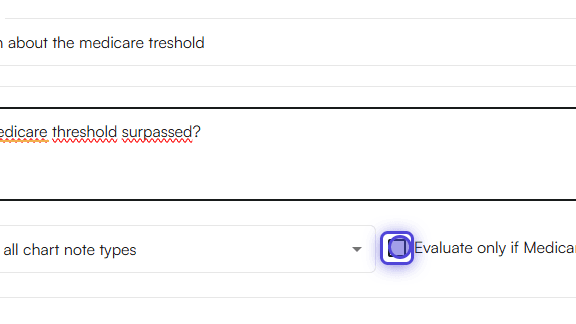
8. Click on Evaluate only if Medicare has been reached
<img src="https://mintcdn.com/air_athelas/EOSU2-xYM7ToxOAX/images/insights_provider/chart_notes/auto_apply_kx_modifier/auto_apply_kx_modifier_19.png?fit=max&auto=format&n=EOSU2-xYM7ToxOAX&q=85&s=644f149b4a113dd5e32e50e0b98c0249" alt="" width="576" height="324" data-path="images/insights_provider/chart_notes/auto_apply_kx_modifier/auto_apply_kx_modifier_19.png" />

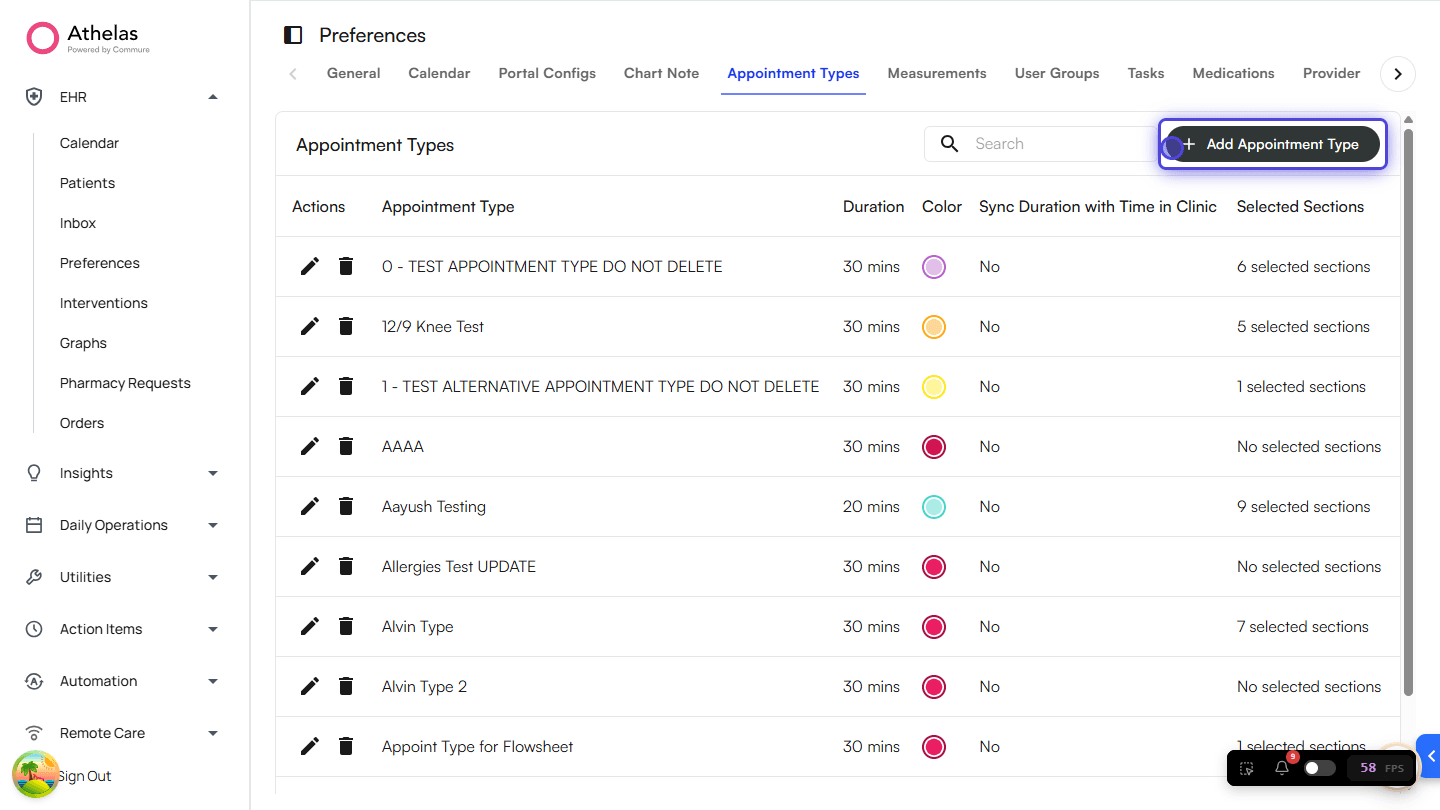
9. Go to EHR Preferences > Appointment Types
<img src="https://mintcdn.com/air_athelas/EOSU2-xYM7ToxOAX/images/insights_provider/chart_notes/auto_apply_kx_modifier/auto_apply_kx_modifier_20.png?fit=max&auto=format&n=EOSU2-xYM7ToxOAX&q=85&s=6fca041f316e73c395dfc2dd448600e4" alt="" width="1440" height="810" data-path="images/insights_provider/chart_notes/auto_apply_kx_modifier/auto_apply_kx_modifier_20.png" />

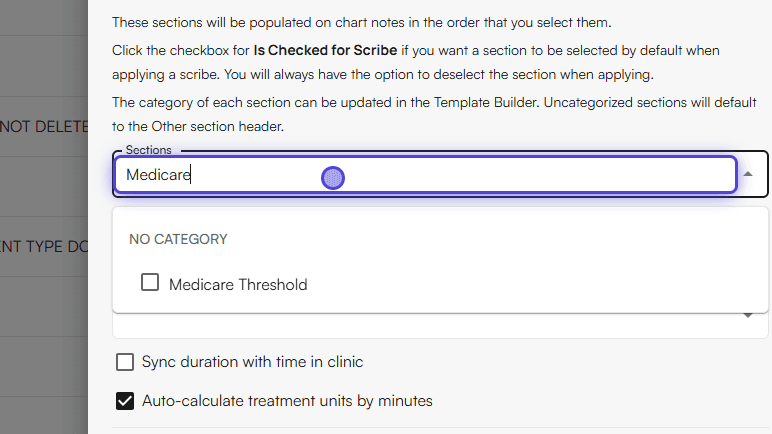
10. Add the new template to an Appointment Type
<img src="https://mintcdn.com/air_athelas/EOSU2-xYM7ToxOAX/images/insights_provider/chart_notes/auto_apply_kx_modifier/auto_apply_kx_modifier_21.png?fit=max&auto=format&n=EOSU2-xYM7ToxOAX&q=85&s=c8e5de82474af6af98e95cfdf3c1eea0" alt="" width="772" height="434" data-path="images/insights_provider/chart_notes/auto_apply_kx_modifier/auto_apply_kx_modifier_21.png" />

11. Done! Now start using the Appointment Type you set up.

#### Usage

**Applying the KX modifier in the Treatment section**

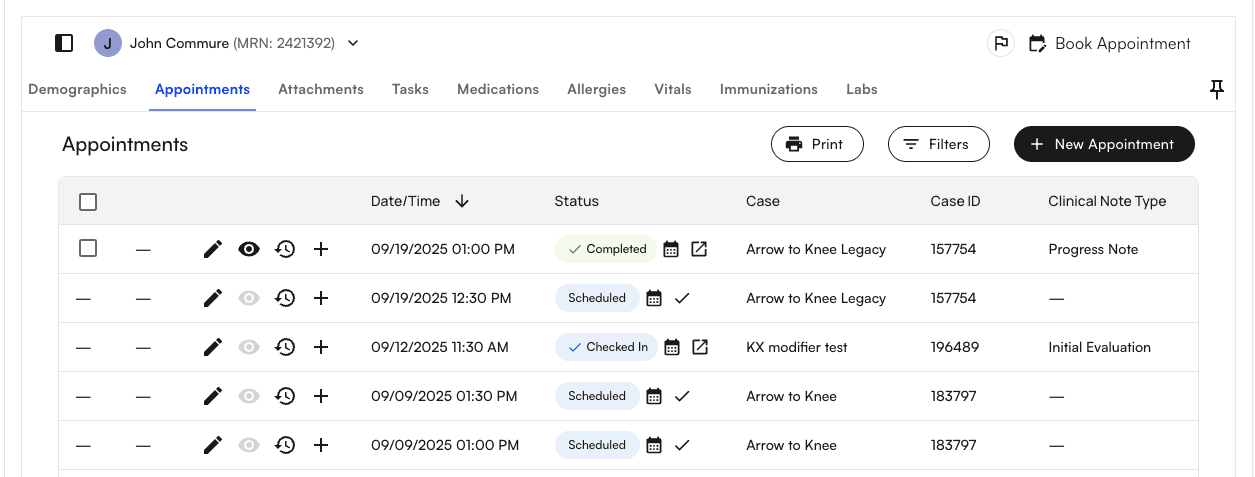
1. Go to an Appointment section of any selected Patient
<img src="https://mintcdn.com/air_athelas/EOSU2-xYM7ToxOAX/images/insights_provider/chart_notes/auto_apply_kx_modifier/auto_apply_kx_modifier_22.png?fit=max&auto=format&n=EOSU2-xYM7ToxOAX&q=85&s=72a512eeb82eb36ce470673d3b2fedb7" alt="" width="1255" height="477" data-path="images/insights_provider/chart_notes/auto_apply_kx_modifier/auto_apply_kx_modifier_22.png" />

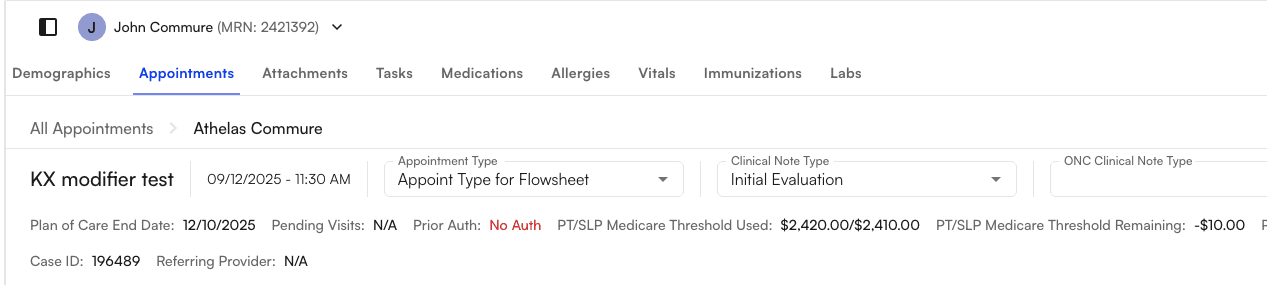
2. You’ll notice that for Medicare thresholds, there are two types: the PT/SLP Medicare Threshold and the OT Medicare Threshold.
<img src="https://mintcdn.com/air_athelas/EOSU2-xYM7ToxOAX/images/insights_provider/chart_notes/auto_apply_kx_modifier/auto_apply_kx_modifier_23.png?fit=max&auto=format&n=EOSU2-xYM7ToxOAX&q=85&s=e0dbc9c7d5e1129b59604ee9ca045534" alt="" width="1267" height="285" data-path="images/insights_provider/chart_notes/auto_apply_kx_modifier/auto_apply_kx_modifier_23.png" />

3. Check if the remaining Medicare threshold (e.g., PT/SLP) is negative (i.e., the threshold has been crossed).

<img src="https://mintcdn.com/air_athelas/EOSU2-xYM7ToxOAX/images/insights_provider/chart_notes/auto_apply_kx_modifier/auto_apply_kx_modifier_24.png?fit=max&auto=format&n=EOSU2-xYM7ToxOAX&q=85&s=321aa74e599cafcbd6c21fea6edd7929" alt="" width="721" height="61" data-path="images/insights_provider/chart_notes/auto_apply_kx_modifier/auto_apply_kx_modifier_24.png" />

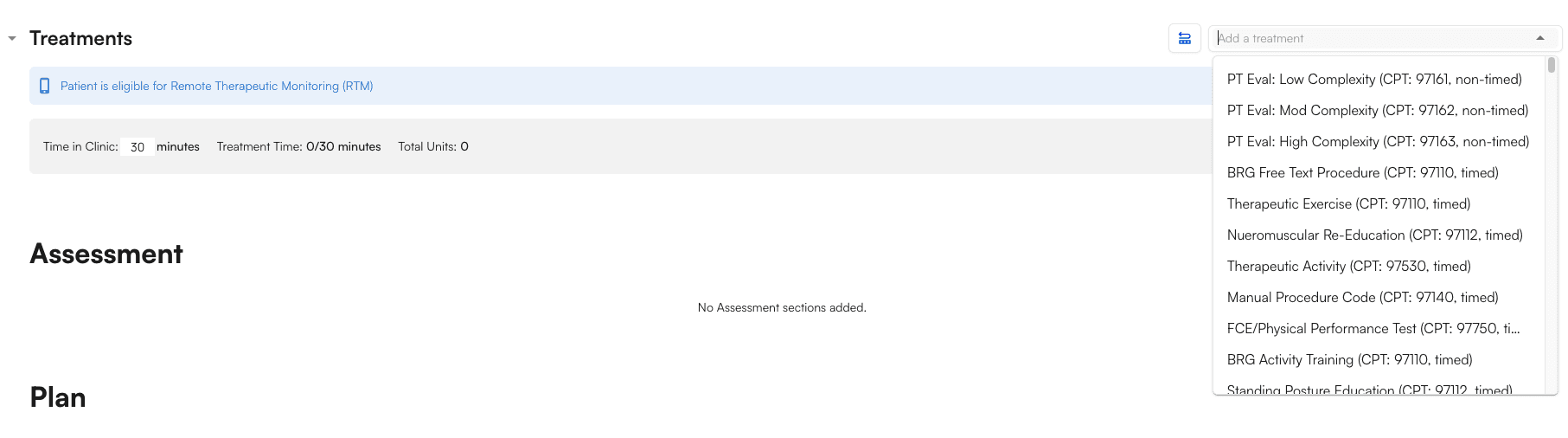
4. Scroll down to the Treatment section, where you can search for and choose a CPT code.
<img src="https://mintcdn.com/air_athelas/EOSU2-xYM7ToxOAX/images/insights_provider/chart_notes/auto_apply_kx_modifier/auto_apply_kx_modifier_25.png?fit=max&auto=format&n=EOSU2-xYM7ToxOAX&q=85&s=a18aa7a89f27db961205350c1baa0e69" alt="" width="1813" height="506" data-path="images/insights_provider/chart_notes/auto_apply_kx_modifier/auto_apply_kx_modifier_25.png" />

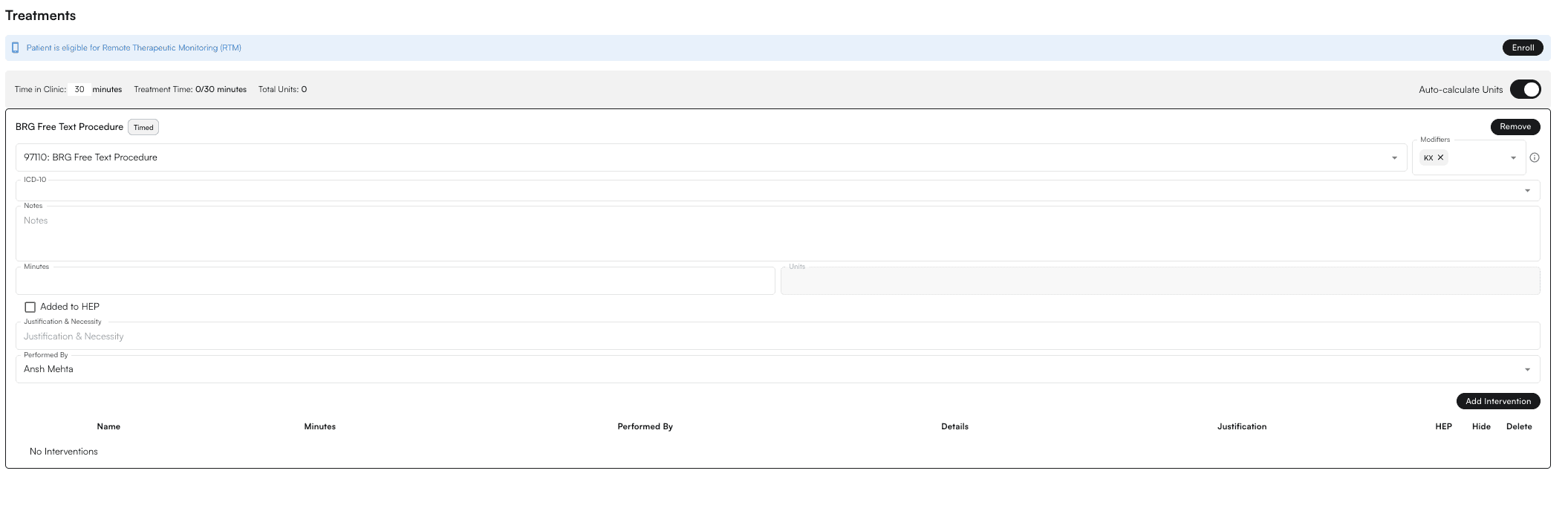
5. Select one of the procedures (i.e., CPT codes) that is KX-modifier qualified (e.g., 97110)
<img src="https://mintcdn.com/air_athelas/EOSU2-xYM7ToxOAX/images/insights_provider/chart_notes/auto_apply_kx_modifier/auto_apply_kx_modifier_26.png?fit=max&auto=format&n=EOSU2-xYM7ToxOAX&q=85&s=21fd47ee2e72b21417eca0605c31d52f" alt="" width="2111" height="692" data-path="images/insights_provider/chart_notes/auto_apply_kx_modifier/auto_apply_kx_modifier_26.png" />

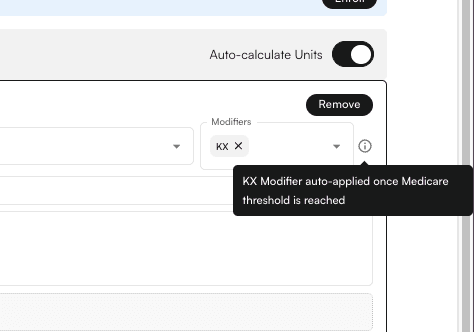
6. After adding the qualified procedure, the KX modifier is automatically applied with a tooltip.
<img src="https://mintcdn.com/air_athelas/EOSU2-xYM7ToxOAX/images/insights_provider/chart_notes/auto_apply_kx_modifier/auto_apply_kx_modifier_27.png?fit=max&auto=format&n=EOSU2-xYM7ToxOAX&q=85&s=e8ef938cd16551c189256030fbbb0d36" alt="" width="474" height="332" data-path="images/insights_provider/chart_notes/auto_apply_kx_modifier/auto_apply_kx_modifier_27.png" />

#### Applying the KX modifier in the Flowsheet Intervention section

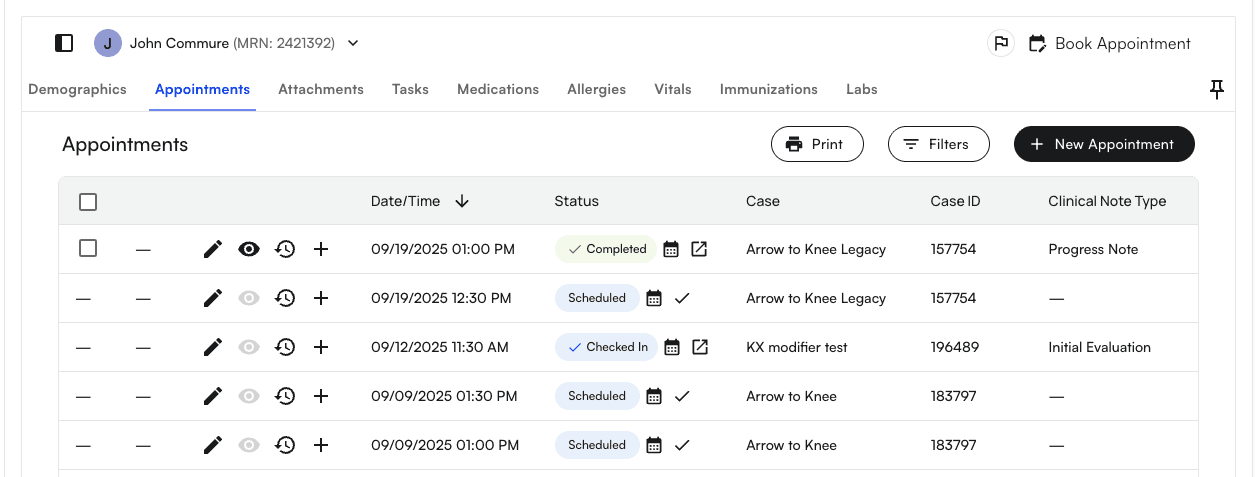
1. Go to an Appointment section of any selected Patient
<img src="https://mintcdn.com/air_athelas/EOSU2-xYM7ToxOAX/images/insights_provider/chart_notes/auto_apply_kx_modifier/auto_apply_kx_modifier_28.png?fit=max&auto=format&n=EOSU2-xYM7ToxOAX&q=85&s=ac4f16bb588dc764e51d3a55b238642d" alt="" width="1255" height="477" data-path="images/insights_provider/chart_notes/auto_apply_kx_modifier/auto_apply_kx_modifier_28.png" />

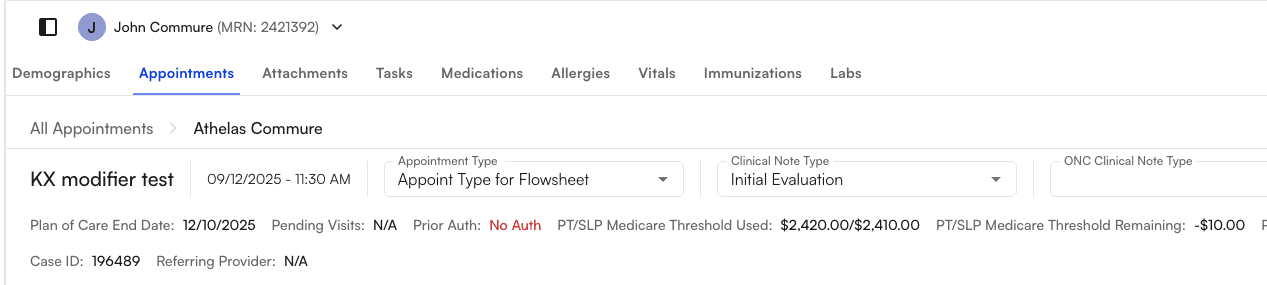
2. You’ll notice that for Medicare thresholds, there are two types: the PT/SLP Medicare Threshold and the OT Medicare Threshold.
<img src="https://mintcdn.com/air_athelas/EOSU2-xYM7ToxOAX/images/insights_provider/chart_notes/auto_apply_kx_modifier/auto_apply_kx_modifier_29.png?fit=max&auto=format&n=EOSU2-xYM7ToxOAX&q=85&s=d44a214238cb2e56b592b5aa4d68c791" alt="" width="1267" height="285" data-path="images/insights_provider/chart_notes/auto_apply_kx_modifier/auto_apply_kx_modifier_29.png" />

3. Check if the remaining Medicare threshold (e.g., PT/SLP) is negative (i.e., the threshold has been crossed).

<img src="https://mintcdn.com/air_athelas/EOSU2-xYM7ToxOAX/images/insights_provider/chart_notes/auto_apply_kx_modifier/auto_apply_kx_modifier_30.png?fit=max&auto=format&n=EOSU2-xYM7ToxOAX&q=85&s=21cc07347cdfd0b897927655a4e45c48" alt="" width="721" height="61" data-path="images/insights_provider/chart_notes/auto_apply_kx_modifier/auto_apply_kx_modifier_30.png" />

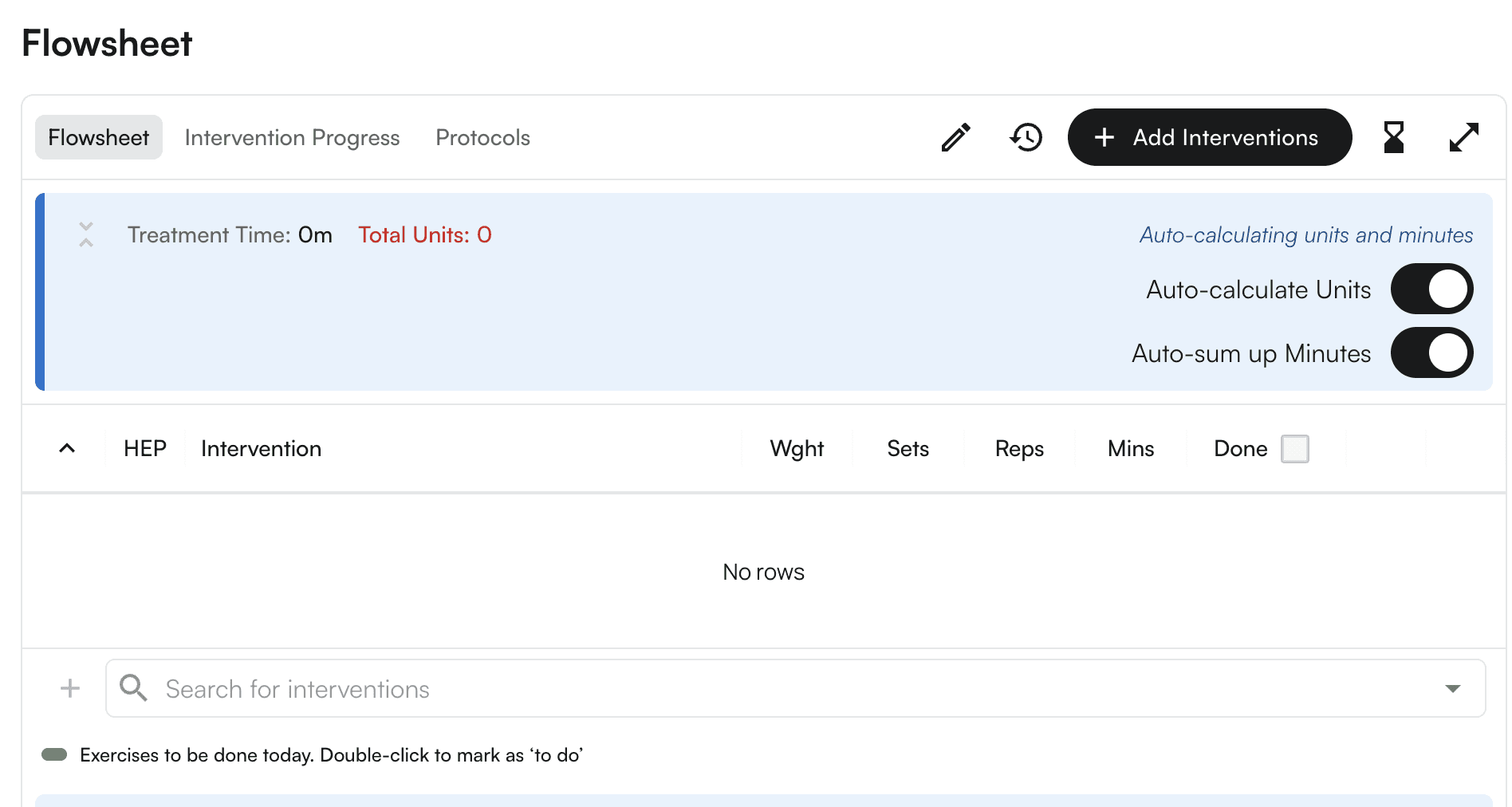
4. Scroll down to the Flowsheet section, where you can search for and choose a CPT code (i.e. “Search For Intervention”).
<img src="https://mintcdn.com/air_athelas/EOSU2-xYM7ToxOAX/images/insights_provider/chart_notes/auto_apply_kx_modifier/auto_apply_kx_modifier_31.png?fit=max&auto=format&n=EOSU2-xYM7ToxOAX&q=85&s=83069264c219ea78dd91b44adb48769a" alt="" width="1896" height="1012" data-path="images/insights_provider/chart_notes/auto_apply_kx_modifier/auto_apply_kx_modifier_31.png" />

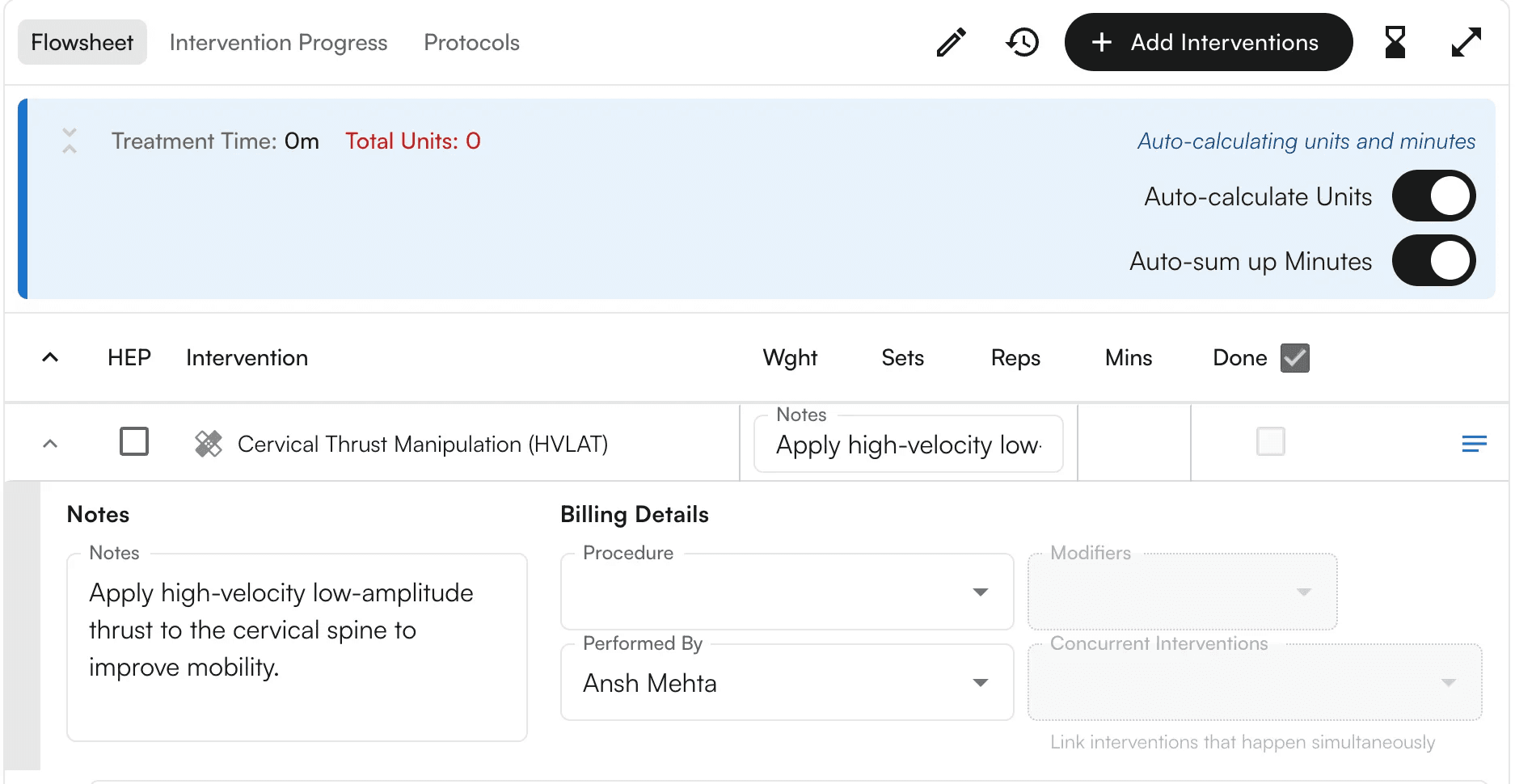
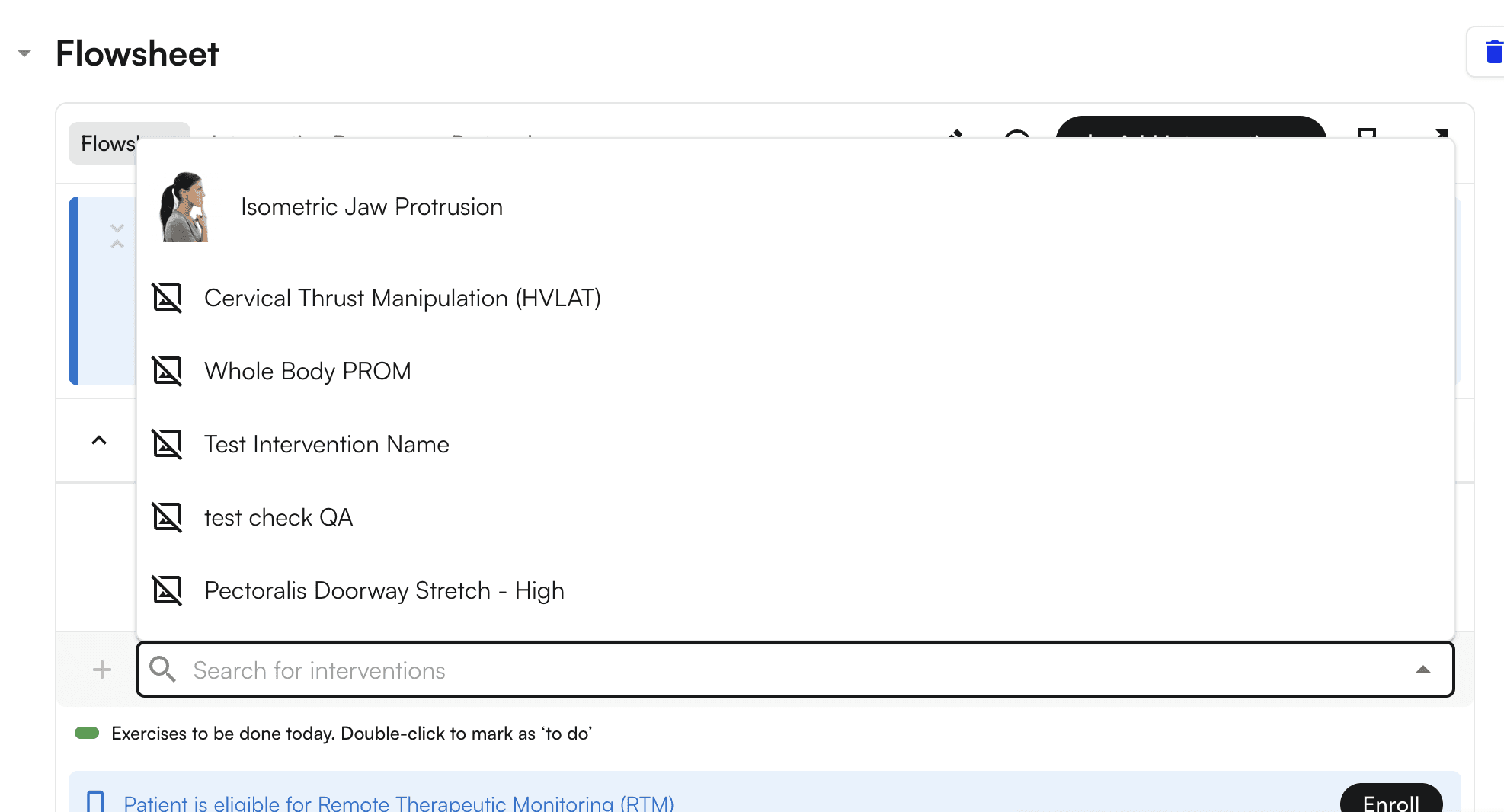
5. Select one of the interventions (e.g., Cervical Thrust Manipulation (HVLAT)).
<img src="https://mintcdn.com/air_athelas/EOSU2-xYM7ToxOAX/images/insights_provider/chart_notes/auto_apply_kx_modifier/auto_apply_kx_modifier_32.png?fit=max&auto=format&n=EOSU2-xYM7ToxOAX&q=85&s=78f406a833e6c715c72b6f517cd7b985" alt="" width="1974" height="1066" data-path="images/insights_provider/chart_notes/auto_apply_kx_modifier/auto_apply_kx_modifier_32.png" />

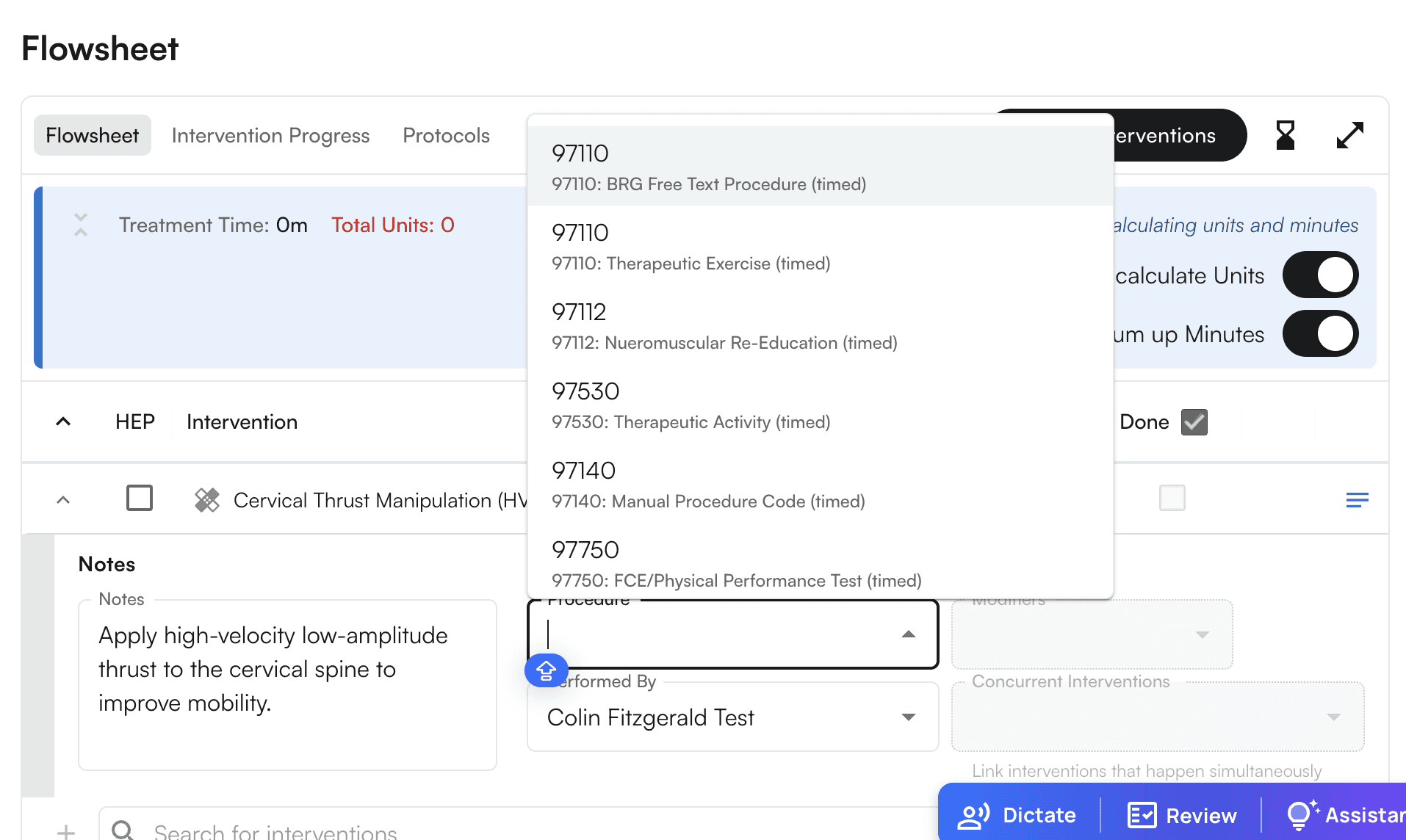
6. Select one of the procedures (i.e., CPT codes) that is KX-modifier qualified (e.g., 97110)
<img src="https://mintcdn.com/air_athelas/EOSU2-xYM7ToxOAX/images/insights_provider/chart_notes/auto_apply_kx_modifier/auto_apply_kx_modifier_33.png?fit=max&auto=format&n=EOSU2-xYM7ToxOAX&q=85&s=14b92fb96ff13867314cf5c48e2bfc3d" alt="" width="1914" height="1144" data-path="images/insights_provider/chart_notes/auto_apply_kx_modifier/auto_apply_kx_modifier_33.png" />

7. Now Mark it as Done

<img src="https://mintcdn.com/air_athelas/EOSU2-xYM7ToxOAX/images/insights_provider/chart_notes/auto_apply_kx_modifier/auto_apply_kx_modifier_34.png?fit=max&auto=format&n=EOSU2-xYM7ToxOAX&q=85&s=6407cd29cbe4c0cbe87832466163e616" alt="" width="1874" height="970" data-path="images/insights_provider/chart_notes/auto_apply_kx_modifier/auto_apply_kx_modifier_34.png" />

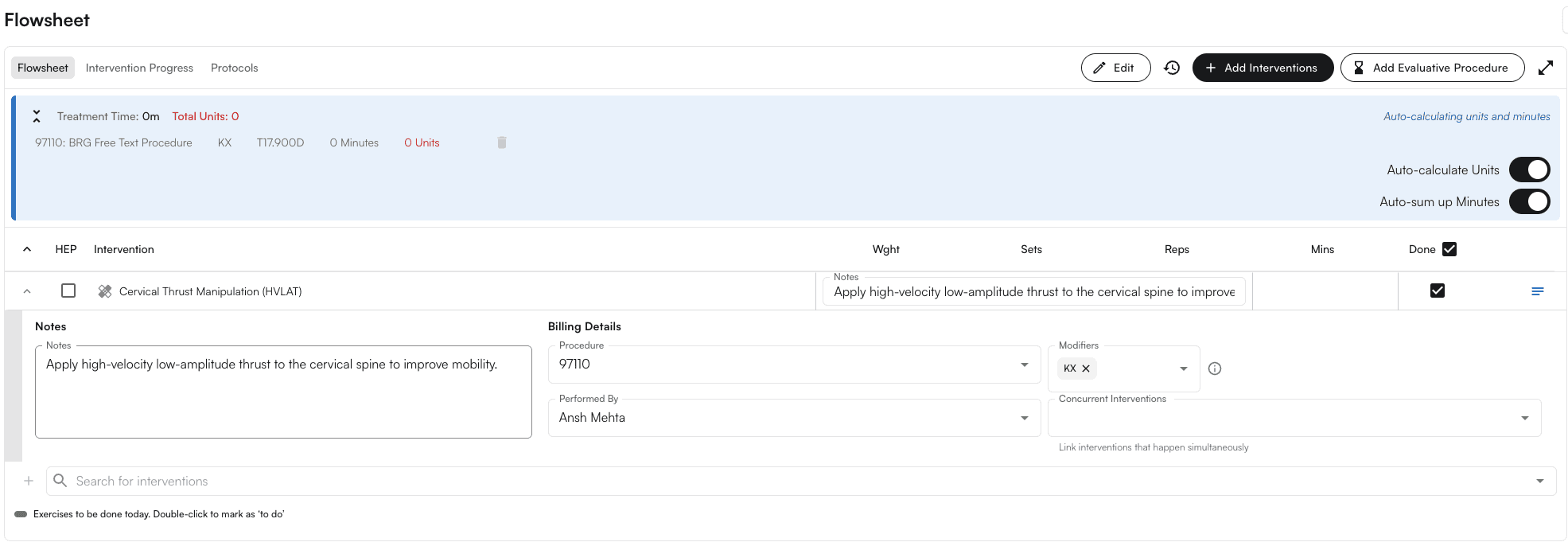
8. The KX modifier will be applied automatically, and you can also see the tooltip.
<img src="https://mintcdn.com/air_athelas/EOSU2-xYM7ToxOAX/images/insights_provider/chart_notes/auto_apply_kx_modifier/auto_apply_kx_modifier_35.png?fit=max&auto=format&n=EOSU2-xYM7ToxOAX&q=85&s=01276cfc019b4e711428bcb4c6c15704" alt="" width="1971" height="686" data-path="images/insights_provider/chart_notes/auto_apply_kx_modifier/auto_apply_kx_modifier_35.png" />