> ## Documentation Index
> Fetch the complete documentation index at: https://docs.athelas.com/llms.txt
> Use this file to discover all available pages before exploring further.
# How to Create Suggested PR Rules
#### At a Glance
Establishing **Suggested PR Rules** can save your staff a lot of time, as they’ll no longer need to manually look up or compare fee schedules and insurance information.
These rules determine things like suggested copay, coinsurance, the prioritization of deductible or copay, etc. based on your criteria.
###
### Walkthrough: How to Set Suggested Charge Rules
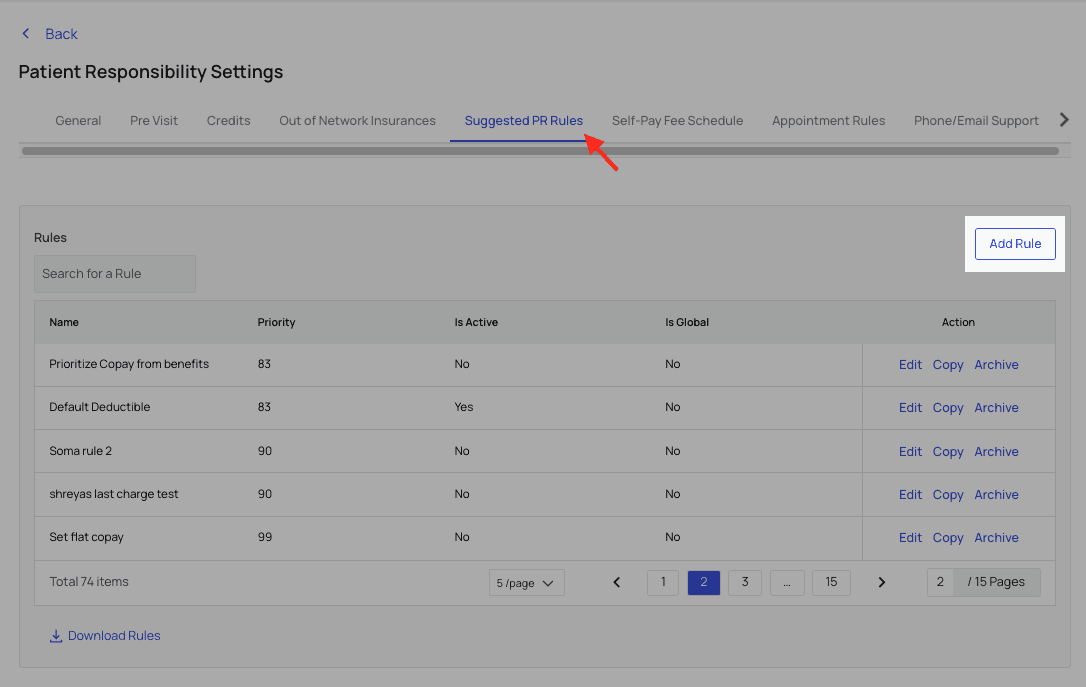
Currently, you can set Suggested Charge Rules via the **Suggested PR Rules** tab in [Patient Responsibility Settings](https://insights.athelas.com/v2/patient-responsibility-settings). Click `Add Rule`.
 **For this example**, imagine you want a Suggested Charge Rule that:
* Sets a \$10 copay that prioritizes any remaining family deductible, but
* Only for patients 65 years of age or older, and
* To only apply when the appointment is for a Diagnostic X-Ray.
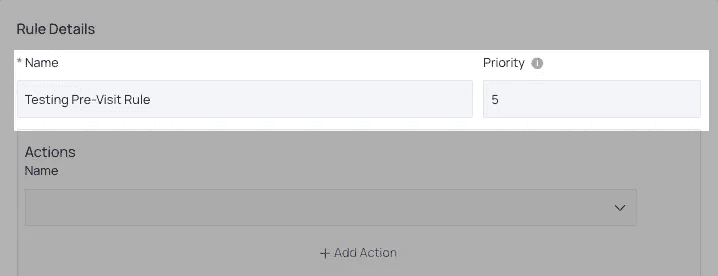
To begin, give your rule a name and level of priority.
Higher numerical values indicate higher priority. For example, a rule with Priority 3 will override a conflicting rule of Priority 2.
**For this example**, imagine you want a Suggested Charge Rule that:
* Sets a \$10 copay that prioritizes any remaining family deductible, but
* Only for patients 65 years of age or older, and
* To only apply when the appointment is for a Diagnostic X-Ray.
To begin, give your rule a name and level of priority.
Higher numerical values indicate higher priority. For example, a rule with Priority 3 will override a conflicting rule of Priority 2.
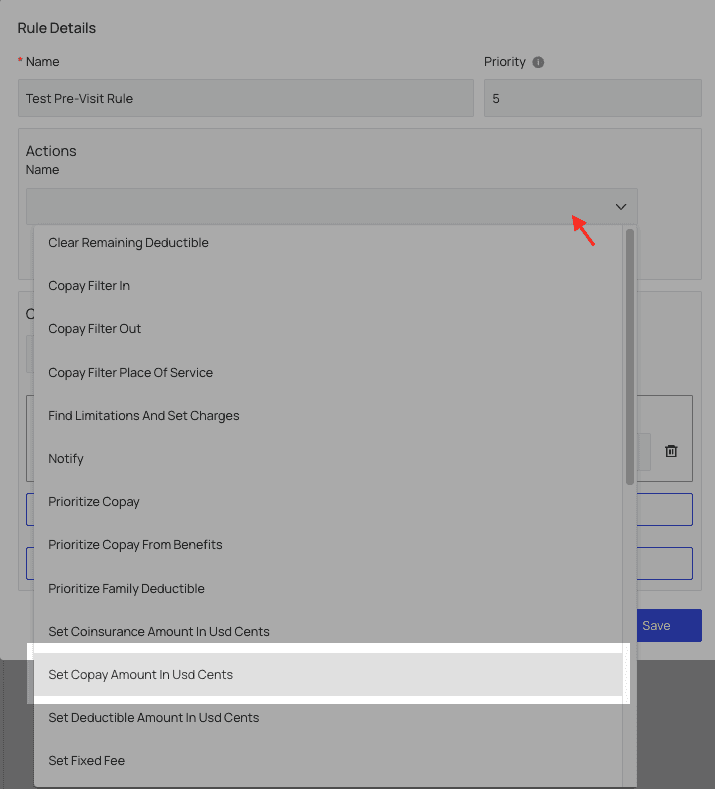
 In the Actions block, choose to `Set Copay Amount in USD Cents` and enter 1000, to equal \$10.
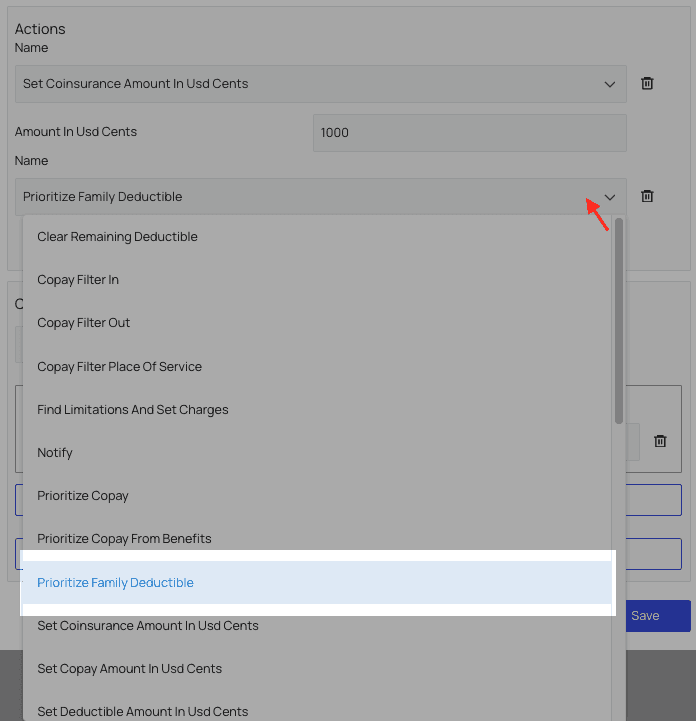
 Then, click `Add Action` and select ‘Prioritize Family Deductible’ from the new dropdown menu.
 Now, add the **conditions** that must be met to activate this rule.
By default, a single-statement block will be displayed.
The **best practice for setting rules with several distinct conditions that must all be met**, like what we’re doing here, would be to delete the single-statement condition block and use a multi-statement condition block instead.
Under `Condition Type`, in this case, you may choose ‘All’ or ‘Any,’ as we will use a multi-statement condition anyway. If you need to edit the rule later, you can change whether ‘All’ conditions must be met or if only ‘Any’ conditions must be met to activate the rule.
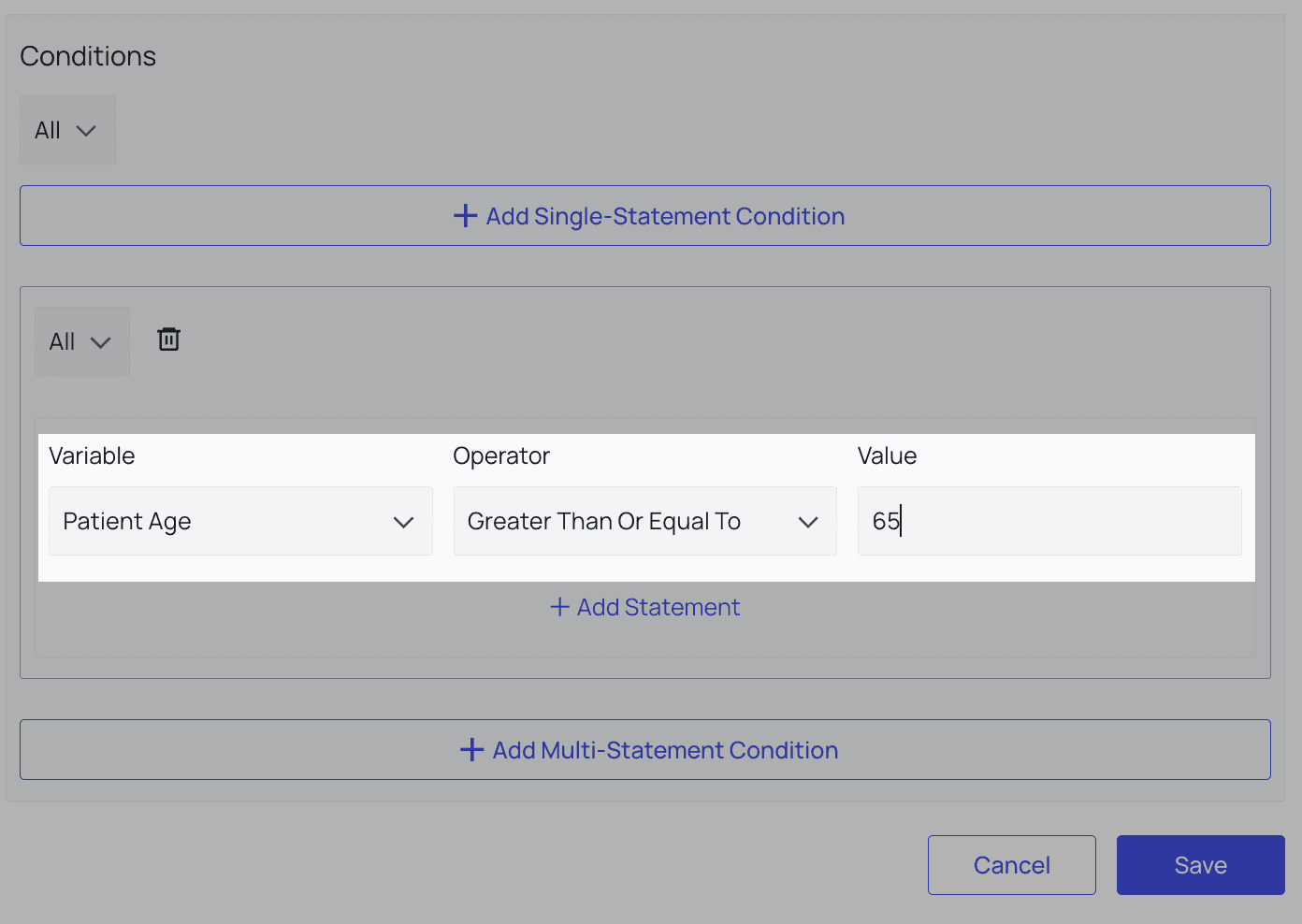
Under `Variable`, choose ‘Patient Age’ and set it greater than or equal to 65.
Now, add the **conditions** that must be met to activate this rule.
By default, a single-statement block will be displayed.
The **best practice for setting rules with several distinct conditions that must all be met**, like what we’re doing here, would be to delete the single-statement condition block and use a multi-statement condition block instead.
Under `Condition Type`, in this case, you may choose ‘All’ or ‘Any,’ as we will use a multi-statement condition anyway. If you need to edit the rule later, you can change whether ‘All’ conditions must be met or if only ‘Any’ conditions must be met to activate the rule.
Under `Variable`, choose ‘Patient Age’ and set it greater than or equal to 65.
 Almost done!
Click `Add Statement`.
For this Variable, choose Appointment Type and set it equal to 4 (the STC for Diagnostic X-Ray. Be sure to look up and enter the proper STC for your rule if you use this or a related variable).
Almost done!
Click `Add Statement`.
For this Variable, choose Appointment Type and set it equal to 4 (the STC for Diagnostic X-Ray. Be sure to look up and enter the proper STC for your rule if you use this or a related variable).
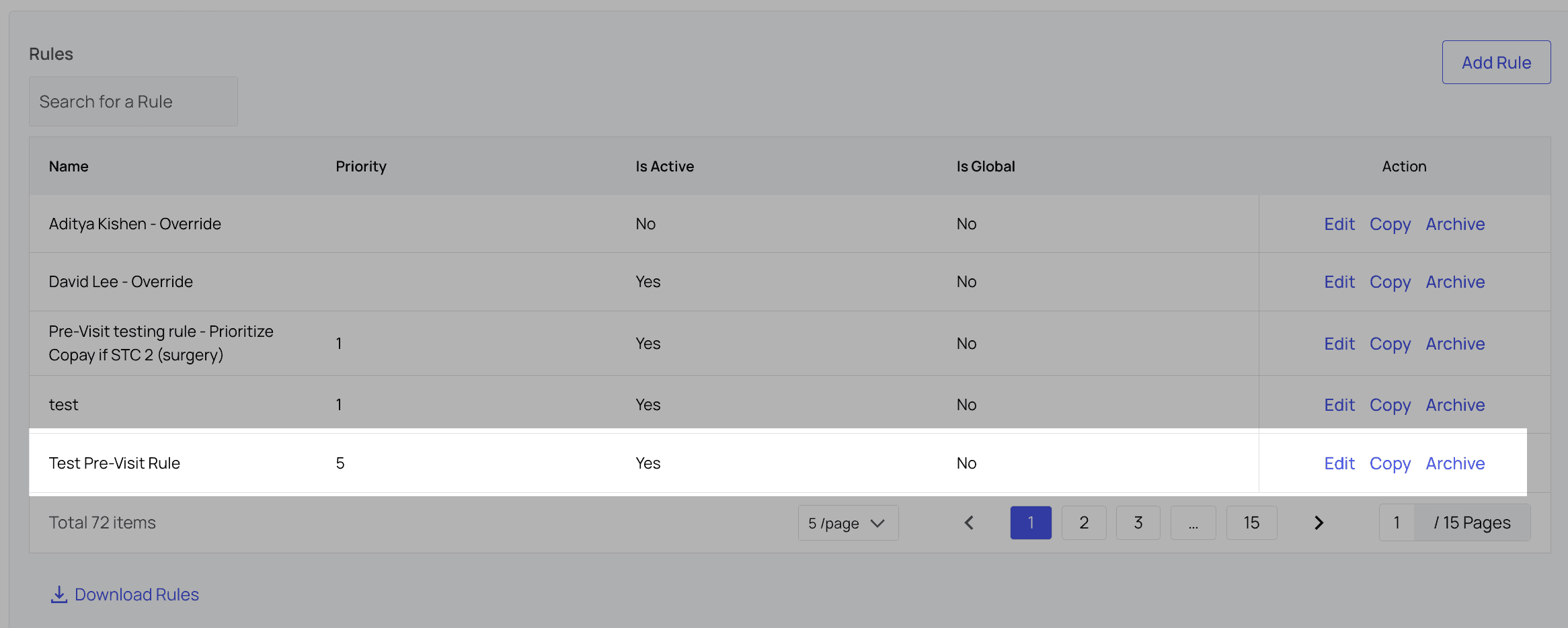
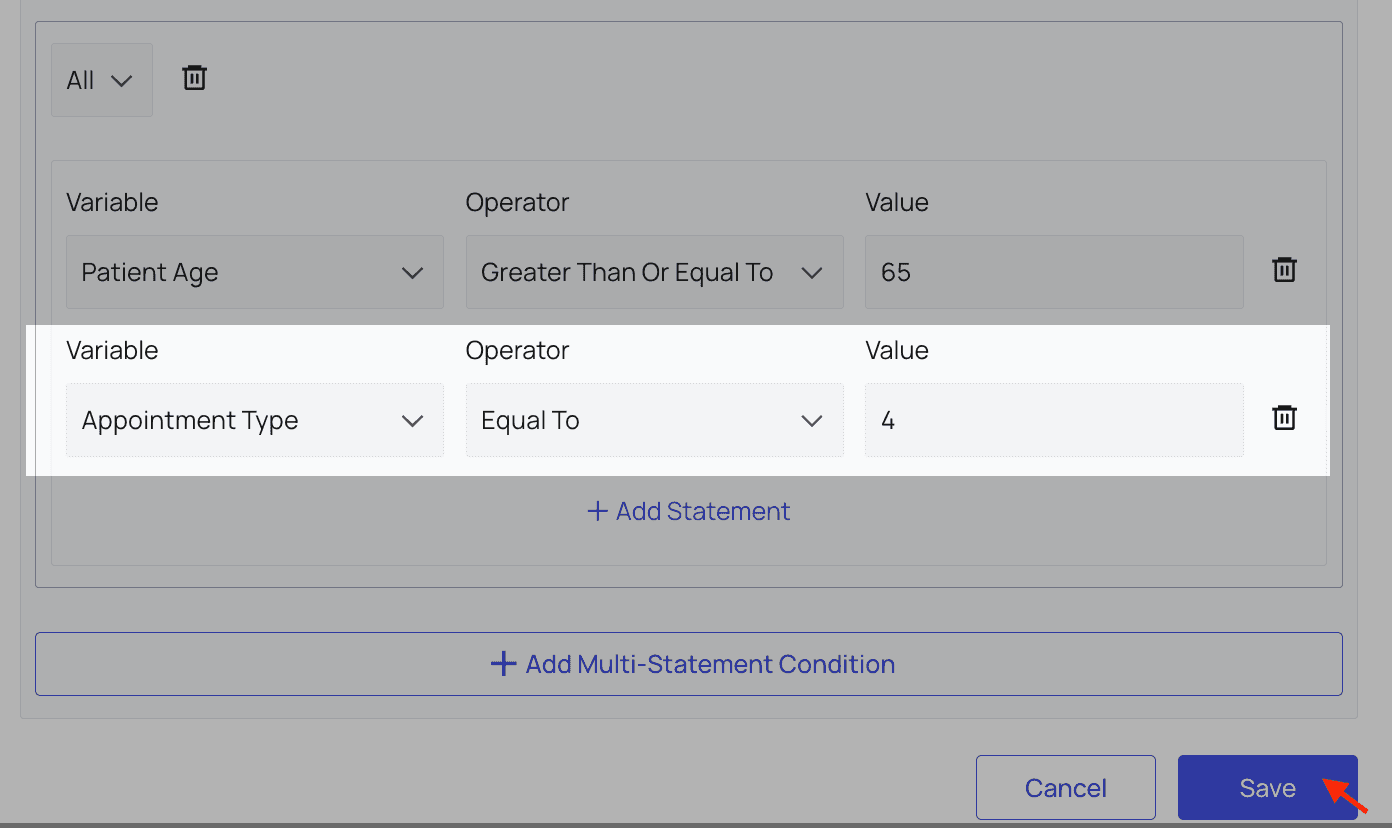 Click `Save`. Now you can view your rule in the Rules list, and edit, copy or archive it from there.
 #### Suggested Charges Features
**Features Supported:**
* Pre-visit rules to customize suggested charge
* ability to suggest last remit amount
* Incorporating benefits into final charge
* Autofilling suggested charges at checkout
**Features In Development:**
* Dynamic deductible rules
**Features Not Supported:**
* Procedure based charges
#### Suggested Charge Rules: Actions and Conditions Reference List
Below is a list of all Actions and Conditions currently available for Suggested Charge Rules. If you would like more options, please contact your account manager.
| **Action** | **Definition** |
| ------------------ | --------------------------------------------------------------------------------------------------- |
| 1. Copay Filter In | Pulls in the chosen text from the eligibility response to be displayed as a payment recommendation. |
*Example*: If the input text is PCP, then it will display the charge associated with the copay for PCP from the eligibility response on the appointment. | | 2. Copay Filter Out | Excludes the chosen text from the eligibility response so it is not displayed as a payment recommendation.
*Example*: If the input text is PCP, then it will not display the charge associated with the copay for PCP from the eligibility response on the appointment. | | 3. Copay Filter Place of Service | Filters in the amount to be collected based on the input place of service.
*Example*: If the input place of service is Hospital - Outpatient, then it will display the copay associated with Hospital – Outpatient from the eligibility response. | | 4. Find Limitations and Set Charges | Finds the input limitations from the eligibility response and defaults to the chosen charge
*Example*: If the input limitation is for a maximum of 6 sessions and the chosen copay is \$50 for anything above that, then it will display that charge as a suggested amount to be collected. | | 5. Notify | Leaves a message on the patient’s appointment for the front desk to read. | | 6. Prioritize Copay | Prioritizes copay to be collected over coinsurance or deductible. | | 7. Prioritize Family Deductible | Prioritizes the family deductible to be collected over coinsurance or copay. | | 8. Set Coinsurance Amount in USD Cents | Input a specific coinsurance amount to be collected. | | 9. Set Copay Amount in USD Cents | Input a specific copay amount to be collected. | | 10. Set Deductible Amount in USD Cents | Input a specific deductible amount to be collected. | | 11. Set Self-Pay Amount in USD Cents | Input a specific amount to be collected if patient is self-pay. |
**Conditions**
* Appointment Reason
* Appointment Type
* Coinsurance Percentage
* Copay in USD Cents
* Facility
* Has QMB Insurance
* Limitations Payer Notes
* Patient Age
* Patient Date of Birth
* Primary Group Name
* Primary Input Insurance Name
* Primary Insurance Company Type
* Primary Member ID
* Primary Payer
* Primary Payer Patient Is Dependent
* Primary Plan Description
* Remaining Deductible in USD Cents
* Remaining Family Out of Pocket in USD Cents
* Remaining Out of Pocket in USD Cents
* Secondary Input Insurance Name
* Secondary Insurance Company Type
* Secondary Member ID
* Secondary Payer
#### Service Charges Features
**Features Supported:**
* Service - payer - charge mappings set internally
* Users can select service and payer to collect the mapped amount
* Line item customization
#### Suggested Charges Features
**Features Supported:**
* Pre-visit rules to customize suggested charge
* ability to suggest last remit amount
* Incorporating benefits into final charge
* Autofilling suggested charges at checkout
**Features In Development:**
* Dynamic deductible rules
**Features Not Supported:**
* Procedure based charges
#### Suggested Charge Rules: Actions and Conditions Reference List
Below is a list of all Actions and Conditions currently available for Suggested Charge Rules. If you would like more options, please contact your account manager.
| **Action** | **Definition** |
| ------------------ | --------------------------------------------------------------------------------------------------- |
| 1. Copay Filter In | Pulls in the chosen text from the eligibility response to be displayed as a payment recommendation. |
*Example*: If the input text is PCP, then it will display the charge associated with the copay for PCP from the eligibility response on the appointment. | | 2. Copay Filter Out | Excludes the chosen text from the eligibility response so it is not displayed as a payment recommendation.
*Example*: If the input text is PCP, then it will not display the charge associated with the copay for PCP from the eligibility response on the appointment. | | 3. Copay Filter Place of Service | Filters in the amount to be collected based on the input place of service.
*Example*: If the input place of service is Hospital - Outpatient, then it will display the copay associated with Hospital – Outpatient from the eligibility response. | | 4. Find Limitations and Set Charges | Finds the input limitations from the eligibility response and defaults to the chosen charge
*Example*: If the input limitation is for a maximum of 6 sessions and the chosen copay is \$50 for anything above that, then it will display that charge as a suggested amount to be collected. | | 5. Notify | Leaves a message on the patient’s appointment for the front desk to read. | | 6. Prioritize Copay | Prioritizes copay to be collected over coinsurance or deductible. | | 7. Prioritize Family Deductible | Prioritizes the family deductible to be collected over coinsurance or copay. | | 8. Set Coinsurance Amount in USD Cents | Input a specific coinsurance amount to be collected. | | 9. Set Copay Amount in USD Cents | Input a specific copay amount to be collected. | | 10. Set Deductible Amount in USD Cents | Input a specific deductible amount to be collected. | | 11. Set Self-Pay Amount in USD Cents | Input a specific amount to be collected if patient is self-pay. |
**Conditions**
* Appointment Reason
* Appointment Type
* Coinsurance Percentage
* Copay in USD Cents
* Facility
* Has QMB Insurance
* Limitations Payer Notes
* Patient Age
* Patient Date of Birth
* Primary Group Name
* Primary Input Insurance Name
* Primary Insurance Company Type
* Primary Member ID
* Primary Payer
* Primary Payer Patient Is Dependent
* Primary Plan Description
* Remaining Deductible in USD Cents
* Remaining Family Out of Pocket in USD Cents
* Remaining Out of Pocket in USD Cents
* Secondary Input Insurance Name
* Secondary Insurance Company Type
* Secondary Member ID
* Secondary Payer
#### Service Charges Features
**Features Supported:**
* Service - payer - charge mappings set internally
* Users can select service and payer to collect the mapped amount
* Line item customization