> ## Documentation Index
> Fetch the complete documentation index at: https://docs.athelas.com/llms.txt
> Use this file to discover all available pages before exploring further.
# Custom Collections Report
 #### Summary
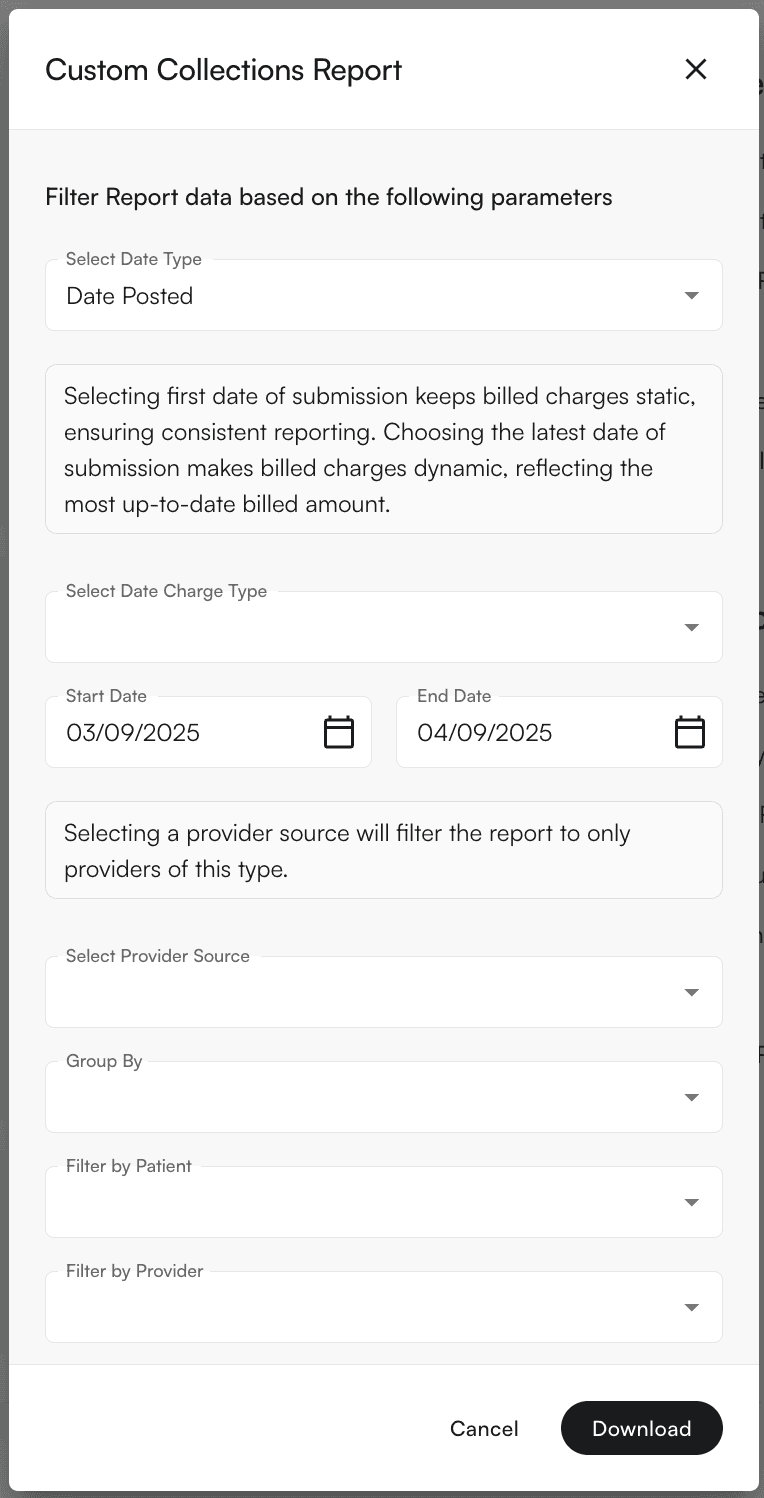
This is the catch-all category for creating collections reports with modifications specific to your practice. Set the filters on these reports to fit your organization’s needs.
For a standard collections report, see this [guide](/insights_biller/reports/collections_report). For front-desk **upfront (point-of-service)** collection performance instead of posted payments, see the [Upfront Collections Report](/insights_biller/reports/upfront_collections_report).
#### Main Feature
Use the ‘**Group By**’ menu to see the report grouped to your specifications. Options are **Facility**, **Provider**, **CPT Code**, **Patient**, **Encounter ID**, **Day**, and **Month**.
#### Summary
This is the catch-all category for creating collections reports with modifications specific to your practice. Set the filters on these reports to fit your organization’s needs.
For a standard collections report, see this [guide](/insights_biller/reports/collections_report). For front-desk **upfront (point-of-service)** collection performance instead of posted payments, see the [Upfront Collections Report](/insights_biller/reports/upfront_collections_report).
#### Main Feature
Use the ‘**Group By**’ menu to see the report grouped to your specifications. Options are **Facility**, **Provider**, **CPT Code**, **Patient**, **Encounter ID**, **Day**, and **Month**.
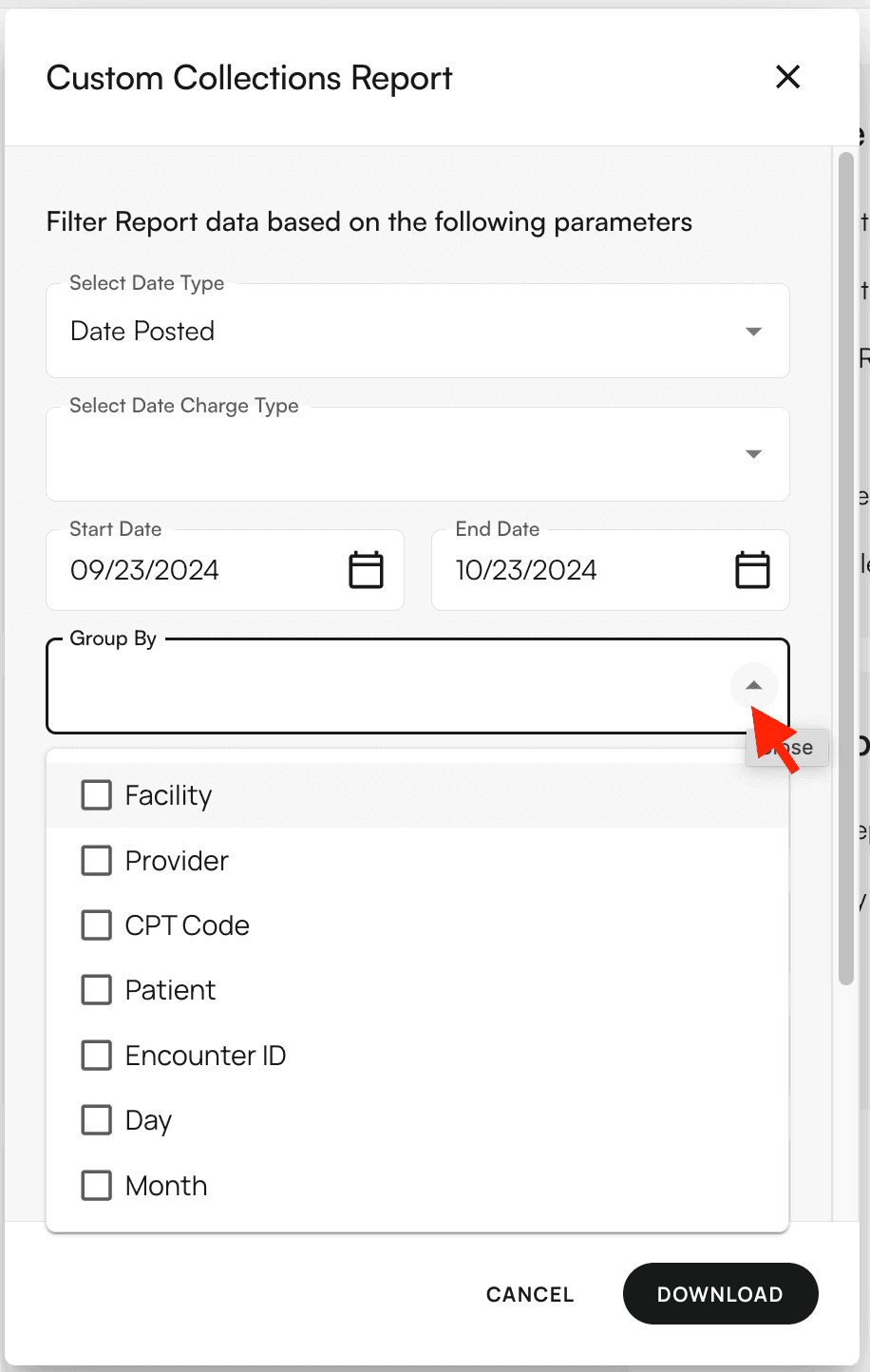 Two date controls determine how the report is built:
* **Select Date Type** sets the date basis for your date range: **Date Posted** (default), **Check Date**, or **Date of Service**.
* **Select Date Charge Type** sets how billed charges are dated: **First Date of Submission** (keeps billed charges static for consistent reporting) or **Latest Date of Submission** (dynamic, reflecting the most up-to-date billed amount).
#### Filters Supported
* Select Date Type (Date Posted, Check Date, Date of Service)
* Select Date Charge Type (First or Latest Date of Submission)
* Group By (Facility, Provider, CPT Code, Patient, Encounter ID, Day, Month)
* Provider Source (rendering provider, resource provider, appointment provider)
* Patients
* Providers
* Payers
* Facilities
* CPT Codes
* Place of Service Codes
* Include Credit Transactions toggle
* Report Format (CSV or XLSX)
Two date controls determine how the report is built:
* **Select Date Type** sets the date basis for your date range: **Date Posted** (default), **Check Date**, or **Date of Service**.
* **Select Date Charge Type** sets how billed charges are dated: **First Date of Submission** (keeps billed charges static for consistent reporting) or **Latest Date of Submission** (dynamic, reflecting the most up-to-date billed amount).
#### Filters Supported
* Select Date Type (Date Posted, Check Date, Date of Service)
* Select Date Charge Type (First or Latest Date of Submission)
* Group By (Facility, Provider, CPT Code, Patient, Encounter ID, Day, Month)
* Provider Source (rendering provider, resource provider, appointment provider)
* Patients
* Providers
* Payers
* Facilities
* CPT Codes
* Place of Service Codes
* Include Credit Transactions toggle
* Report Format (CSV or XLSX)