> ## Documentation Index
> Fetch the complete documentation index at: https://docs.athelas.com/llms.txt
> Use this file to discover all available pages before exploring further.
# How to Resubmit Claims in Bulk
### At a Glance
When the same problem affects many claims — an eligibility denial across a patient's visits, a batch of submission errors with the same cause — you don't have to fix them one at a time. The Claims Page lets you build a focused worklist, select a group of claims, and resubmit them all in a single action.
✨**Smart Tip:** Bulk actions turn what used to be many clicks into a few. An eligibility denial on five claims for one patient — update insurance, resubmit, and comment — drops from roughly 15 actions to about 3.
### Step 1 — Build a Focused Worklist
Bulk resubmission works best when you first gather the claims that share a problem. Filter your list and **group by reason** so claims with the same denial, rejection, or submission-error reason land in one bucket. For the full set of tools, see [Organizing Your Claims Worklist](/insights_biller/claim_details/organizing_your_claims_worklist).
### Step 2 — Select the Claims
Select the claims you want to resubmit using the checkboxes. To grab an entire bucket, **right-click the empty space in the group** and choose **Select all in the group**.
You can select up to **50 claims at a time**. To work a bigger bucket, scroll down to load more rows first, then select again — each selection captures everything currently loaded.
### Step 3 — Resubmit with More Actions
With your claims selected, open **More Actions** at the bottom of the screen and choose **Resubmit** (or **Submit**). The action applies to every selected claim at once.
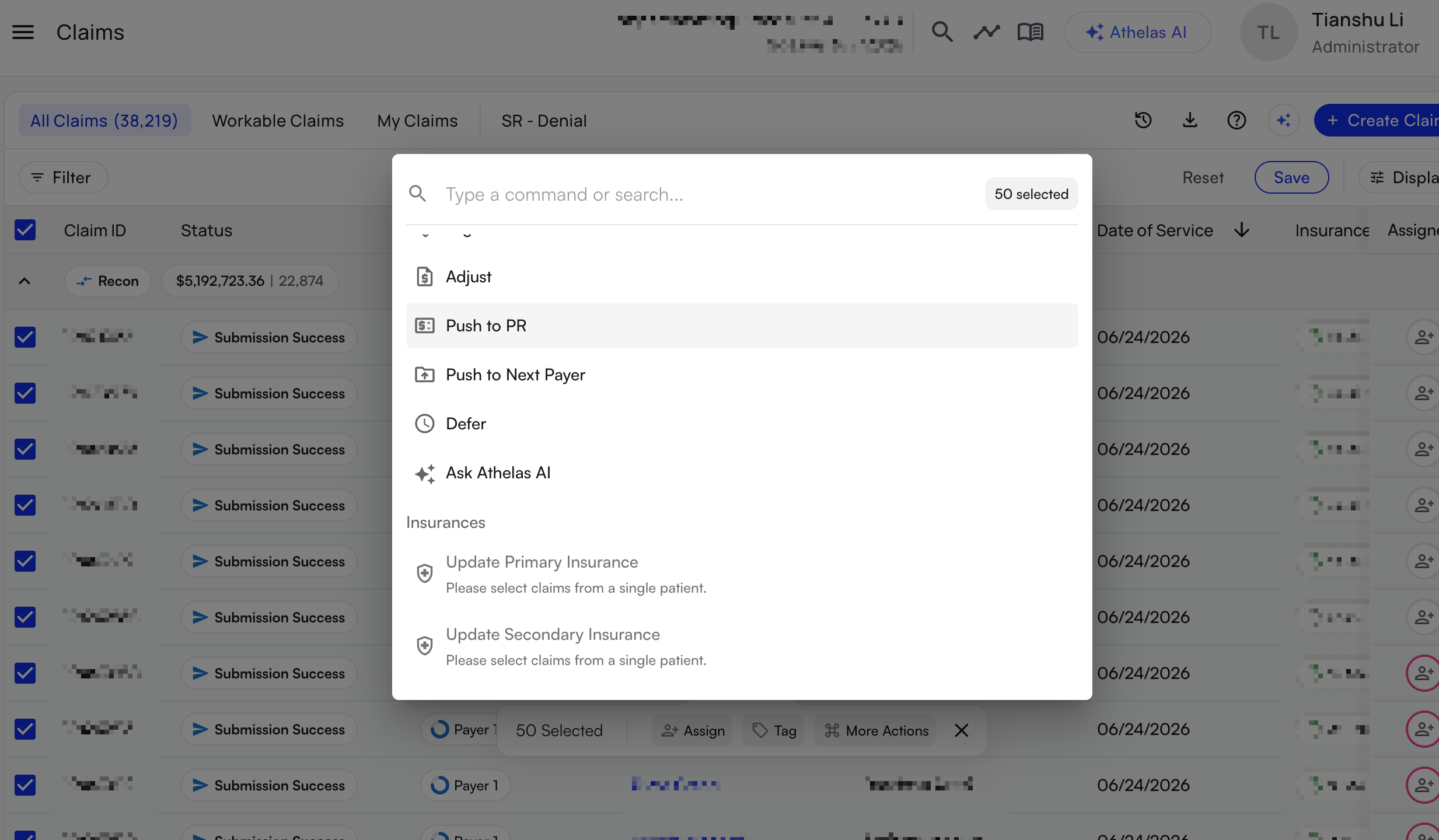 From the same **More Actions** menu you can run other bulk operations on the selected claims — update primary insurance, leave a comment, push to patient responsibility, mark as intended to bill, or defer.
Higher-risk actions like **push to PR**, **push to next payer**, and **adjust** stay UI-validated so you review them before they run.
✨**Smart Tip:** For a niche change across a group — say, "add a KX modifier to all 99214s on these claims" — pass the selected claims to [Athelas Assistant](/insights_general/athelas_assistant/getting_started_with_athelas_assistant) and describe the edit. The Assistant works with your selection as context.
### FAQ
It's built into the Claims Page. Select claims from your worklist, then open **More Actions** at the bottom of the screen and choose **Resubmit**. There's no separate bulk-resubmission page to visit.
Up to **50 at a time**. To work a larger group, scroll to load more rows and select again — each selection grabs everything currently loaded, so you can scroll to the bottom of a group and select the whole bucket.
Yes. **Update primary insurance** is one of the bulk actions in the **More Actions** menu — useful when an eligibility denial hits several claims. Update the insurance across the group, then resubmit them together.
Open the claim from the [Claims Page](/insights_biller/claim_details/claim_details_page) and use **Actions → Edit Claim Form & Resubmit** to fix and resubmit it individually.
From the same **More Actions** menu you can run other bulk operations on the selected claims — update primary insurance, leave a comment, push to patient responsibility, mark as intended to bill, or defer.
Higher-risk actions like **push to PR**, **push to next payer**, and **adjust** stay UI-validated so you review them before they run.
✨**Smart Tip:** For a niche change across a group — say, "add a KX modifier to all 99214s on these claims" — pass the selected claims to [Athelas Assistant](/insights_general/athelas_assistant/getting_started_with_athelas_assistant) and describe the edit. The Assistant works with your selection as context.
### FAQ
It's built into the Claims Page. Select claims from your worklist, then open **More Actions** at the bottom of the screen and choose **Resubmit**. There's no separate bulk-resubmission page to visit.
Up to **50 at a time**. To work a larger group, scroll to load more rows and select again — each selection grabs everything currently loaded, so you can scroll to the bottom of a group and select the whole bucket.
Yes. **Update primary insurance** is one of the bulk actions in the **More Actions** menu — useful when an eligibility denial hits several claims. Update the insurance across the group, then resubmit them together.
Open the claim from the [Claims Page](/insights_biller/claim_details/claim_details_page) and use **Actions → Edit Claim Form & Resubmit** to fix and resubmit it individually.