> ## Documentation Index
> Fetch the complete documentation index at: https://docs.athelas.com/llms.txt
> Use this file to discover all available pages before exploring further.
# Viewing a C-CDA Document
When a **C-CDA** (Consolidated Clinical Document Architecture) arrives in your CCDA inbox, you can open and read it on its own—before, after, or independently of [reconciling its data into the chart](/air_developer/onc_feature_guides/reconcile_incoming_ccda). This page covers reading a received document, what each clinical section contains, and customizing how the document is laid out.
To open a document, go to the **CCDA** tab in the **Inbox** and select an entry from the list. See [Viewing and Reconciling Incoming C-CDAs](/air_developer/onc_feature_guides/reconcile_incoming_ccda) for how to find and sort the inbox.
## Read the document
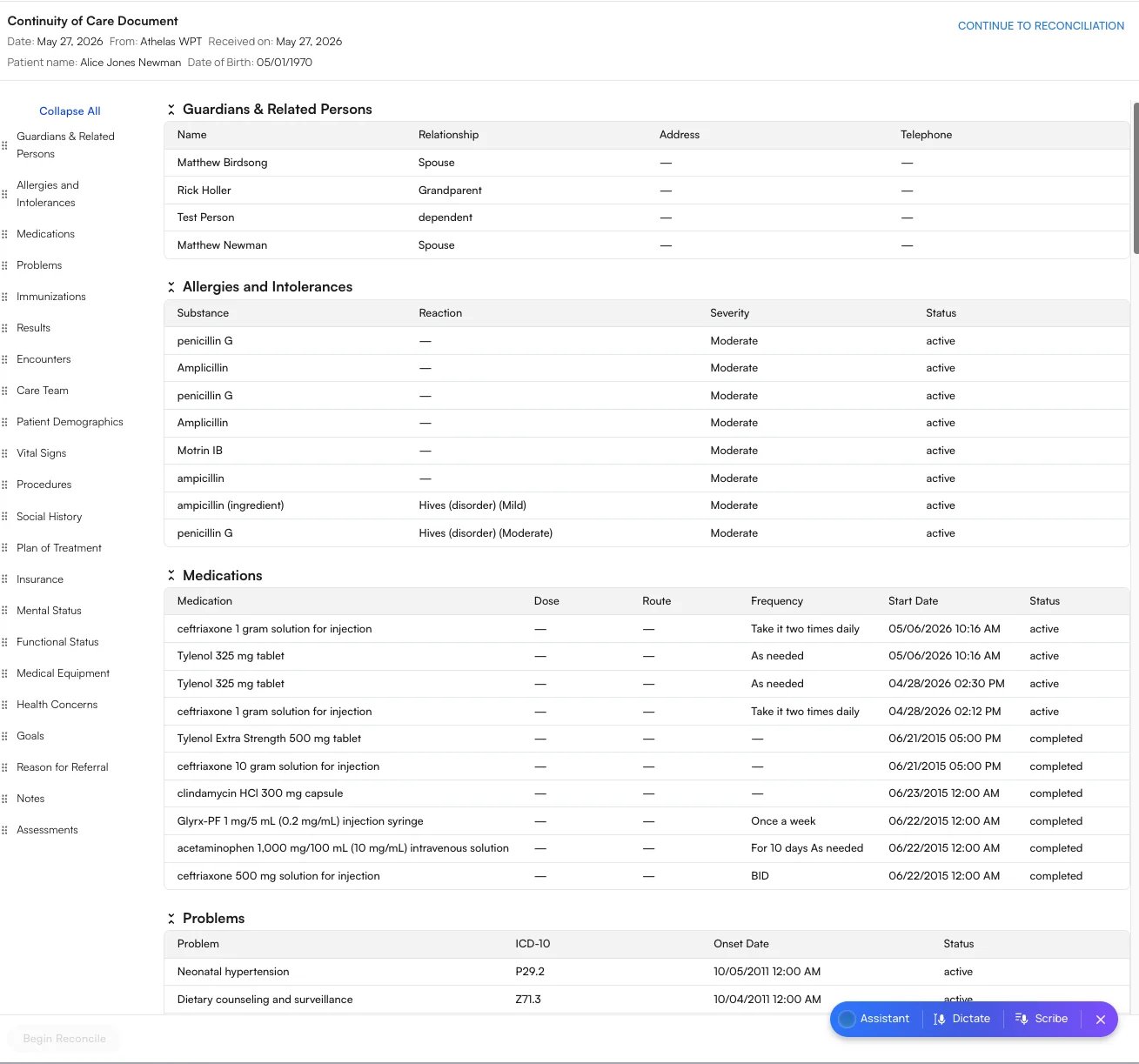
The document opens as a **Continuity of Care Document**, showing the patient's name, date of birth, the sending site, and the date received. Its contents are organized into the standard C-CDA clinical sections—for example **Guardians & Related Persons**, **Allergies and Intolerances**, **Medications**, **Problems**, **Immunizations**, **Results**, and more.
You also have two ways to keep the source data:
* **Additional Files** — Files attached during the transition of care (for example, an X-ray report or urinalysis). Clicking a file downloads it so you can open it in your preferred viewer.
* **Download XML** — Downloads the exact XML document that was sent to you.
When you're ready to incorporate the data, click **Continue to Reconciliation** (or **Begin Reconcile**) to start [reconciliation](/air_developer/onc_feature_guides/reconcile_incoming_ccda).
## Understanding the C-CDA sections
A C-CDA is organized into standard **clinical sections** defined by the C-CDA / USCDI standard. Each section is a self-contained part of the patient's chart—allergies, medications, problems, and so on—and is shown in Air as a labeled table. Not every document includes every section: a section only appears when the sending system populated it, so a given C-CDA may show only a handful of the sections below.
The table below explains every section you may encounter, what clinical information it holds, and the columns you'll see inside it.
| Section | What it contains | What you'll see |
| :------------------------------ | :--------------------------------------------------------------------------------------------------------------------------------------------------------- | :----------------------------------------------------------------------- |
| **Allergies and Intolerances** | Substances—drugs, foods, or environmental triggers—the patient reacts to, with the type and severity of the reaction. Review carefully before prescribing. | Substance / Reaction / Severity / Status |
| **Procedures** | Surgical, diagnostic, and therapeutic procedures the patient has had (e.g. an inhalation treatment or a pacemaker insertion). | Procedure / Date / Status |
| **Medications** | Drugs the patient is taking or has taken, including how much, how it's given, and how often. | Medication / Dose / Route / Frequency / Start Date / Status |
| **Problems** | The patient's diagnoses and clinical conditions, coded to ICD-10, marked active or resolved. | Problem / ICD-10 / Onset Date / Status |
| **Immunizations** | Vaccines the patient has received. Codes (e.g. `88`, `106`) are CVX vaccine codes when no name is supplied. | Immunization / Date / Status |
| **Results** | Laboratory and diagnostic test results, with the measured value and its unit (e.g. a urinalysis panel). | Name / Value / Unit / Date / Status |
| **Encounters** | Visits and interactions the patient has had with providers or facilities. | Type / Date / Location / Status |
| **Care Team** | The clinicians responsible for the patient's care and how to reach them. | Name / Role / Phone |
| **Guardians & Related Persons** | Family members, guardians, and other people connected to the patient (e.g. spouse, grandparent, dependent). | Name / Relationship / Address / Telephone |
| **Patient Demographics** | Identity and administrative details—name, date of birth, race, ethnicity, language, address, contact info, and occupation. | Field / Value |
| **Vital Signs** | Measured vitals such as blood pressure, heart rate, temperature, weight, height, BMI, and oxygen saturation. | Name / Value / Unit / Date |
| **Social History** | Lifestyle and social factors—tobacco use, occupation, sexual orientation, gender identity, and social-needs screenings. | Type / Value / Status |
| **Plan of Treatment** | Planned or ordered future care, including follow-up activities and referrals to address the patient's needs. | Description / Status / Date |
| **Insurance** | The patient's coverage—payer, plan, policy details, and effective dates. | Payer / Plan / Group Number / Policy Number / Plan Type / Effective Date |
| **Mental Status** | Observations about the patient's cognitive and psychological state. | Name / Value / Date / Status |
| **Functional Status** | The patient's ability to perform daily activities—mobility, dependence on aids (e.g. a cane), and disability status. | Name / Value / Date / Status |
| **Medical Equipment** | Devices the patient uses or has implanted, identified by a Unique Device Identifier (UDI) where available. | Device / UDI / Status / Start Date / End Date |
| **Health Concerns** | Risks or issues the care team is actively tracking (e.g. food insecurity), distinct from formal diagnoses. | Concern / Status / Onset Date / Resolution Date |
| **Goals** | Targets the patient and care team are working toward (e.g. resolving recurring fever, gaining energy). | Goal / Description / Date / Status |
| **Reason for Referral** | Why the patient was referred—the prompt for this transition of care. | Referral / Indication / Date / Status |
| **Notes** | Free-text clinical narratives such as progress notes, procedure notes, and laboratory report summaries, with their author. | Type / Text / Date / Author / Status |
| **Assessments** | The clinician's evaluation of the patient's condition and reasoning, often summarizing findings and next steps. | Assessment / Author / Date |
When you reconcile a document, the categories you actively **incorporate** into the chart—per ONC criterion **§170.315(b)(2)**—are **Medications**, **Allergies and Intolerances**, and **Problems**. The remaining sections are read-only clinical context that travels with the document. See [Viewing and Reconciling Incoming C-CDAs](/air_developer/onc_feature_guides/reconcile_incoming_ccda).
## Customize your view
To make long documents easier to read:
* Every section is **collapsible**. Use **Collapse All** to collapse them at once.
* **Rearrange sections** by dragging them using the handles in the left sidebar.
Your view preferences are **saved across all notes**, not just the document you're looking at. If you collapse or rearrange the sections while viewing Alice Newman's document, the next patient you open—say, Jeremy Bates—will be laid out exactly the same way. You set up your view once and it carries over to every patient, so there's no need to switch it back each time.
## FAQ
Yes. Use **Download XML** to save the exact document that was sent to you, and open any attachments from the **Additional Files** menu.
Yes. View preferences are saved across all notes, so the layout you set on one patient's document carries over to every patient you open next—no need to rearrange each time.
 ##
##