> ## Documentation Index
> Fetch the complete documentation index at: https://docs.athelas.com/llms.txt
> Use this file to discover all available pages before exploring further.
# Scribe Retention Policy
The **Scribe Retention Policy** gives your practice control over how long [**AI Scribe**](/air_provider/fill_a_chart_note/scribe_faq) data is stored before it is automatically and permanently deleted. Configure a retention window to align AI Scribe data storage with your organization's privacy, security, and compliance requirements.
## How Scribe Retention Works
* **Site-level configuration.** Retention policies are set per site from your administrative settings.
* **What gets deleted.** Once a policy is active, AI Scribe **audio recordings**, **transcriptions**, and other associated context older than the configured window are removed.
* **Automatic, nightly cleanup.** Data that has aged past the retention window is deleted during the next nightly cleanup—no manual action is required.
* **Minimum window of 1 day.** The shortest retention window you can set is **1 day**.
* **Deletion is permanent.** Deleted AI Scribe data **cannot be recovered**.
* **Default is unchanged.** Sites without a configured retention policy continue to retain data as they do today—no deletion occurs.
Scribe data deletion is **permanent and cannot be undone**. Confirm your retention window meets your clinical, legal, and compliance needs before saving.
## Configure a Retention Policy
To open the setting, navigate to **EHR Preferences → Administrative → Scribe**.
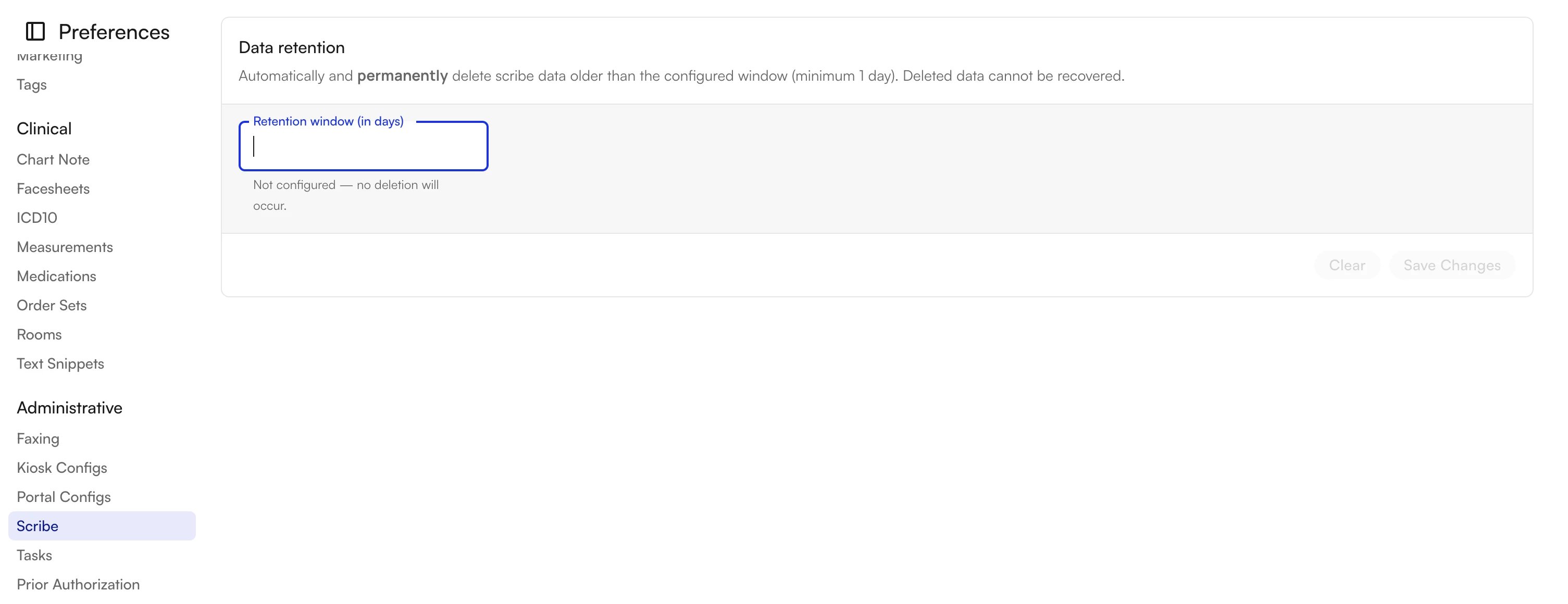 Under **Data retention**, the **Retention window (in days)** field controls how long scribe data is kept. When the field is empty, it reads **Not configured — no deletion will occur**, and your site retains all scribe data.
### Set a Retention Window
1. In the **Retention window (in days)** field, enter the number of days to keep AI Scribe data (minimum **1**).
2. Review any on-screen guidance:
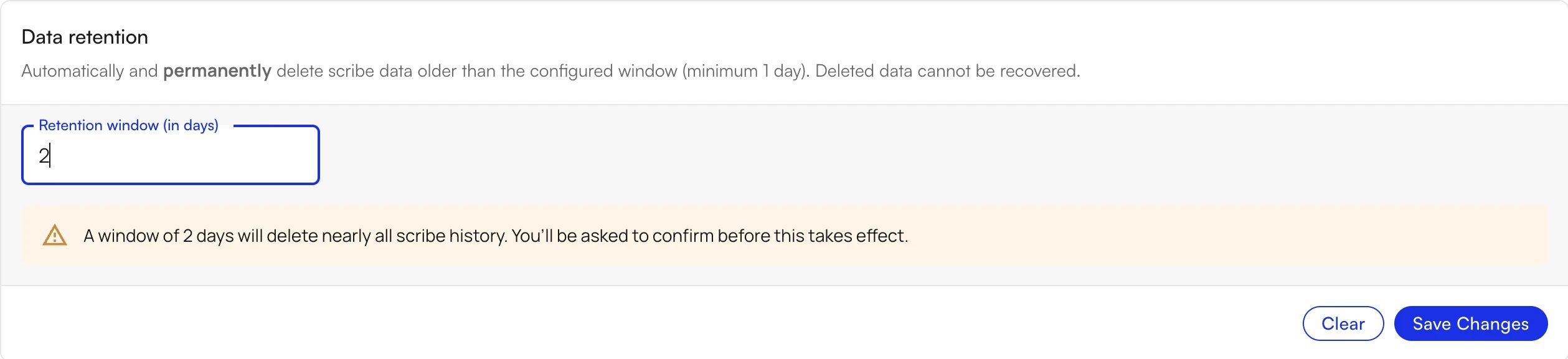
* A very short window shows a warning that it will delete nearly all scribe history.
* A standard window shows no warning.
3. Click **Save Changes**.
**Very short window (warning):**
Under **Data retention**, the **Retention window (in days)** field controls how long scribe data is kept. When the field is empty, it reads **Not configured — no deletion will occur**, and your site retains all scribe data.
### Set a Retention Window
1. In the **Retention window (in days)** field, enter the number of days to keep AI Scribe data (minimum **1**).
2. Review any on-screen guidance:
* A very short window shows a warning that it will delete nearly all scribe history.
* A standard window shows no warning.
3. Click **Save Changes**.
**Very short window (warning):**
 **Standard window (no warning):**
 ### Confirm the Change
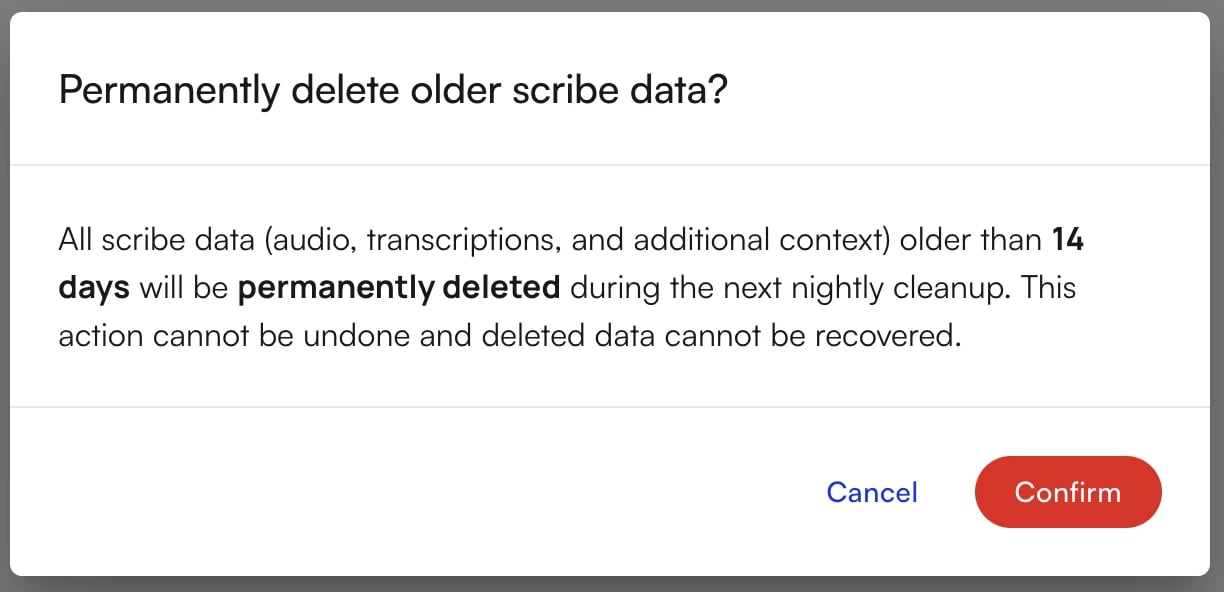
When you save, a confirmation dialog summarizes exactly what will be removed: all scribe data (audio, transcriptions, and additional context) older than your configured window will be permanently deleted during the next nightly cleanup.
Click **Confirm** to activate the policy, or **Cancel** to keep your current settings.
### Confirm the Change
When you save, a confirmation dialog summarizes exactly what will be removed: all scribe data (audio, transcriptions, and additional context) older than your configured window will be permanently deleted during the next nightly cleanup.
Click **Confirm** to activate the policy, or **Cancel** to keep your current settings.
 ✨**Smart Tip:** Start with a longer retention window that comfortably covers your documentation and audit needs, then shorten it once you have confirmed the behavior on your site.
## Clear a Retention Policy
To stop automatic deletion, open **Data retention** and click **Clear**. The retention window returns to **Not configured — no deletion will occur**, and your site resumes retaining all scribe data going forward.
**Note:** Clearing the policy stops future deletions but does not restore data that was already deleted under a previous policy.
### FAQ
When a retention window is active, all AI Scribe data older than the configured number of days is removed. This includes **audio recordings**, **transcriptions**, and other associated context generated by AI Scribe.
Data that has aged past your retention window is deleted during the next **nightly cleanup**. You do not need to trigger deletion manually.
The minimum retention window is **1 day**. If you enter a very short window, the platform warns you that it will delete nearly all scribe history and asks you to confirm before the change takes effect.
No. Deletion is **permanent and cannot be undone**. Once data is removed during the nightly cleanup, it cannot be recovered.
Nothing changes. Sites without a configured retention policy continue to retain AI Scribe data exactly as they do today—no automatic deletion occurs.
✨**Smart Tip:** Start with a longer retention window that comfortably covers your documentation and audit needs, then shorten it once you have confirmed the behavior on your site.
## Clear a Retention Policy
To stop automatic deletion, open **Data retention** and click **Clear**. The retention window returns to **Not configured — no deletion will occur**, and your site resumes retaining all scribe data going forward.
**Note:** Clearing the policy stops future deletions but does not restore data that was already deleted under a previous policy.
### FAQ
When a retention window is active, all AI Scribe data older than the configured number of days is removed. This includes **audio recordings**, **transcriptions**, and other associated context generated by AI Scribe.
Data that has aged past your retention window is deleted during the next **nightly cleanup**. You do not need to trigger deletion manually.
The minimum retention window is **1 day**. If you enter a very short window, the platform warns you that it will delete nearly all scribe history and asks you to confirm before the change takes effect.
No. Deletion is **permanent and cannot be undone**. Once data is removed during the nightly cleanup, it cannot be recovered.
Nothing changes. Sites without a configured retention policy continue to retain AI Scribe data exactly as they do today—no automatic deletion occurs.