> ## Documentation Index
> Fetch the complete documentation index at: https://docs.athelas.com/llms.txt
> Use this file to discover all available pages before exploring further.
# Automatic Lead Creation from Faxes
## Overview
Automatic lead creation turns inbound referral faxes into Lead Tracker leads without any manual data entry. When a referral fax arrives, Air Clinical scans it, pulls out the patient's details (name, date of birth, and contact information), and creates a lead linked back to the original fax.
## Getting started
Automatic lead creation is controlled per site from your faxing preferences.
1. Go to **Preferences → Administrative → Faxing**.
2. Under **Patient Lead Fax Configuration**, turn on **Enable auto lead generation from faxes**.
3. Set **Default Lead Type** to the lead type you want applied to leads created this way (for example `Fax`).
Save your changes.
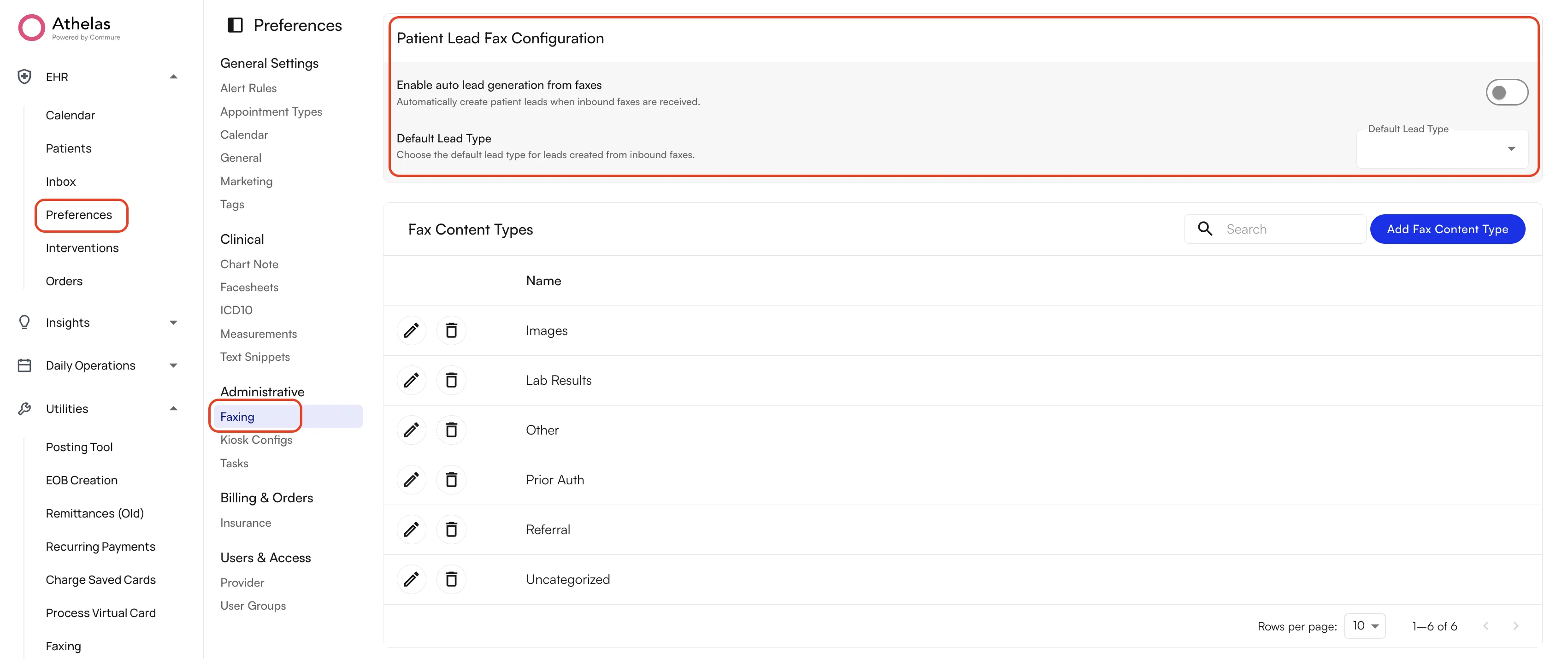 Once it is enabled, no further action is needed — new referral faxes start generating leads automatically.
## Lead generation logic
To generate a lead, the automated system works through these steps:
1. **Initial scan** — every inbound fax is scanned to determine what kind of document it is.
2. **Referral identification** — if the fax contains a referral section, Air Clinical extracts the patient's **first name**, **last name**, and **date of birth**, plus **phone number** where one is available.
3. **Lead creation** — if the required fields (first name, last name, and date of birth) are all found, Air Clinical creates a lead in the Lead Tracker with:
* The Lead Type set to your **Default Lead Type**
* The lead placed in your first referral stage, ready for review
* A note recording that it was imported automatically from an inbound fax
* A link back to the original fax, so you can always trace a lead to its source document
4. **Duplicate protection** — if a referral matches the name and date of birth of a patient who already has an open case, or if a lead was recently created from another fax for the same person, Air Clinical skips creating a second lead.
Because these details come from an AI reading a scanned document, review a new lead before reaching out to the patient.
## Creating a lead manually from a fax
If the system misses a referral, or you would rather not turn the automation on, you can still create and link leads yourself:
1. Open the fax from your **Faxing** tab.
2. Use the **Create Lead** action.
3. Choose to create a new lead, or link the fax to a lead that is already in the Lead Tracker.
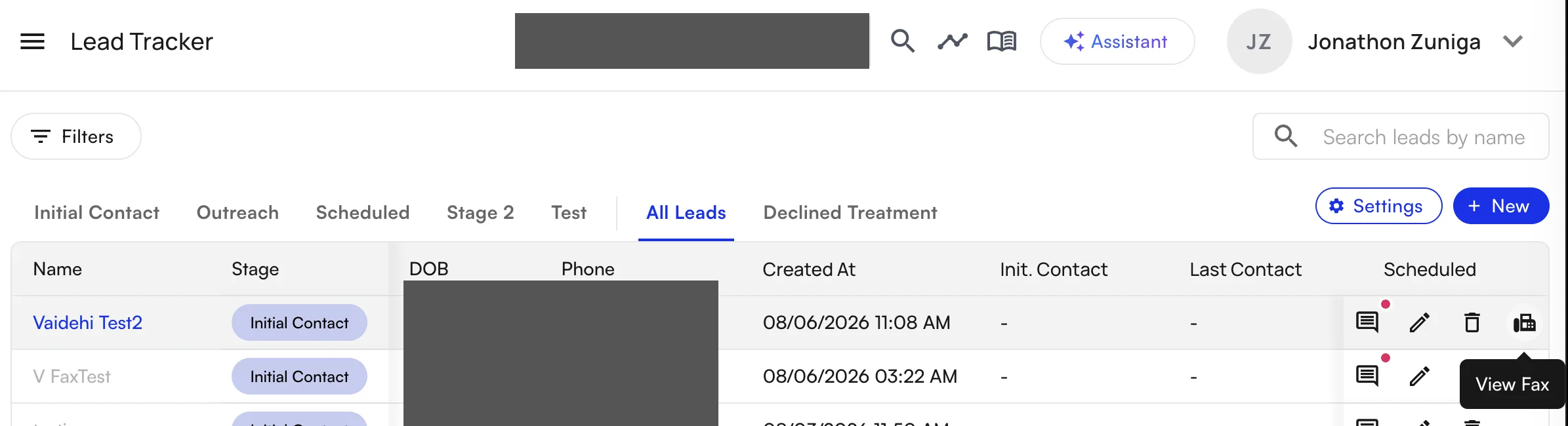
Leads that came from a fax show a **View Fax** action on their row in the tracker, which opens the source document.
Once it is enabled, no further action is needed — new referral faxes start generating leads automatically.
## Lead generation logic
To generate a lead, the automated system works through these steps:
1. **Initial scan** — every inbound fax is scanned to determine what kind of document it is.
2. **Referral identification** — if the fax contains a referral section, Air Clinical extracts the patient's **first name**, **last name**, and **date of birth**, plus **phone number** where one is available.
3. **Lead creation** — if the required fields (first name, last name, and date of birth) are all found, Air Clinical creates a lead in the Lead Tracker with:
* The Lead Type set to your **Default Lead Type**
* The lead placed in your first referral stage, ready for review
* A note recording that it was imported automatically from an inbound fax
* A link back to the original fax, so you can always trace a lead to its source document
4. **Duplicate protection** — if a referral matches the name and date of birth of a patient who already has an open case, or if a lead was recently created from another fax for the same person, Air Clinical skips creating a second lead.
Because these details come from an AI reading a scanned document, review a new lead before reaching out to the patient.
## Creating a lead manually from a fax
If the system misses a referral, or you would rather not turn the automation on, you can still create and link leads yourself:
1. Open the fax from your **Faxing** tab.
2. Use the **Create Lead** action.
3. Choose to create a new lead, or link the fax to a lead that is already in the Lead Tracker.
Leads that came from a fax show a **View Fax** action on their row in the tracker, which opens the source document.
 ### FAQ
No. Only faxes that Air Clinical identifies as referrals, and that carry at least a first name, last name, and date of birth, generate a lead.
Open the lead in the Lead Tracker and edit it, the same as any lead you created by hand. Check new fax-generated leads before contacting the patient.
Yes. Go to **Preferences → Administrative → Faxing** and turn off **Enable auto lead generation from faxes** at any time.
Nothing about how faxes are stored or displayed changes. This feature only adds a lead, and a link between that lead and the fax it came from.
### FAQ
No. Only faxes that Air Clinical identifies as referrals, and that carry at least a first name, last name, and date of birth, generate a lead.
Open the lead in the Lead Tracker and edit it, the same as any lead you created by hand. Check new fax-generated leads before contacting the patient.
Yes. Go to **Preferences → Administrative → Faxing** and turn off **Enable auto lead generation from faxes** at any time.
Nothing about how faxes are stored or displayed changes. This feature only adds a lead, and a link between that lead and the fax it came from.